Direkt zum Inhalt

Devbits

Kleine Code-Schnipsel aus unserem Alltag mit Drupal, PHP und DevOps: Problem, Lösung, Code.

13.11.2026 | Michael Ebert

Replace deprecated .module file in Drupal 11.5 or newer

Starting with Drupal 11.5, the .module file extension is deprecated. It will be no longer autoladed in Drupal 13. This means all functions inside this file have to move to classes and services, otherwise they stop running.

Old Implementation

<?php

/**
 * @file
 * Legacy procedural hooks – deprecated since Drupal 11.5.
 */

use Drupal\Core\Form\FormStateInterface;
use Drupal\node\NodeInterface;

/**
 * Implements hook_form_alter().
 */
function my_module_form_alter(array &$form, FormStateInterface $form_state, $form_id) {
  if ($form_id === 'user_login_form') {
    $form['#attributes']['class'][] = 'my-module-login';
  }
}

/**
 * Implements hook_ENTITY_TYPE_presave() for node entities.
 */
function my_module_node_presave(NodeInterface $node) {
  $node->setTitle(trim($node->getTitle()));
}

New Implementation

<?php

declare(strict_types=1);

namespace Drupal\my_module\Hook;

use Drupal\Core\Form\FormStateInterface;
use Drupal\Core\Hook\Attribute\Hook;
use Drupal\Core\Hook\Order\Order;
use Drupal\node\NodeInterface;

/**
 * Hook implementations for my_module.
 */
class MyModuleHooks {

  /**
   * Implements hook_form_alter().
   */
  #[Hook('form_alter', order: Order::Last)]
  public function formAlter(array &$form, FormStateInterface $form_state, string $form_id): void {
    if ($form_id === 'user_login_form') {
      $form['#attributes']['class'][] = 'my-module-login';
    }
  }

  /**
   * Implements hook_ENTITY_TYPE_presave() for node entities.
   */
  #[Hook('node_presave')]
  public function nodePresave(NodeInterface $node): void {
    $node->setTitle(trim($node->getTitle()));
  }

}
parameters:
  # All hooks are OOP now – tell core not to scan .module/.inc files.
  my_module.skip_procedural_hook_scan: true

Issue:

Starting with Drupal 11.5, the .module file extension is deprecated. It will be no longer autoladed in Drupal 13. This means all functions inside this file have to move to classes and services, otherwise they stop running. 

As long as Core supports procedual hooks, it scans every .module or .inc files for hooks, which costs performance even when a module has nothing procedual left.

Prerequisites:

  • drupal ≥ 11.5

Solution:

  1. Hook class: Any class in the Drupal\my_module\Hook namespace or its subdirectories is registered automatically as an autowired service, so no services.yml entry is needed. The #[Hook('...')] attribute defines which hook a method implements. One method can carry several #[Hook] attributes and an order parameter. To change hooks of other modules you can use #[RemoveHook] or #[ReorderHook].
  2. Skip the scan: Once no more regular procedual hooks are left in our services.yml, we set my_module.skip_procedural_hook_scan: true so that Core is skipping parsing our modules .module or .inc files. Procedual hooks that are not #[LegacyHook] would not be found anymore.
  3. Move remaining helper functions to services or methods on the hook class. If other projects call your public functions, keep them as deprecated wrappers that call the new service.

To help you upgrading your code for Drupal 13, there is a ddev script listed in the additional links section.

Additional Links:

11.11.2026 | Pascal Crott

Provide content translation language block limited to available translations

Language blocks always show all languages but you only want to show the ones which content translations exist for.

<?php

namespace Drupal\content_translation_language_block\Plugin\Block;

use Drupal\Core\Block\Attribute\Block;
use Drupal\Core\Plugin\ContainerFactoryPluginInterface;
use Drupal\Core\Plugin\Context\ContextDefinition;
use Drupal\Core\StringTranslation\TranslatableMarkup;
use Drupal\language\Plugin\Block\LanguageBlock;
use Drupal\language\Plugin\Derivative\LanguageBlock as LanguageBlockDeriver;

/**
 * Provides a 'Content translation language switcher' block.
 */
#[Block(
  id: "content_translation_language_block",
  admin_label: new TranslatableMarkup("Language switcher"),
  category: new TranslatableMarkup("Content translation"),
  context_definitions: [
    "entity" => new ContextDefinition("entity",
      label: new TranslatableMarkup("Entity"),
      required: TRUE
    ),
  ],
  deriver: LanguageBlockDeriver::class
)]
class ContentTranslationLanguageBlock extends LanguageBlock implements ContainerFactoryPluginInterface {

  /**
   * {@inheritdoc}
   */
  public function build() {
    $build = parent::build();
    if ($entity = $this->getContextValue('entity')) {
      foreach ($build['#links'] as $langcode => $link) {
        if (!$entity->hasTranslation($langcode)) {
          unset($build['#links'][$langcode]);
        }
      }
      if (count($build['#links']) < 2) {
        unset($build['#links']);
      }
    }


    return $build;
  }

}

Issue:

Language blocks always show all languages but you only want to show the ones which content translations exist for.

Prerequisites:

  • You need to be in the context of a translatable content entity.
  • We make use of the Entity Route Context module which needs to be installed.

Solution:

Extend the Core plugin using the provided copy-and-paste snippet.

The snippet checks whether the current entity has translations. If any are found, the language options are reduced to those for which a translation exists.

23.10.2026 | Lothar Ferreira Neumann

How to fill empty form fields via a custom Drupal AJAX command

In many editor or form workflows fields need to be prefilled (for example based on a selected entity or computed data) without overwriting input the user may have already entered.

<?php

declare(strict_types=1);

namespace Drupal\my_module\Ajax;

use Drupal\Core\Ajax\CommandInterface;

/**
 * Ajax command: fill empty form elements with a predefined value.
 *
 * This command targets one or more form elements via a CSS selector and sets
 * their value only if the current value is empty (after trimming).
 *
 * The command also triggers `input` and `change` events so Drupal behaviors and
 * other listeners react as if the user entered the value manually.
 */
final class SetValueIfEmptyCommand implements CommandInterface {

  /**
   * The Ajax command name used by Drupal.AjaxCommands.
   */
  public const COMMAND = 'setValueIfEmpty';

  /**
   * Default selector used when none is provided.
   */
  public const DEFAULT_SELECTOR = '[data-my-fill-target]';

  /**
   * Creates a command instance.
   *
   * @param string $fillValue
   *   The value to set when the target element is empty.
   * @param string|null $targetSelector
   *   CSS selector for the target elements. If omitted, DEFAULT_SELECTOR is used.
   */
  public function __construct(
    protected string $fillValue,
    protected ?string $targetSelector = null,
  ) {}

  /**
   * {@inheritdoc}
   */
  public function render(): array {
    return [
      'command' => self::COMMAND,
      'selector' => $this->targetSelector ?? self::DEFAULT_SELECTOR,
      'value' => $this->fillValue,
    ];
  }

}
/**
 * @file Field empty check.
 */
(function (Drupal) {
  'use strict';

  Drupal.AjaxCommands.prototype.setValueIfEmpty = function (ajax, response) {
    const targetSelector = response && response.selector ? response.selector : '';
    const fillValue = response && typeof response.value === 'string' ? response.value : '';

    if (!targetSelector) {
      return;
    }

    const elements = document.querySelectorAll(targetSelector);
    for (const element of elements) {
      let currentValue = '';

      if (typeof element.value === 'string') {
        currentValue = element.value.trim();
      }
      else if (element.isContentEditable) {
        currentValue = (element.textContent || '').trim();
      }

      if (currentValue !== '') {
        continue;
      }

      if (typeof element.value === 'string') {
        element.value = fillValue;
      }
      else if (element.isContentEditable) {
        element.textContent = fillValue;
      }
      else {
        continue;
      }

      element.dispatchEvent(new Event('input', { bubbles: true }));
      element.dispatchEvent(new Event('change', { bubbles: true }));
    }
  };

})(Drupal);
set_value_if_empty:
  js:
    js/set_value_if_empty.js: {}
  dependencies:
    - core/drupal
    - core/drupal.ajax
use Drupal\Core\Ajax\AjaxResponse;
use Drupal\my_module\Ajax\SetValueIfEmptyCommand;

$response = new AjaxResponse();

// Example: fill a media name field if it's empty.
$fill_value = 'foo-bar';

// Selector for a specific element in this use-case.
$target_selector = '[data-drupal-selector$="my_field"]';

$response->addAttachments([
  'library' => [
    'my_module/set_value_if_empty',
  ],
]);

$response->addCommand(new SetValueIfEmptyCommand($fill_value, $target_selector));

return $response;

Issue

In many editor or form workflows fields need to be prefilled (for example based on a selected entity or computed data) without overwriting input the user may have already entered.

Built-in AJAX setters such as InvokeCommand('val') always assign values unconditionally. When an AJAX update happens after the user started typing, this can unintentionally replace user-provided content.

Prerequisites

This approach only works when executed within an AJAX callback returning an AjaxResponse.

Solution

Use a lightweight custom AJAX command that runs in the browser and checks the current value of the target element(s).
The command sets the provided value only if the field is empty (after trimming).

The server supplies the selector and value while the client performs the final emptiness check and applies the update conditionally, preventing accidental overwrites of user input.

05.10.2026 | Lothar Ferreira Neumann

Declaring the return parameter with NULLable type as an option.

Handling a situation where a function might return an error since it returns NULL.

/**
 * Retrieves the name of a role based on its ID.
 *
 * @param string $role_id
 *   The ID of the role to retrieve.
 *
 * @return string|null
 *   The name of the role if it exists, or NULL if the role is not found.
 */
public function getRoleName(string $role_id): ?string {
  // Example roles array.
  $roles = [
    'admin' => 'Administrator',
    'editor' => 'Content Editor',
    'viewer' => 'Viewer',
  ];

  // Use the null coalescing operator to return the role name or null.
  return $roles[$role_id] ?? NULL;
}

Issue:

Handling a situation where a function might return an error since it returns NULL.

Solution:

Utilizes the "?" in the definition of the return type.

PHP

10.09.2026 | Mathias Grab

Get "key" from entity type

When working with entities dynamically, the base field name of a specific entity key (e.g., the primary ID field) is not always known beforehand. Given only the entity type ID, the entity key needs to be determined dynamically.

$entity_type_id = 'node';
$definition = \Drupal::entityTypeManager()->getDefinition($entity_type_id);
$id_key = $definition->getKey('id');

Issue:

When working with entities dynamically, the base field name of a specific entity key (e.g., the primary ID field) is not always known beforehand. Given only the entity type ID, the entity key needs to be determined dynamically.

Solution:

Load all base field definitions of the given entity type via entityTypeManager() and return the ID with the method getKey().

10.09.2026 | Lothar Ferreira Neumann

How to delete an ECA model that throws PluginNotFoundException for a missing event/action plugin

An ECA (Event-Condition-Action) model's config can end up referencing an event, condition, or action plugin ID that no longer exists on the current site, for example, after a submodule was uninstalled or after importing a config export from an environment with different ECA submodules enabled.…

// web/modules/contrib/eca/src/Entity/Eca.php (simplified excerpt)

protected function isValidationDisabled(): bool {
  return $this->request()->query->get('eca_validation', '') === 'off';
}

public function getPluginCollections(): array {
  if ($this->isValidationDisabled()) {
    return [];
  }
  // Otherwise every referenced event/condition/action plugin is
  // instantiated here, throwing PluginNotFoundException if one
  // of them no longer exists.
  ...
}
# Delete URL — load this directly, don't click through from a listing page
/admin/config/workflow/eca/{eca_id}/delete?eca_validation=off

Issue:

An ECA (Event-Condition-Action) model's config can end up referencing an event, condition, or action plugin ID that no longer exists on the current site, for example, after a submodule was uninstalled or after importing a config export from an environment with different ECA submodules enabled. Opening that model to edit or even delete it in the ECA admin UI (/admin/config/workflow/eca) throws Drupal\Component\Plugin\Exception\PluginNotFoundException: The "..." plugin does not exist. and lands on an error page. This happens because Drupal's entity form eagerly instantiates every plugin referenced in the model as soon as it builds the entity object - even on the delete-confirmation form, before anything is submitted.

Solution:

ECA already ships a way around this: Eca::getPluginCollections() checks Eca::isValidationDisabled() which reads the eca_validation query parameter off the current request. When it's off, plugin collections are skipped entirely, so no plugin gets instantiated and the exception never fires. Load the model's edit or delete URL with ?eca_validation=off appended directly in the address bar. 

Drupal's FormBuilder copies the current request's query string into the form's #action, so the parameter survives the confirm-button POST too. The model can then be viewed, edited, or deleted cleanly, with zero code changes. Info: The parameter has to be on the URL you actually load. Clicking a normal link - e.g. the "Delete" link from the ECA listing page - navigates to a fresh URL without it, so the error still happens. 

Paste the full URL with ?eca_validation=off into the address bar instead.

01.09.2026 | Dominik Wille

Test PHP database connection without Drupal

You need to debug the database connection.

<?php

include('web/sites/default/settings.php');

$dbHostName = $databases['default']['default']['host'];
$dataBaseName = $databases['default']['default']['database'];
$dbUserName = $databases['default']['default']['username'];
$dbPassword = $databases['default']['default']['password'];
$dbPort = $databases['default']['default']['port'];

$pdo = new PDO('mysql:host='.$dbHostName.';port='.$dbPort.';dbname='.$dataBaseName.'', $dbUserName, $dbPassword, array(
  // PDO::MYSQL_ATTR_SSL_CA    =>'ca.cert',
  PDO::MYSQL_ATTR_SSL_VERIFY_SERVER_CERT => TRUE
  )
);

$query = $pdo->query('SHOW TABLES;');
print_r($query->fetchAll());

return $pdo;

Issue:

You need to debug the database connection.

A standalone script – for example a monitoring, backup, or migration helper – needs direct database access without bootstrapping the full Drupal framework. Duplicating database credentials in the script is undesirable since they would need to be kept in sync with settings.php.

Solution:

The snippet provided allows PHP debugging. Use it to check whether your database connection works on PHP level.

The script includes settings.php directly, which populates the $databases array as Drupal itself does during bootstrap. Credentials are then read from $databases['default']['default'], avoiding hardcoded or duplicated connection details.

A PDO connection is built from these values. PDO::MYSQL_ATTR_SSL_VERIFY_SERVER_CERT => TRUE enforces SSL certificate verification on the connection – relevant when the database host requires or supports TLS, such as many managed hosting environments.

Since settings.php is plain PHP, including it outside of Drupal's bootstrap process only defines variables and does not require Drupal's autoloader or dependency injection container.

13.08.2026 | Pascal Crott

Can't save Form API autocomplete when referencing too many elements

Sometimes you can't save entity_autocomplete fields when selecting to many items. This comes from the fact that the form element is technically based on the textfield element. This results in inheriting all of the textfield specific properties and behaviors and one of them is a maxlength which…

If this does not work...

$form['nodes'] = [
    '#title' => $this->t('Select articles'),
    '#type' => 'entity_autocomplete',
    '#target_type' => 'node',
    '#tags' => TRUE,
    '#selection_handler' => 'default',
    '#selection_settings' => ['target_bundles' => ['article']],
    '#default_value' => $default_nodes,
];

...try adding an increased maxlength value:

$form['nodes'] = [
    '#title' => $this->t('Select articles'),
    '#type' => 'entity_autocomplete',
    '#target_type' => 'node',
    '#maxlength' => 1024,
    '#tags' => TRUE,
    '#selection_handler' => 'default',
    '#selection_settings' => ['target_bundles' => ['article']],
    '#default_value' => $default_nodes,
];

Issue: 

Sometimes you can't save entity_autocomplete fields when selecting to many items. This comes from the fact that the form element is technically based on the textfield element. This results in inheriting all of the textfield specific properties and behaviors and one of them is a maxlength which limits the text input to 128 characters.

Solution: 

To fix this, increase the maxlength value for your autocomplete field.

30.07.2026 | Lothar Ferreira Neumann

Merge multidimensional arrays in Drupal

You want to merge configurations in nested associative arrays without overwriting existing values.

use Drupal\Component\Utility\NestedArray;

// Parent array with default settings.
$parent_array = [
    'config' => [
        'theme' => 'dark',
        'layout' => [
            'width' => 800,
            'height' => 600,
        ],
    ],
];

// Child array adds more nested data but doesn't override existing values.
$child_array = [
    'config' => [
        'layout' => [
            'depth' => 300, // New nested key
        ],
        'features' => [
            'animations' => true, // New section
        ],
    ],
];

// Merge both arrays.
$merged_array = NestedArray::mergeDeep($parent_array, $child_array);
[
    'config' => [
        // Unchanged (not overridden)
        'theme' => 'dark', 
        'layout' => [
            // Keeps parent value
            'width' => 800, 
            // Keeps parent value  
            'height' => 600,
            // New nested key added
            'depth' => 300,   
        ],
        'features' => [
            // New section added
            'animations' => true, 
        ],
    ],
]

Issue:

You want to merge configurations in nested associative arrays without overwriting existing values.

Solution:

The code merges two nested arrays, preserving original values and adding new nested entries where they don't exist.

See the Drupal Nested Array documentation for more on the topic.

30.07.2026 | Michael Ebert

Formatting Dates programmatically with the Drupal date formatter service

You need to format datetime objects before printing them.

Example for a single datetime field

use Drupal\Core\Datetime\DrupalDateTime;

/** @var Drupal\Core\Datetime\DateFormatterInterface $date_formatter */
$date_formatter = \Drupal::service('date.formatter');

// Get DateTime object from stored date from a DateTimeFieldItemList field.
$my_date = $node->field_my_date->date;

// Get unix timestamp.
$my_date_timestamp = $my_date->getTimestamp();

// For formatting your DateTime object all other arguments are optional:
// See DateFormatterInterface for built-in options, or use machine name of a date format in config.
$type = 'medium';
// Custom PHP date format if $type="custom".
$format = '';

$formatted = $date_formatter->format($my_date_timestamp, $type, $format, $timezone = NULL, $langcode = NULL);

Example for a daterange field

use Drupal\Core\Datetime\DrupalDateTime;

/** @var Drupal\Core\Datetime\DateFormatterInterface $date_formatter */
$date_formatter = \Drupal::service('date.formatter');

// Get DateTime objects from stored date from a DateTimeFieldItemList field.
$start_date = $node->field_my_date->start_date;
$end_date = $node->field_my_date->end_date;

// For formatting your DateTime object all other arguments are optional:
// See DateFormatterInterface for built-in options, or use machine name of a date format in config.
$type = 'medium';
// Custom PHP date format if $type="custom".
$format = '';

$start_date_formatted = $date_formatter->format($start_date, $type, $format, $timezone = NULL, $langcode = NULL);
$end_date_formatted = $date_formatter->format($end_date, $type, $format, $timezone = NULL, $langcode = NULL);

Issue:

You need to format datetime objects before printing them.

Solution:

The Drupal date formatter service will be your friend. If you have enabled the datetime and/or datetime_range Core modules, you can set it to a defined date format (/admin/config/regional/date-time) or use a custom one. Details about the parameters you can use can be found on php.net.

We recommend always choosing the Drupal solution instead of a custom solution whenever possible.

16.07.2026 | Dominik Wille

Controller decorator

Sometimes you might want to alter the behavior of a route controller. By default, a controller can only be exchanged once by altering the route and replacing the route controller.

<?php

namespace Drupal\layout_builder_collapse_categories\Routing;

use Drupal\Core\Routing\RoutingEvents;
use Drupal\Core\Routing\RouteSubscriberBase;
use Symfony\Component\Routing\RouteCollection;
use Drupal\layout_builder_collapse_categories\Controller\ChooseBlockController;

/**
 * Override the controller for layout_builder.move_block.
 */
class RouteSubscriber extends RouteSubscriberBase {

  /**
   * {@inheritdoc}
   */
  public static function getSubscribedEvents() {
    $events[RoutingEvents::ALTER] = ['onAlterRoutes', -1000];
    return $events;
  }

  /**
   * {@inheritdoc}
   */
  public function alterRoutes(RouteCollection $collection) {
    // Add a decorator for the choose_block conroller
    if ($route = $collection->get('layout_builder.choose_block')) {
      $defaults = $route->getDefaults();
      $route->setOption('original_controller', substr($defaults['_controller'], 0, strpos($defaults['_controller'], '::')));
      $defaults['_controller'] = ChooseBlockController::class . '::build';
      $route->setDefaults($defaults);
    }

  }
}
<?php

namespace Drupal\layout_builder_collapse_categories\Controller;

use Drupal\Core\Controller\ControllerBase;
use Drupal\Core\Routing\RouteMatchInterface;
use Drupal\layout_builder\SectionStorageInterface;
use Drupal\Core\Controller\ControllerResolverInterface;
use Symfony\Component\DependencyInjection\ContainerInterface;

class ChooseBlockController extends ControllerBase {


  /**
   * The original ChooseBlockController
   *
   * @var \Drupal\layout_builder\Controller\ChooseBlockController $originalController
   */
  protected $originalController;

  /**
   * @param \Drupal\Core\Controller\ControllerResolverInterface $controller_resolver
   */
  public function __construct(ControllerResolverInterface $controller_resolver, RouteMatchInterface $route_match) {
    $original_controller_class = $route_match->getRouteObject()->getOption('original_controller');
    $this->originalController = $controller_resolver->getControllerFromDefinition($original_controller_class);
  }

  /**
   * {@inheritdoc}
   */
  public static function create(ContainerInterface $container) {
    return new static(
      $container->get('controller_resolver'),
      $container->get('current_route_match')
    );
  }

  public function build(SectionStorageInterface $section_storage, $delta, $region) {
    $build = $this->originalController->build($section_storage, $delta, $region);

    foreach ($build['block_categories'] as &$category) {
      if (isset($category['#open'])) {
        $category['#open'] = FALSE;
      }
      
    }

    return $build;
  }

}

Issue:

Sometimes you might want to alter the behavior of a route controller. By default, a controller can only be exchanged once by altering the route and replacing the route controller.

Solution:

Use the provided snippet to simulate a decorator pattern for an existing controller like you would do with services. This enables you to alter the outcome multiple times.

11.06.2026 | Michael Ebert

Change the order of local tasks

You are dissatisfied with the order of the local tasks (tabs) and want to rearrange them. If you have a view with multiple displays, it is easy to reorder the tabs by adjusting the order of the view displays. In my case, I have different views that provide the tabs for routes starting with…

function my_module_local_tasks_alter(&$local_tasks) {
  if (isset($local_tasks['entity.section_library_template.collection'])) {
    $local_tasks['entity.section_library_template.collection']['weight'] = 110;
  }
    
  if (isset($local_tasks['feeds.admin'])) {
    $local_tasks['feeds.admin']['weight'] = 120;
  }

}

Issue:

You are dissatisfied with the order of the local tasks (tabs) and want to rearrange them. If you have a view with multiple displays, it is easy to reorder the tabs by adjusting the order of the view displays. In my case, I have different views that provide the tabs for routes starting with "/admin/content".

Solution:

Change the weight of the local tasks. In my example, I have the the Layout Builder Library and the Feeds module installed. I chose these two to explain where you can find the local task you need to adjust the weight.

For the Feeds module, we needed to look up where the route "admin/content/feed" is defined. We will find it inside the routing.yml file of the module. It is defined under feeds.admin.

The Layout Builder Library Module defines the route we are looking for (admin/content/section-library) in the annotation of the entity. The route name can be found in the links.task.yml file. It is defined as entity.[entity_id].[link].

11.06.2026 | Nikolas Kopp

List enabled view modes (view displays) for a bundle of an entity type

A developer needs to find which bundles of a given entity type have a specific view mode enabled – for example, to conditionally apply logic only to bundles where a teaser or custom view mode is configured.

  private function getBundlesWithViewmode(string $entity_type, string $view_mode): array {
    $bundles = [];

    foreach (\Drupal::service('entity_type.bundle.info')->getBundleInfo($entity_type) as $bundle => $info) {
      $view_modes = \Drupal::service('entity_display.repository')->getViewModeOptionsByBundle($entity_type, $bundle);
      if (isset($view_modes[$view_mode])) {
        $bundles[] = $bundle;
      }
    }

    return $bundles;
  }
  

Issue:

A developer needs to find which bundles of a given entity type have a specific view mode enabled – for example, to conditionally apply logic only to bundles where a teaser or custom view mode is configured.

Solution:

This snippet finds all bundles for a certain entity type which have a certain view mode enabled. 

Example: Find all node bundles that have a teaser view display. 
→ php $this->getBundlesWithViewmode('node', 'teaser'); Result: php ['article', 'blog']

21.05.2026 | Michael Ebert

Do bulk updates as a batch job

You have to update many entities during development and the server runs out of memory.

<?php

/**
 * Update node title of all nodes.
 */
function custom_module_update_10001(&$sandbox) {
  // Define you entity type.
  $entity_type = 'node';

  // Load the entity type manager service.
  $entity_type_manager = \Drupal::service('entity_type.manager');

  // Get the storage for the entity type.
  $entity_storage = $entity_type_manager->getStorage($entity_type);

  if (!isset($sandbox['total'])) {
    $all_entity_ids = $entity_storage->getQuery()
      ->accessCheck()
      ->execute();
    $sandbox['total'] = count($all_entity_ids);
    $sandbox['current'] = 0;

    if (empty($sandbox['total'])) {
      $sandbox['#finished'] = 1;
      return;
    }
  }

  $entities_per_batch = 25;
  $entity_ids = $entity_storage->getQuery()
    ->accessCheck()
    ->range($sandbox['current'], $entities_per_batch)
    ->execute();
  if (empty($entity_ids)) {
    $sandbox['#finished'] = 1;
    return;
  }

  // Optionally, perform operations with the loaded entities.
  // For example, load and modify each node and set a new title.
  foreach ($entity_ids as $entity_id) {
    $entity = $entity_storage->load($entity_id);

    if ($entity->hasField('title')) {
      $entity->setTitle('New Title');
    }

    $entity->save();
    $sandbox['current']++;
  }

  \Drupal::messenger()
    ->addMessage($sandbox['current'] . ' users processed.');

  if ($sandbox['current'] >= $sandbox['total']) {
    $sandbox['#finished'] = 1;
  }
  else {
    $sandbox['#finished'] = ($sandbox['current'] / $sandbox['total']);
  }

}

Issue:

You have to update many entities during development and the server runs out of memory.

Solution:

Update entities in batch mode. Copy-paste the snippet code.

30.04.2026 | Pascal Crott

Prevent empty views blocks from getting rendered even if they are empty.

Sometimes blocks are rendered even when they are empty and even if the setting in views is activated that they should not be rendered when empty. This might be the case in combination i.e. with lazy loading. If an empty block is rendered, this may have impact on the layout because the empty block…

Issue: https://www.drupal.org/project/drupal/issues/953034
<?php

use Drupal\views\Plugin\Block\ViewsBlock;

/**
 * Implements hook_block_alter().
 */
function hook_block_alter(array &$definitions) {
  foreach ($definitions as $block_id => &$block_definition) {
    if ($block_definition['class'] === ViewsBlock::class) {
      $block_definition['class'] = 'Drupal\my_module\Plugin\Block\ViewsBlock';
    }
  }
}
<?php

namespace Drupal\my_module\Plugin\Block;

use Drupal\views\Plugin\Block\ViewsBlock as ViewsBlockCore;

/**
 * Replaces the generic Views block.
 */
class ViewsBlock extends ViewsBlockCore {

  /**
   * {@inheritdoc}
   */
  public function build() {
    if (empty($this->view->result) && empty($this->view->empty)) {
      // Without caching.
      // return ['#cache' => ['max-age' => 0]];
      // With hard caching.
      return [];
    }

    return parent::build();
  }

}

Issue:

Sometimes blocks are rendered even when they are empty and even if the setting in views is activated that they should not be rendered when empty. This might be the case in combination i.e. with lazy loading. If an empty block is rendered, this may have impact on  the layout because the empty block might still have margins or paddings

Solution:

This snippet replaces the generic Views block and checks "manually" whether or not the block is empty.

30.04.2026 | Mathias Grab

How to get a list of all available contexts by context providers

You need to load a list with all context providers available in your Drupal system.

<?php

$all_available_contexts = \Drupal::service('context.repository')->getAvailableContexts();

Issue:

You need to load a list with all context providers available in your Drupal system.

Solution:

Load the context.repository service and its getAllAvailableContexts method using the provided snippet.

23.04.2026 | Lothar Ferreira Neumann

Sort render array by custom weight property

You would like to order elements of an array for rendering based on a custom weight value.

// ...

$build['content_1'] = [
    '#markup' => "content 1",
    '#custom_weight_property' => 10,
];

$build['content_2'] = [
    '#markup' => "content 2",
    '#custom_weight_property' => 5,
];

usort($build, function ($a, $b) {
    return SortArray::sortByKeyInt($a, $b, '#custom_weight_property');
});

The output looks like this:

content 2
content 1

Just a hint:

The custom weight system controls the display order of elements, where lower weight values appear earlier, as shown in the example: content_2 (with weight 5) is rendered before content_1 (with weight 10).
 

Issue:

You would like to order elements of an array for rendering based on a custom weight value.

Solution:

The code assigns a custom weight property to each element in an array and then sorts the array using a custom sorting function based on these weights. Here is the link to the documentation of the function: https://www.php.net/manual/en/function.uasort.php

The Drupal SortArray class is documented here: https://api.drupal.org/api/drupal/core%21lib%21Drupal%21Component%21Utility%21SortArray.php/class/SortArray/11.x

23.04.2026 | Lothar Ferreira Neumann

Add custom text to gin_login with Form Decorator

First we create a module, lets name it 'gin_login_text'. If you have drush installed, you can generate a module using 'drush generate module'.

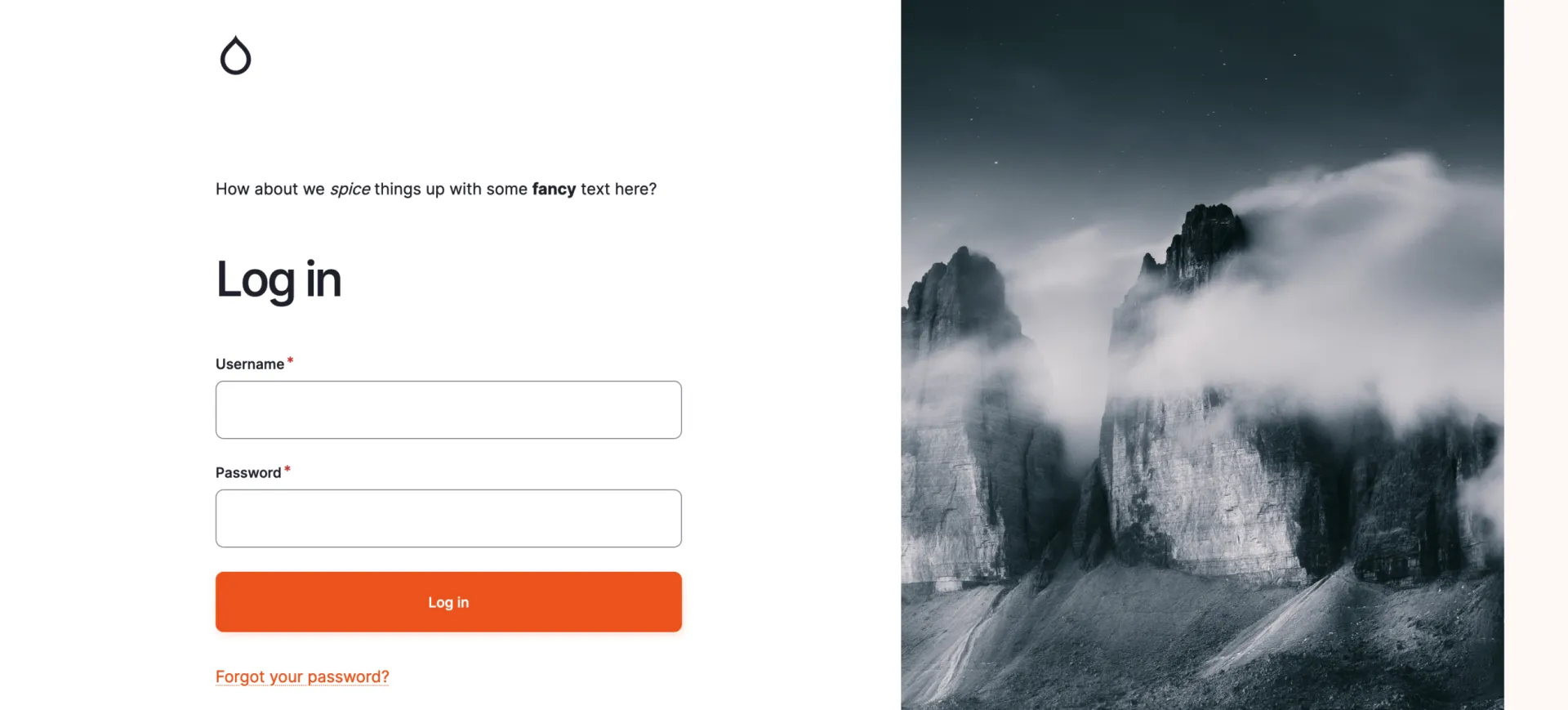
We will use the form_decorator module to alter the output of the gin_login module to look something like this:
 

An example what the result looks like when using gin_login_text.

This DevBit provides a step-by-step tutorial how to get there. 

First we create a module, lets name it 'gin_login_text'. If you have drush installed, you can generate a module using 'drush generate module'.

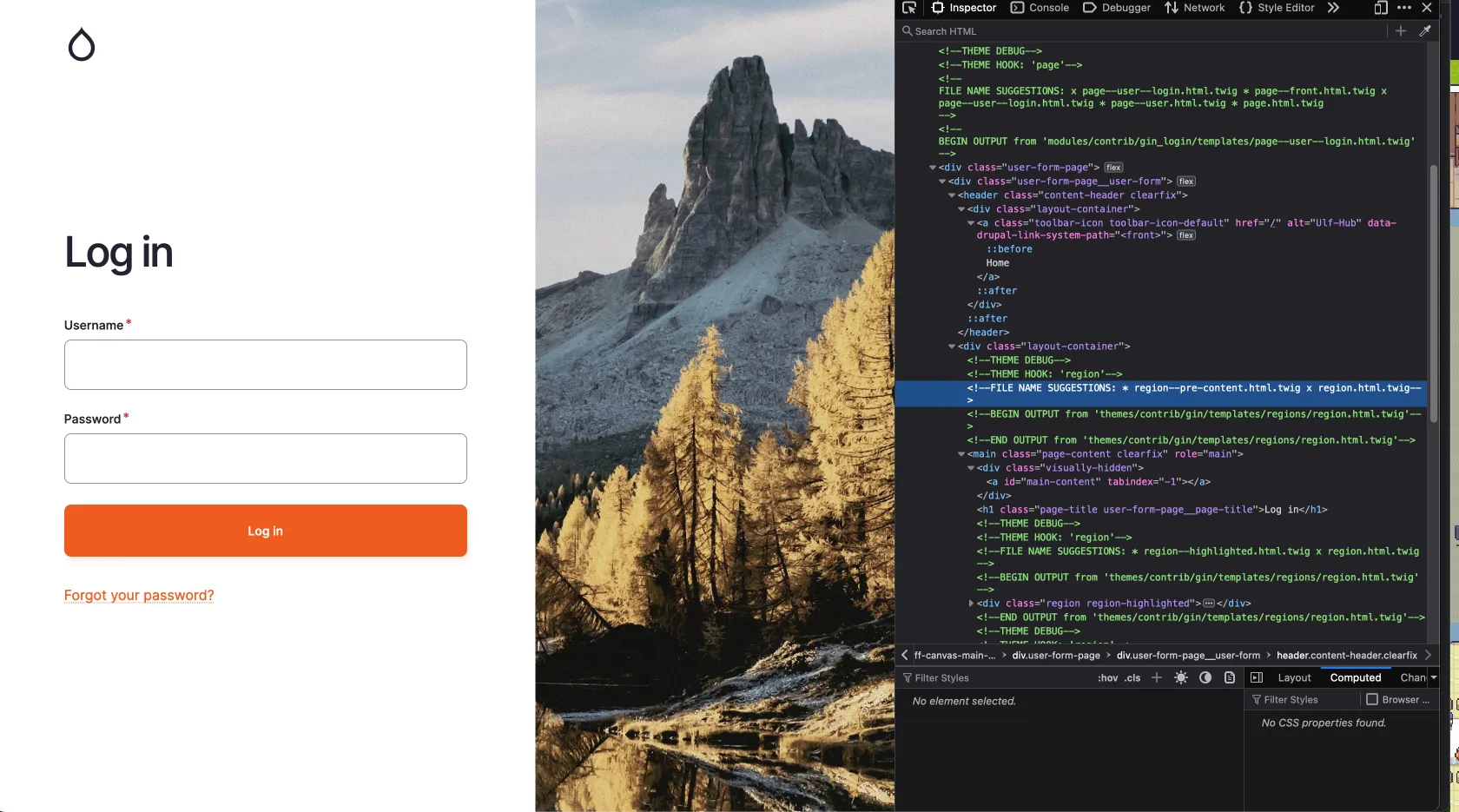
To insert our text into the gin_login we need to find the proper render array. For this we look up the logout screen with the inspector:

A screenshot from the gin_login screen with inspector.

In the picture we can see a FILE NAME SUGGESTION: 'region--pre-content.html.twig', thanks to the enabled Twig debug. If we now look into the templates for gin_login we find this:

...
    <div class="layout-container">
      {{ page.pre_content|without('claro_primary_local_tasks', 'gin_primary_local_tasks') }}
      <main class="page-content clearfix" role="main">
        <div class="visually-hidden"><a id="main-content" tabindex="-1"></a></div>
        {% block title %}
          <h1 class="page-title user-form-page__page-title">{{ 'Log in'|t }}</h1>
        {% endblock %}
        {{ page.highlighted }}
        {% if page.help %}
          <div class="help">
            {{ page.help }}
          </div>
        {% endif %}
        {{ page.content|without('claro_primary_local_tasks', 'gin_primary_local_tasks') }}
      </main>

    </div>
...

We are interested in the line `{{ page.pre_content ..... }}`

So now we need to put our text into the render array for the page with a hook:

<?php

declare(strict_types=1);

/**
 * @file
 * Implements hooks for gin_login_text.
 */

use Drupal\Core\Url;

/**
 * Implements hook_preprocess_page__user__login().
 */
function gin_login_text_preprocess_page__user__login(&$variables) {
  $config = \Drupal::config('gin_login.settings');

  $variables['page']['pre_content']['login_text']['#tree'] = TRUE;
  $variables['page']['pre_content']['login_text']['text'] = [
    '#type' => 'markup',
    '#format' => $config->get('login_text.text')['format'] ?? 'full_html',
    '#markup' => $config->get('login_text.text')['value'] ?? 'Default Heading Text',
  ];
}

$variables['page']['pre_content']['login_text'][''#tree] = TRUE;

This line is used to enable the nested array structure in a form which we will use to alter the form of gin_login to enter a text.

Last but not least add the dependencies to the info.yml:

name: gin_login_text
type: module
description: Provides a login text for gin_login
package: Custom
core_version_requirement: ^10 || ^11
dependencies:
  - form_decorator:form_decorator
  - gin_login:gin_login

As you already see in the info.yml, we have a dependency on the form_decorator. Using this module, we can decorate the form of gin_login which you can find at `/admin/config/system/configuration/gin-login`. The clue is in the title. Follow the example on the module site at https://www.drupal.org/project/form_decorator.

Your file should look like this: 

<?php

declare(strict_types=1);

namespace Drupal\gin_login_text\FormDecorator;

use Drupal\Core\Config\ConfigFactoryInterface;
use Drupal\Core\DependencyInjection\DependencySerializationTrait;
use Drupal\Core\Form\FormStateInterface;
use Drupal\Core\Plugin\ContainerFactoryPluginInterface;
use Drupal\Core\StringTranslation\StringTranslationTrait;
use Drupal\form_decorator\FormDecoratorBase;
use Drupal\multivalue_form_element\Element\MultiValue;
use Symfony\Component\DependencyInjection\ContainerInterface;

/**
 * Decorates the gin login form.
 *
 * @FormDecorator(hook = "form_gin_login_form_alter")
 */
final class GinLoginFormDecorator extends FormDecoratorBase implements ContainerFactoryPluginInterface {
  use StringTranslationTrait;
  use DependencySerializationTrait;

  /**
   * Constructs a GinLoginFormDecorator object.
   *
   * @param array $configuration
   *   A configuration array containing information about the plugin instance.
   * @param string $plugin_id
   *   The plugin_id for the plugin instance.
   * @param mixed $plugin_definition
   *   The plugin implementation definition.
   * @param \Drupal\Core\Config\ConfigFactoryInterface $configFactory
   *   The configuration factory.
   */
  public function __construct(
    array $configuration,
    string $plugin_id,
    mixed $plugin_definition,
    protected ConfigFactoryInterface $configFactory,
  ) {
    parent::__construct($configuration, $plugin_id, $plugin_definition);
  }

  /**
   * {@inheritdoc}
   */
  public static function create(ContainerInterface $container, $configuration, $plugin_id, $plugin_definition) {
    return new self(
      $configuration,
      $plugin_id,
      $plugin_definition,
      $container->get('config.factory'),
    );
  }

  /**
   * {@inheritdoc}
   */
  public function buildForm(array $form, FormStateInterface $form_state, ...$args): array {
    $form = $this->inner->buildForm($form, $form_state);
    $config = $this->configFactory->get('gin_login.settings');

    $form['login_text'] = [
      '#type' => 'details',
      '#title' => $this->t('Text'),
      '#open' => TRUE,
      '#tree' => TRUE,
    ];
    $form['login_text']['text'] = [
      '#type' => 'text_format',
      '#title' => $this->t('Text to appear as the login page heading.'),
      '#description' => $this->t('If textfield is left empty no text will be displayed on the login page'),
      '#format' => $config->get('login_text.text')['format'] ?? 'full_html',
      '#default_value' => $config->get('login_text.text')['value'] ?? '',
    ];

    return $form;
  }

  /**
   * {@inheritdoc}
   */
  public function submitForm(array &$form, FormStateInterface $form_state): void {
    $this->inner->submitForm($form, $form_state);
    // Get it editable or else its immutable.
    $config = $this->configFactory->getEditable('gin_login.settings');
    $config->set('login_text.text', $form_state->getValue('login_text')['text']);

    $config->save();
  }

}

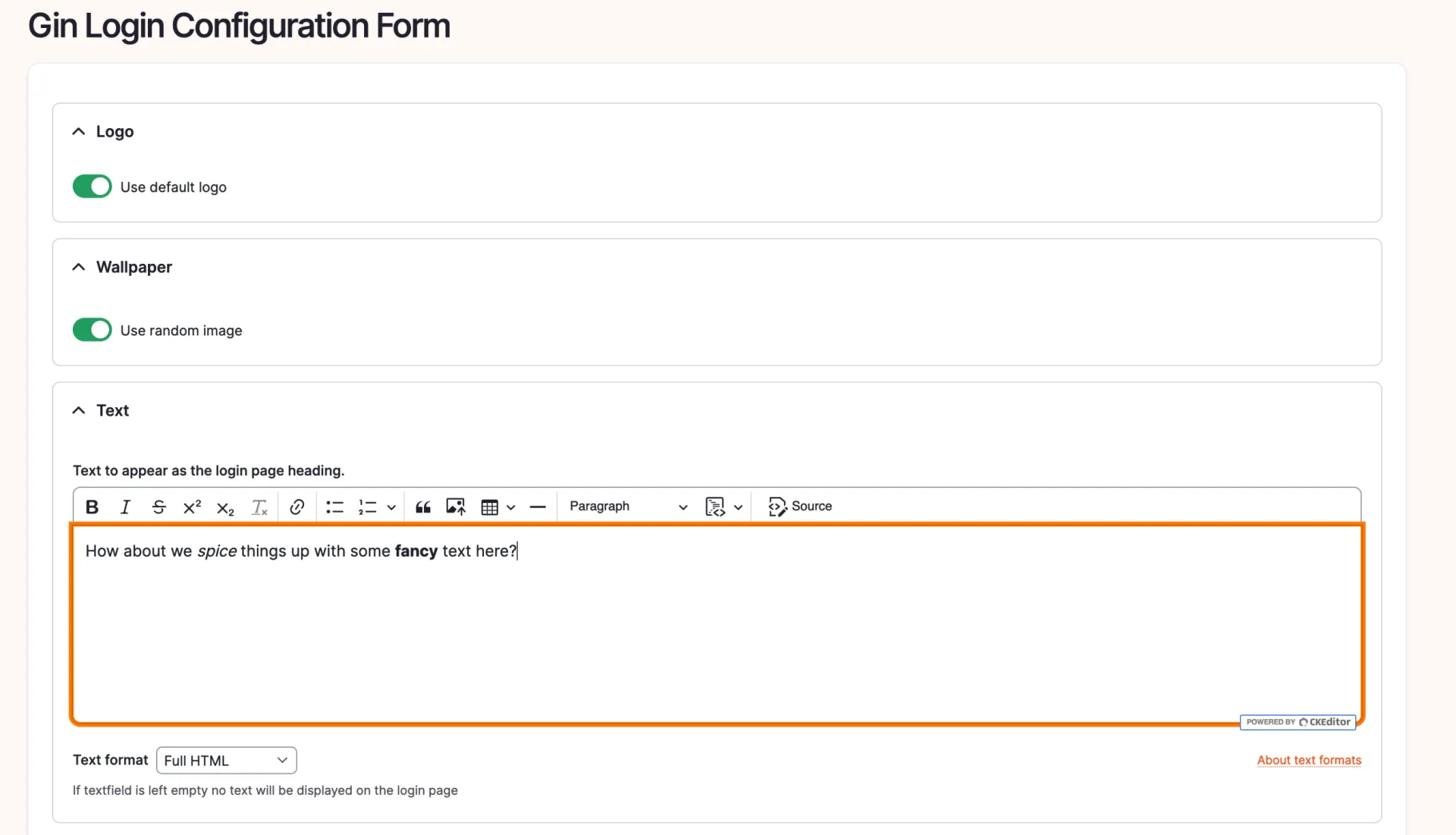
You should now be able to see this at the gin_login configuration under `/admin/config/system/configuration/gin-login`:

A fancy login_text for gin.

With the text added, even with some bold and italic modifications, let's observe the outcome:

An example what the result looks like when using gin_login_text.

On a site note, there is an issue to tackle that problem, but i wanted to elaborate the form_decorator usage here.
https://www.drupal.org/project/gin_login/issues/3252442 

Hopefully this article helped you alter your login site!
12.03.2026 | Peter Gerken

How to build a menu render array programmatically

This is a small but useful snippet for generating menu tree render arrays for any menu from a custom controller.

    $menu_name = 'my_custom_menu_machine_name';
  
    $menu_tree = \Drupal::menuTree();
    // Build the typical default set of menu tree parameters.
    $parameters = $menu_tree->getCurrentRouteMenuTreeParameters($menu_name);
    // Load the tree based on this set of parameters.
    $tree = $menu_tree->load($menu_name, $parameters);
    // Transform the tree using the manipulators you want.
    $manipulators = [
      // Only show links that are accessible for the current user.
      ['callable' => 'menu.default_tree_manipulators:checkAccess'],
      // Use the default sorting of menu links.
      ['callable' => 'menu.default_tree_manipulators:generateIndexAndSort'],
    ];
    
    $tree = $menu_tree->transform($tree, $manipulators);

    $menu = $menu_tree->build($tree);

     // Set theme for custom styling.
    $menu['#theme'] = 'my_custom_theme';

Issue:

Sometimes you might need to load and render a custom menu inside a controller – for example on a user dashboard – with access checking, default sorting, and a custom theme hook applied.

Solution:

This is a small but useful snippet for generating menu tree render arrays for any menu from a custom controller.

Just change $menu_name to the machine name of your menu.

Extra: For similar use cases, you might want to use the Drupal Twig Tweak module. You can also use the {{ drupal_menu('my_menu') }} function directly in your template.

24.02.2026 | Michael Ebert

How to configure mailpit in local dev environment if normal sendmail will fail.

You had problems to receive mails in mailhog in a local setup with sendmail configuration.

// mailsender command for the "Symfony Mailer" module for drupal 10
$settings['mailer_sendmail_commands'] = [
  '/usr/local/bin/mailpit sendmail -t --smtp-addr=mail:1025',
];

Prerequisite:

You have the Drupal Symfony Mailer module enabled and have a local Config Split running.

Issue:

You had problems to receive mails in mailhog in a local setup with sendmail configuration.

Solution:

Add this custom command to the sendmail configuration in your settings.local.php.

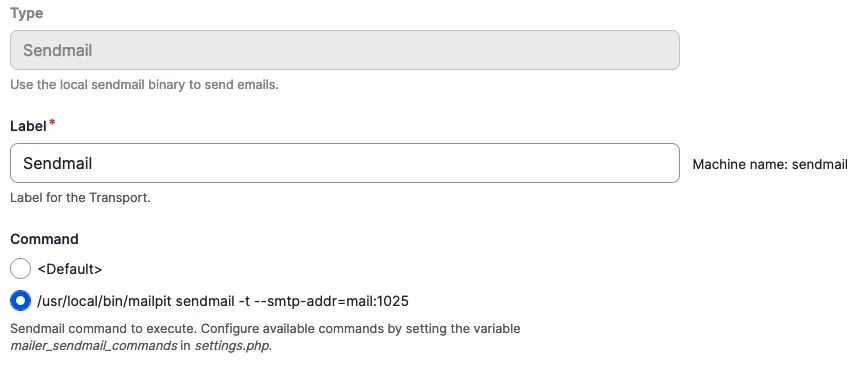
After adding go to `/admin/config/system/mailer/transport` and create a transport type 'sendmail'. Chose our newly added command and save the configuration.

Sendmail Transport Command Configuration

Add the `symfony_mailer.mailer_transport.sendmail` config to your partial split configuration for your local split and then export the configuration.

12.02.2026 | Michael Ebert

Get value of an entity field

You often need to access a value of a field within a Drupal entity programmatically, but you may encounter challenges in doing so due to the complexity of Drupal's data structure.

// For single value fields.
$entity->field_name->value;

// If you don`t know the main property.
$main_property_name = $entity->field_name->getMainPropertyName();

// For multiple value fields.
$entity->field_name->getValue();

Issue:

You often need to access a value of a field within a Drupal entity programmatically, but you may encounter challenges in doing so due to the complexity of Drupal's data structure.

Solution:

$entity->field_myfield->value

  • Direct Access: This approach directly accesses the value property of the field item.
  • Single Value: This is typically used when you are certain that the field holds a single value (e.g., a single text value, a single number, etc.). This is common with fields that are configured to store only one value.
  • Simplicity: It provides a simple and straightforward way to get the value if the field only holds one item.
  • Assumptions: It assumes that the field item exists and that the value property is the correct way to access the field data.

$entity->field_myfield->getMainPropertyName()

  • Main Property of the Field: getMainPropertyName() returns the main property of a field. For most fields, this is the value property, but it can also be another property depending on the field type. For example, for a reference field, the main property might be target_id.
  • Field Data Model: Each field in Drupal has a data model that can contains various properties. The main property is considered the primary piece of information for the field.
  • Usage in Entities: This method is useful when you want to use the field in a general context without knowing exactly which specific property represents the main information.

$entity->field_myfield->getValue()

  • Method Access: This approach uses the getValue() method to retrieve the field's value.
  • Array of Values: getValue() returns an array of all the field values. This is useful for fields that can hold multiple values (e.g., multiple text values, multiple references, etc.).
  • Structured Data: The returned array provides more structure and includes potentially other properties of the field items, not just the value property. For example, an image field might return an array with target_id, alt, title, etc.
  • Flexibility: This method is more flexible and can be used for both single and multi-value fields. You will need to handle the array appropriately in your code.

Conclusion:

  • Use $entity->field_myfield->value if you are dealing with a single-value field and want a straightforward, direct access to the field value.
  • Use $entity->field_myfield->getMainPropertyName() if you want to determine the main property of the field in a general way without knowing the specific field type.
  • Use $entity->field_myfield->getValue() if you need to handle multiple values or require the complete array structure of the field data, providing more flexibility and additional information.

18.12.2025 | Dominik Wille

How to pass a context to a condition plugin instance

You want to manually create a condition instance (e.g.: "am I on an article?") but it will initially lack a runtime context which would usually be provided by the integrating UI / system, e.g. visibility settings on blocks.

use ConditionAccessResolverTrait;


$conditions = [];
foreach ($conditions as $condition_id => $condition) {
  if ($condition instanceof ContextAwarePluginInterface) {
    try {
      $contexts = $this->contextRepository->getRuntimeContexts(array_values($condition->getContextMapping()));
      $this->contextHandler->applyContextMapping($condition, $contexts);
    }
    catch (MissingValueContextException $e) {
      $missing_value = TRUE;
    }
    catch (ContextException $e) {
      $missing_context = TRUE;
    }
  }
  $conditions[$condition_id] = $condition;
}

$this->resolveConditions($conditions, 'and')

Issue:

You want to manually create a condition instance (e.g.: "am I on an article?") but it will initially lack a runtime context which would usually be provided by the integrating UI / system, e.g. visibility settings on blocks.

Solution:

Use the snippet provided to insert all available runtime contexts. This way, yours will be included.

18.12.2025 | Michael Böker

How to add a password field to an entity as the Field_UI has none to offer

You want to add a password field to an entity via the field_ui. It does not work, and – as a reminder to recurring devs – is not supposed to work. The UI is switched off in the core definition.

/**
 * Defines the 'password' entity field type.
 *
 * @FieldType(
 *   id = "password",
 *   label = @Translation("Password"),
 *   description = @Translation("An entity field containing a password value."),
 *   no_ui = TRUE,
 * )
 */

Issue:

You want to add a password field to an entity via the field_ui. It does not work, and – as a reminder to recurring devs – is not supposed to work. The UI is switched off in the core definition.

Solution:

If you need a password field, first evaluate the necessity to save a password in the database – this might create a serious security risk. 

If your project requires it anyway, you either have to create a custom widget for a textfield or use the module Password field.

12.12.2025 | Pascal Crott

Sort blocks inside layout regions by weight.

Blocks inside a layout region are not sorted by weight property per default, even though the weight is used for rendering in the rendering process. But when you work with the blocks in a template directly you can't make sure they appear in the right order.

/**
 * Implements hook_preprocess_HOOK() for layout.html.twig.
 */
function hook_preprocess_layout(&$variables) {
  $layout = $variables['layout'];
  foreach ($layout->getRegionNames() as $region_name) {
    if (array_key_exists($region_name, $variables['content'])) {
      uasort($variables['content'][$region_name], [\Drupal\Component\Utility\SortArray::class, 'sortByWeightProperty']);
    }
  }
}

Issue:

Blocks inside a layout region are not sorted by weight property per default, even though the weight is used for rendering in the rendering process. But when you work with the blocks in a template directly you can't make sure they appear in the right order.

Solution:

Preprocess the regions and use the Drupal Core sortByWeightProperty mechanism to change the order of the blocks in the array before entering the template.