11.11.2026 | Marc Hitscherich
By default, git flow hotfix finish creates a release tag. Small fixes, such as config changes or typos, don't always need a new version, but they still need to land in main and develop.
git flow hotfix start fix-short-description
# ... commit changes ...
git flow hotfix finish fix-short-description -n -p
Issue:
By default, git flow hotfix finish creates a release tag. Small fixes, such as config changes or typos, don't always need a new version, but they still need to land in main and develop.
Prerequisites:
git-flow (AVH Edition) is installed and the repository is initialized with git flow init. Ensure that your local main and develop branches are up to date.
Solution:
The -n (--notag) flag finishes the hotfix without creating a tag. The hotfix branch is merged into main and develop and then deleted. The -p (--push) flag then pushes main and develop to origin.
14.10.2026 | Lothar Ferreira Neumann
Managing dependencies in a Drupal project where certain modules may not be compatible with the Core version you are using.
# Get lenient.
composer require mglaman/composer-drupal-lenient

# Add the module to the allow list. Use escapes for the quote signs. \" ... \"
composer config --merge --json extra.drupal-lenient.allowed-list '[\"drupal/module_with_incompatible_core_version\"]'

# You can check if the merge worked, either just take a look
# into the composer.json or use this command.
composer config --merge --json extra.drupal-lenient.allowed-list
"drupal-lenient": {
  "allowed-list": [
    "drupal/module_with_incompatible_core_version"
  ]
}
Issue:
Managing dependencies in a Drupal project where certain modules may not be compatible with the Core version you are using.
Prerequisites:
Your project needs to be Composer managed.
Solution:
The code uses the mglaman/composer-drupal-lenient package to allow specific Drupal modules that are incompatible with the core version to be installed without causing version conflicts.
Learn more in the Lenient install tutorial.
05.10.2026 | Lothar Ferreira Neumann
A contrib module (in this example, Tagify) declares its JavaScript library with type: external, loading it from a third-party CDN such as cdnjs.cloudflare.com. However, for privacy and digital sovereignity reasons we want to reduce the amount of data potentially being exchanged with an external…
composer require npm-asset/yaireo--tagify:4.35.4
/**
 * Implements hook_library_info_alter().
 *
 * The tagify module loads Tagify from cdnjs.cloudflare.com. Serve it from
 * npm-asset/yaireo--tagify in /libraries instead, so no request reaches a
 * third party and the widget keeps working behind restrictive firewalls.
 */
function my_module_library_info_alter(array &$libraries, string $extension): void {
  if ($extension !== 'tagify') {
    return;
  }

  // Assigning replaces the CDN entries. The npm package ships an unminified
  // UMD build and no *.min.css; Drupal aggregates them either way.
  $libraries['tagify']['js'] = [
    '/libraries/yaireo--tagify/dist/tagify.js' => ['minified' => FALSE],
  ];
  $libraries['tagify']['css']['component'] = [
    '/libraries/yaireo--tagify/dist/tagify.css' => ['minified' => FALSE],
  ];
  $libraries['tagify_polyfils']['js'] = [
    '/libraries/yaireo--tagify/dist/tagify.polyfills.min.js' => ['minified' => TRUE],
  ];

  unset($libraries['tagify']['remote'], $libraries['tagify_polyfils']['remote']);
}
A contrib module (in this example, Tagify) declares its JavaScript library with type: external, loading it from a third-party CDN such as cdnjs.cloudflare.com. However, for privacy and digital sovereignity reasons we want to reduce the amount of data potentially being exchanged with an external provider like Cloudflare.
- Composer with the npm-asset repository configured, or composer/installers plus oomphinc/composer-installers-extender for asset packages
- An affected contrib module (in this example, the Tagify module)
composer require npm-asset/yaireo--tagify:4.35.4 pulls the library from npm via the npm-asset Composer repository, placing it under /libraries where Drupal's library system expects locally vendored assets.
hook_library_info_alter() is the key mechanism that rewires the library definition without patching the contrib module. Reassigning $libraries['tagify']['js'] and ['css']['component'] replaces the CDN-hosted files with paths into /libraries/yaireo--tagify/dist/. Crucially, unset($libraries['tagify']['remote'], ...) removes the remote key – without this, Drupal still treats the library metadata as pointing to an external library, even though the file paths were changed.
Further information
Use the CDN fetcher module to automatically save external libraries in your Drupal project. This reduces the amount of externally loaded assets.
01.09.2026 | Michael Ebert
You want to show the status report inside your shell or terminal window instead of opening it in the browser, or if access to the status page is not possible for some reason.
drush core:requirements
Issue:
You want to show the status report inside your shell or terminal window instead of opening it in the browser, or if access to the status page is not possible for some reason.
Solution:
The Drush command in the snippet will show you the same output as the status report does (/admin/reports/status).
Read more in the official Drush documentation: https://www.drush.org/13.3.0/commands/core_requirements
06.08.2026 | Michael Ebert
You want to have a coloured output of a var_dump() or your stack trace when debugging with XDebug.
// Default, only plaintext.
xdebug.cli_color=0
// Coloured if your terminal will support it.
xdebug.cli_color=1
// Forced coloured output.
xdebug.cli_color=2
Prerequisite:
You have a setup runnig with PHP XDebug (>= version 2.2) enabled.
Issue:
You want to have a coloured output of a var_dump() or your stack trace when debugging with XDebug.
Solution:
You can enable coloured output of XDebug in your `php.ini` settings.
In mode 1 it tries to automatically detect if your terminal will support it. In mode 2 it will force coloured output, but if your terminal does not support syntax highlighting it might occur that you see some escaped code.
For more information about the settings of XDebug please consider the official XDebug documentation on xdebug.org.
09.07.2026 | Michael Ebert
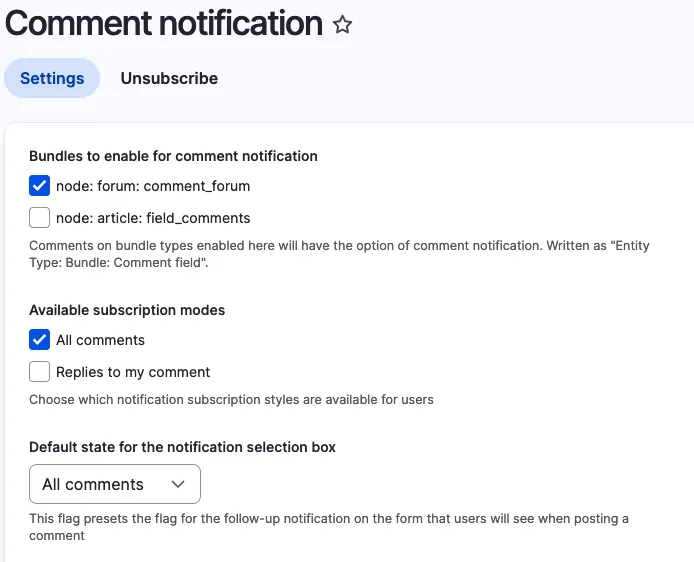
You want to get informed about updates on nodes like forum topics and need an easy solution to subscribe to it.
Installation with composer:
composer require 'drupal/comment_notify'
Enable with drush:
drush pm:install comment_notify
Configure it under ../admin/config/people/comment_notify.
Select the Bundle on that you want to enable it. Chose "All Comments" under availible subscription modes and set it as default state.
Issue:
You want to get informed about updates on nodes like forum topics and need an easy solution to subscribe to it.
Solution:
During research we found the comment_notify module.
Conclusion:
Install the module, enable it, configure it. Thats it.
26.03.2026 | Dominik Wille
You want to run your automated Drupal module tests on drupal.org
curl https://git.drupalcode.org/project/gitlab_templates/-/raw/main/gitlab-ci/template.gitlab-ci.yml > .gitlab-ci.yml
Issue:
You want to run your automated Drupal module tests on drupal.org
Solution:
Customize the command to fit your module and execute it.
12.03.2026 | Pascal Crott, Michael Böker
You have a MySQL 8 Database Dump which needs to be converted into MariaDB for use with a Drupal setup.
cat olddump.sql | sed -e s/uca1400_as_ci/utf8mb4_general_ci/ | gzip > newdump.sql.gz
Issue
You have a MySQL 8 Database Dump which needs to be converted into MariaDB for use with a Drupal setup.
Solution
Use the command provided.
05.03.2026 | Lothar Ferreira Neumann
We want to make sure the local 'stage' branch is updated with the latest changes from a specific remote branch before pushing updates back to the 'stage' branch in the repository.
git fetch --all
git checkout stage
# This resets your local stage branch to the version of remote.
# The origin/stage could diverge from the local due to resetting the branch.
git reset --hard origin/stage
git merge origin/BRANCHNAME
git push origin stage
git checkout BRANCHNAME
Issue:
We want to make sure the local 'stage' branch is updated with the latest changes from a specific remote branch before pushing updates back to the 'stage' branch in the repository.
Solution:
The code snippet updates the local 'stage' branch with the latest changes from the remote 'stage' branch, merges updates from another specified branch and pushes these combined updates back to the remote 'stage' branch. Finally, it switches back to the original branch.
22.01.2026 | Marc Hitscherich
If you have moved to a new server and want to access it with SSH via domain name, you will get the warning "Remote host identification has changed" due to changed SSH fingerprints in your `~/.ssh/known_host` file.
# Remove all old entries for my.example.com
ssh-keygen -R my.example.com

# Scan all supported fingerprints from the new server and insert them in your known_hosts file
ssh-keyscan my.example.com >> ~/.ssh/known_hosts
Issue:
If you have moved to a new server and want to access it with SSH via domain name, you will get the warning "Remote host identification has changed" due to changed SSH fingerprints in your `~/.ssh/known_host` file.
The code snippet addresses the challenge of updating SSH fingerprints in the known_hosts file for a server, particularly in cases where the server's keys have been changed, or there are discrepancies with the existing entries.
Solution:
Remove all old entries from the `~/.ssh/known_host` file and insert the new fingerprint(s). Hint: Only do this if you are sure that the new server is under your control.
This code snippet provides a solution to update the SSH fingerprints in the known_hosts file. It first removes any old entries related to a specific hostname (my.example.com) using the ssh-keygen command with the -R option. Then, it scans and appends all supported fingerprints from the new server to the known_hosts file using the ssh-keyscan command.
15.01.2026 | Mathias Grab
When working on a Composer based project, you may need to check the installed version, dependencies, and other details of a specific package.
# Syntax.
composer show vendor/package

# Example.
composer show drupal/eca
name     : drupal/eca
descrip. : Event, Conditions, Actions - powerful, versatile, and user-friendly rules engine for Drupal
keywords :
versions : * 2.1.0
type     : drupal-module
license  : GNU General Public License v2.0 or later (GPL-2.0-or-later) (OSI approved) https://spdx.org/licenses/GPL-2.0-or-later.html#licenseText
homepage : https://www.drupal.org/project/eca
source   : [git] https://git.drupalcode.org/project/eca.git 2.1.0
dist     : [zip] https://ftp.drupal.org/files/projects/eca-2.1.0.zip 2.1.0
path     : /var/www/html/web/modules/contrib/eca
names    : drupal/eca

support
source : https://drupal.org/project/eca
issues : https://drupal.org/project/issues/eca

requires
dragonmantank/cron-expression ^3.1
drupal/core ^10.3||^11
ext-dom *
ext-json *
mtownsend/xml-to-array ^2.0
php >=8.1

requires (dev)
drupal/eca_ui *
drupal/entity_reference_revisions ^1.12
drupal/inline_entity_form ^3.0
drupal/paragraphs ^1.18
drupal/token ^1.15
drupal/webform dev-3465838-drupal-11-compatibility
Issue:
When working on a Composer based project, you may need to check the installed version, dependencies, and other details of a specific package.
Solution:
Use the command composer show vendor/package to retrieve detailed information about the package, including its version, description, dependencies, license, and more. This helps in debugging, verifying versions, and managing dependencies effectively.
See the Composer documentation for more info.
13.11.2025 | Peter Majmesku
When you install the default GitFlow version via brew, an extremely outdated version (over 10 years old) is installed.
13.11.2025 | Marc Hitscherich
You would like to automatically and programmatically find the next suitable version number for a release in Git.
#!/bin/bash

latest=$(git tag -l | sort -V | tail -n1)
semver_parts=(${latest//./ })
major=${semver_parts[0]}
minor=${semver_parts[1]}
patch=${semver_parts[2]}

patch_version=${major}.${minor}.$((patch+1))
minor_version=${major}.$((minor+1)).0
major_version=$((major+1)).0.0

echo "latest:        $latest"
echo "patch release: $patch_version"
echo "minor release: $minor_version"
echo "major release: $major_version"
Issue:
You would like to automatically and programmatically find the next suitable version number for a release in Git.
Prerequisites:
You are working by semantic versioning principles.
Solution:
Save and execute the provided snippet into your terminal.
13.11.2025 | Pascal Crott
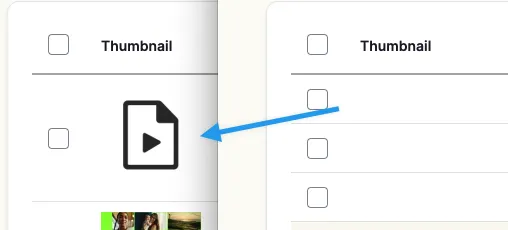
The error log is full of the warning "Warning: copy(public://media-icons/generic/generic.png)" and the media library shows no previews. This can happen when environments are set up based on a database dump and without properly transferring the files. The media icons are usually created during the…
drush php-eval "\Drupal::moduleHandler()->loadInclude('media', 'install');media_install();";
Issue:
The error log is full of the warning "Warning: copy(public://media-icons/generic/generic.png)" and the media library shows no previews. This can happen when environments are set up based on a database dump and without properly transferring the files. The media icons are usually created during the installation of the media module, which will never happen in this scenario.
Solution:
Trigger the install hook of the Core Media module. It will take care of creating those files. Use the provided snippet.
See also https://www.drupal.org/project/drupal/issues/3060509