Direkt zum Inhalt

Devbits

Kleine Code-Schnipsel aus unserem Alltag mit Drupal, PHP und DevOps: Problem, Lösung, Code.

13.11.2026 | Michael Ebert

Replace deprecated .module file in Drupal 11.5 or newer

Starting with Drupal 11.5, the .module file extension is deprecated. It will be no longer autoladed in Drupal 13. This means all functions inside this file have to move to classes and services, otherwise they stop running.

Old Implementation

<?php

/**
 * @file
 * Legacy procedural hooks – deprecated since Drupal 11.5.
 */

use Drupal\Core\Form\FormStateInterface;
use Drupal\node\NodeInterface;

/**
 * Implements hook_form_alter().
 */
function my_module_form_alter(array &$form, FormStateInterface $form_state, $form_id) {
  if ($form_id === 'user_login_form') {
    $form['#attributes']['class'][] = 'my-module-login';
  }
}

/**
 * Implements hook_ENTITY_TYPE_presave() for node entities.
 */
function my_module_node_presave(NodeInterface $node) {
  $node->setTitle(trim($node->getTitle()));
}

New Implementation

<?php

declare(strict_types=1);

namespace Drupal\my_module\Hook;

use Drupal\Core\Form\FormStateInterface;
use Drupal\Core\Hook\Attribute\Hook;
use Drupal\Core\Hook\Order\Order;
use Drupal\node\NodeInterface;

/**
 * Hook implementations for my_module.
 */
class MyModuleHooks {

  /**
   * Implements hook_form_alter().
   */
  #[Hook('form_alter', order: Order::Last)]
  public function formAlter(array &$form, FormStateInterface $form_state, string $form_id): void {
    if ($form_id === 'user_login_form') {
      $form['#attributes']['class'][] = 'my-module-login';
    }
  }

  /**
   * Implements hook_ENTITY_TYPE_presave() for node entities.
   */
  #[Hook('node_presave')]
  public function nodePresave(NodeInterface $node): void {
    $node->setTitle(trim($node->getTitle()));
  }

}
parameters:
  # All hooks are OOP now – tell core not to scan .module/.inc files.
  my_module.skip_procedural_hook_scan: true

Issue:

Starting with Drupal 11.5, the .module file extension is deprecated. It will be no longer autoladed in Drupal 13. This means all functions inside this file have to move to classes and services, otherwise they stop running. 

As long as Core supports procedual hooks, it scans every .module or .inc files for hooks, which costs performance even when a module has nothing procedual left.

Prerequisites:

  • drupal ≥ 11.5

Solution:

  1. Hook class: Any class in the Drupal\my_module\Hook namespace or its subdirectories is registered automatically as an autowired service, so no services.yml entry is needed. The #[Hook('...')] attribute defines which hook a method implements. One method can carry several #[Hook] attributes and an order parameter. To change hooks of other modules you can use #[RemoveHook] or #[ReorderHook].
  2. Skip the scan: Once no more regular procedual hooks are left in our services.yml, we set my_module.skip_procedural_hook_scan: true so that Core is skipping parsing our modules .module or .inc files. Procedual hooks that are not #[LegacyHook] would not be found anymore.
  3. Move remaining helper functions to services or methods on the hook class. If other projects call your public functions, keep them as deprecated wrappers that call the new service.

To help you upgrading your code for Drupal 13, there is a ddev script listed in the additional links section.

Additional Links:

23.10.2026 | Lothar Ferreira Neumann

How to fill empty form fields via a custom Drupal AJAX command

In many editor or form workflows fields need to be prefilled (for example based on a selected entity or computed data) without overwriting input the user may have already entered.

<?php

declare(strict_types=1);

namespace Drupal\my_module\Ajax;

use Drupal\Core\Ajax\CommandInterface;

/**
 * Ajax command: fill empty form elements with a predefined value.
 *
 * This command targets one or more form elements via a CSS selector and sets
 * their value only if the current value is empty (after trimming).
 *
 * The command also triggers `input` and `change` events so Drupal behaviors and
 * other listeners react as if the user entered the value manually.
 */
final class SetValueIfEmptyCommand implements CommandInterface {

  /**
   * The Ajax command name used by Drupal.AjaxCommands.
   */
  public const COMMAND = 'setValueIfEmpty';

  /**
   * Default selector used when none is provided.
   */
  public const DEFAULT_SELECTOR = '[data-my-fill-target]';

  /**
   * Creates a command instance.
   *
   * @param string $fillValue
   *   The value to set when the target element is empty.
   * @param string|null $targetSelector
   *   CSS selector for the target elements. If omitted, DEFAULT_SELECTOR is used.
   */
  public function __construct(
    protected string $fillValue,
    protected ?string $targetSelector = null,
  ) {}

  /**
   * {@inheritdoc}
   */
  public function render(): array {
    return [
      'command' => self::COMMAND,
      'selector' => $this->targetSelector ?? self::DEFAULT_SELECTOR,
      'value' => $this->fillValue,
    ];
  }

}
/**
 * @file Field empty check.
 */
(function (Drupal) {
  'use strict';

  Drupal.AjaxCommands.prototype.setValueIfEmpty = function (ajax, response) {
    const targetSelector = response && response.selector ? response.selector : '';
    const fillValue = response && typeof response.value === 'string' ? response.value : '';

    if (!targetSelector) {
      return;
    }

    const elements = document.querySelectorAll(targetSelector);
    for (const element of elements) {
      let currentValue = '';

      if (typeof element.value === 'string') {
        currentValue = element.value.trim();
      }
      else if (element.isContentEditable) {
        currentValue = (element.textContent || '').trim();
      }

      if (currentValue !== '') {
        continue;
      }

      if (typeof element.value === 'string') {
        element.value = fillValue;
      }
      else if (element.isContentEditable) {
        element.textContent = fillValue;
      }
      else {
        continue;
      }

      element.dispatchEvent(new Event('input', { bubbles: true }));
      element.dispatchEvent(new Event('change', { bubbles: true }));
    }
  };

})(Drupal);
set_value_if_empty:
  js:
    js/set_value_if_empty.js: {}
  dependencies:
    - core/drupal
    - core/drupal.ajax
use Drupal\Core\Ajax\AjaxResponse;
use Drupal\my_module\Ajax\SetValueIfEmptyCommand;

$response = new AjaxResponse();

// Example: fill a media name field if it's empty.
$fill_value = 'foo-bar';

// Selector for a specific element in this use-case.
$target_selector = '[data-drupal-selector$="my_field"]';

$response->addAttachments([
  'library' => [
    'my_module/set_value_if_empty',
  ],
]);

$response->addCommand(new SetValueIfEmptyCommand($fill_value, $target_selector));

return $response;

Issue

In many editor or form workflows fields need to be prefilled (for example based on a selected entity or computed data) without overwriting input the user may have already entered.

Built-in AJAX setters such as InvokeCommand('val') always assign values unconditionally. When an AJAX update happens after the user started typing, this can unintentionally replace user-provided content.

Prerequisites

This approach only works when executed within an AJAX callback returning an AjaxResponse.

Solution

Use a lightweight custom AJAX command that runs in the browser and checks the current value of the target element(s).
The command sets the provided value only if the field is empty (after trimming).

The server supplies the selector and value while the client performs the final emptiness check and applies the update conditionally, preventing accidental overwrites of user input.

14.10.2026 | Nikolas Kopp

Skip migrating row if the value is an empty array

The single_value plugin is necessary since the skip_on_empty plugin doesn't work with an empty array properly. See Issue: https://www.drupal.org/project/drupal/issues/3239410

  skip_on_empty_array:
  -
    plugin: single_value
    source: file_path
  -
    plugin: skip_on_empty
    method: row

Issue:

The single_value plugin is necessary since the skip_on_empty plugin doesn't work with an empty array properly. See Issue: https://www.drupal.org/project/drupal/issues/3239410 

Prerequisites:

The migrate_plus module needs to be enabled.

Solution:

The provided snippet skips the row if the value is an empty array.

16.07.2026 | Lothar Ferreira Neumann

How to translate the Maxlength Countdown message label globally

When enabling the soft or hard character limit for a field using the Maxlength module, the module writes a default label into the field widget configuration. Because the label string is written directly into configuration, the fallback string logic is never used. As a result, the label cannot be…

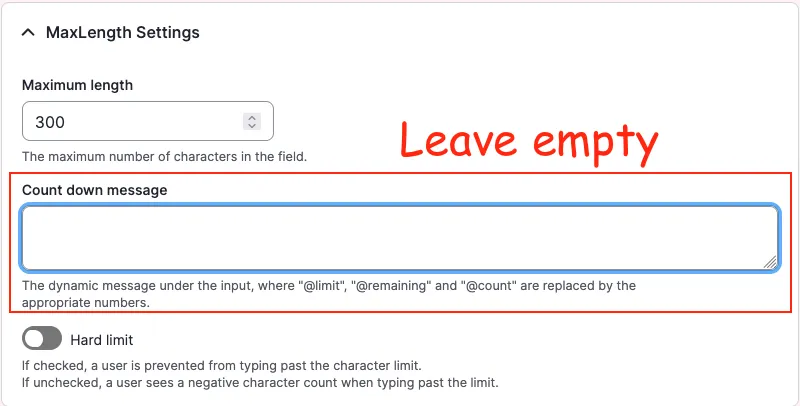
A Drupal backend screenshot showing the "Count down message" field

Example configuration created by enabling Maxlength:

# ...
content:
  field_copyright:
    type: text_textarea
    weight: 3
    region: content
    settings:
      rows: 2
      placeholder: ''
    third_party_settings:
      allowed_formats:
        hide_help: '1'
        hide_guidelines: '1'
      maxlength:
        maxlength_js: null
        maxlength_js_label: 'Content limited to @limit characters, remaining: <strong>@remaining</strong>'
        maxlength_js_enforce: false
# ...

However, the module already contains fallback logic for this label in maxlength.module: 

$maxlength_js_label = !empty($thirdPartySettings['maxlength']['maxlength_js_label']) ? $thirdPartySettings['maxlength']['maxlength_js_label'] : t('Content limited to @limit characters, remaining: <strong>@remaining</strong>');
$maxlength_js = $thirdPartySettings['maxlength']['maxlength_js'];

Working configuration: empty the label

# ...
content:
  field_copyright:
    type: text_textarea
    weight: 3
    region: content
    settings:
      rows: 2
      placeholder: ''
    third_party_settings:
      allowed_formats:
        hide_help: '1'
        hide_guidelines: '1'
      maxlength:
        maxlength_js: null
        maxlength_js_label: ''
        maxlength_js_enforce: false
# ...

With the label empty, the module falls back to its internal t() string, which can then be translated normally via the interface translation system.

Issue:

When enabling the soft or hard character limit for a field using the Maxlength module, the module writes a default label into the field widget configuration. Because the label string is written directly into configuration, the fallback string logic is never used. As a result, the label cannot be translated through the Interface Translation system, since Drupal treats it as configuration rather than a translatable interface string.

Solution:

To allow translating the countdown string via the Drupal interface translation, the label must be removed from the configuration so the module fallback is used instead.

  • There is alrady a fix for this problem for the maxlength module on drupal.org.

22.06.2026 | Mathias Grab

How to enable Twig debug in Drupal

You work with Twig templates and need to use the debugger.

parameters:
  twig.config:
    debug: true
    auto_reload: null
    cache: false

Issue:

You work with Twig templates and need to use the debugger.

Solution:

Code solution:
Enable Twig debug by copying the snippet provided from root/web/sites/default.services.yml into root/web/sites/development.services.yml

See also: Drupal Docs on Twig

Sitebuilding solution:
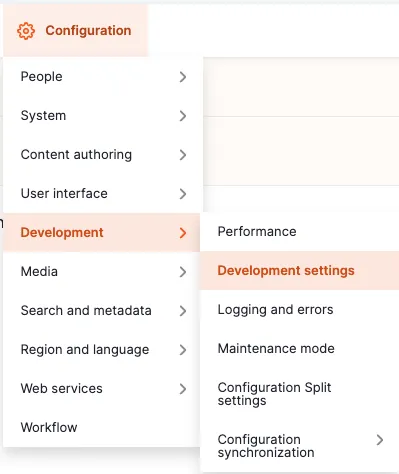
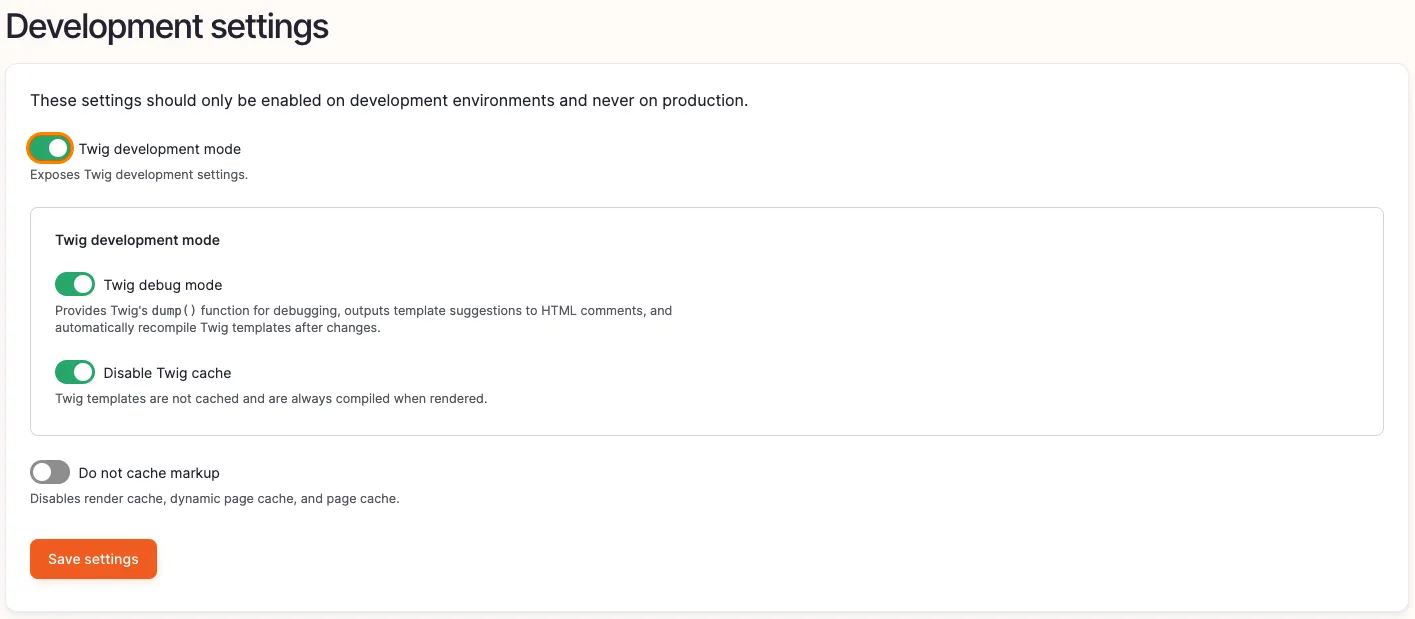
Navigate to the administrative area via the admin toolbar to Configuration -> Development -> Development settings or via the path /admin/config/development/settings
 

Enabling twig debug 1


Enable the checkbox Twig development mode, as well as Twig debug mode and Disable Twig cache.
 

Enabling twig debug 3

For further information regarding Drupal and Twig take a look at  https://www.drupal.org/docs/develop/theming-drupal/twig-in-drupal/debugging-twig-templates

Info

This should only be used for local development environments but disabled in production.

21.05.2026 | Lothar Ferreira Neumann

Aggregate heterogeneous media fields for structured Drupal migration

You want to combine multiple image fields from a legacy system into a single media field in a new Drupal system during migration.

  field_media:
    - plugin: merge
      source:
        - field_image
        - field_images
    - plugin: sub_process
      process:
        target_id:
          - plugin: migration_lookup
            source: fid
            migration:
              - my_migration_media_image

Issue:

You want to combine multiple image fields from a legacy system into a single media field in a new Drupal system during migration.

Solution:

The code uses the migration API of Drupal to merge multiple source image fields into a single media field. It employs the merge plugin to combine the fields and a sub-process to transform the references into media entities using a migration lookup.

23.04.2026 | Lothar Ferreira Neumann

Add custom text to gin_login with Form Decorator

First we create a module, lets name it 'gin_login_text'. If you have drush installed, you can generate a module using 'drush generate module'.

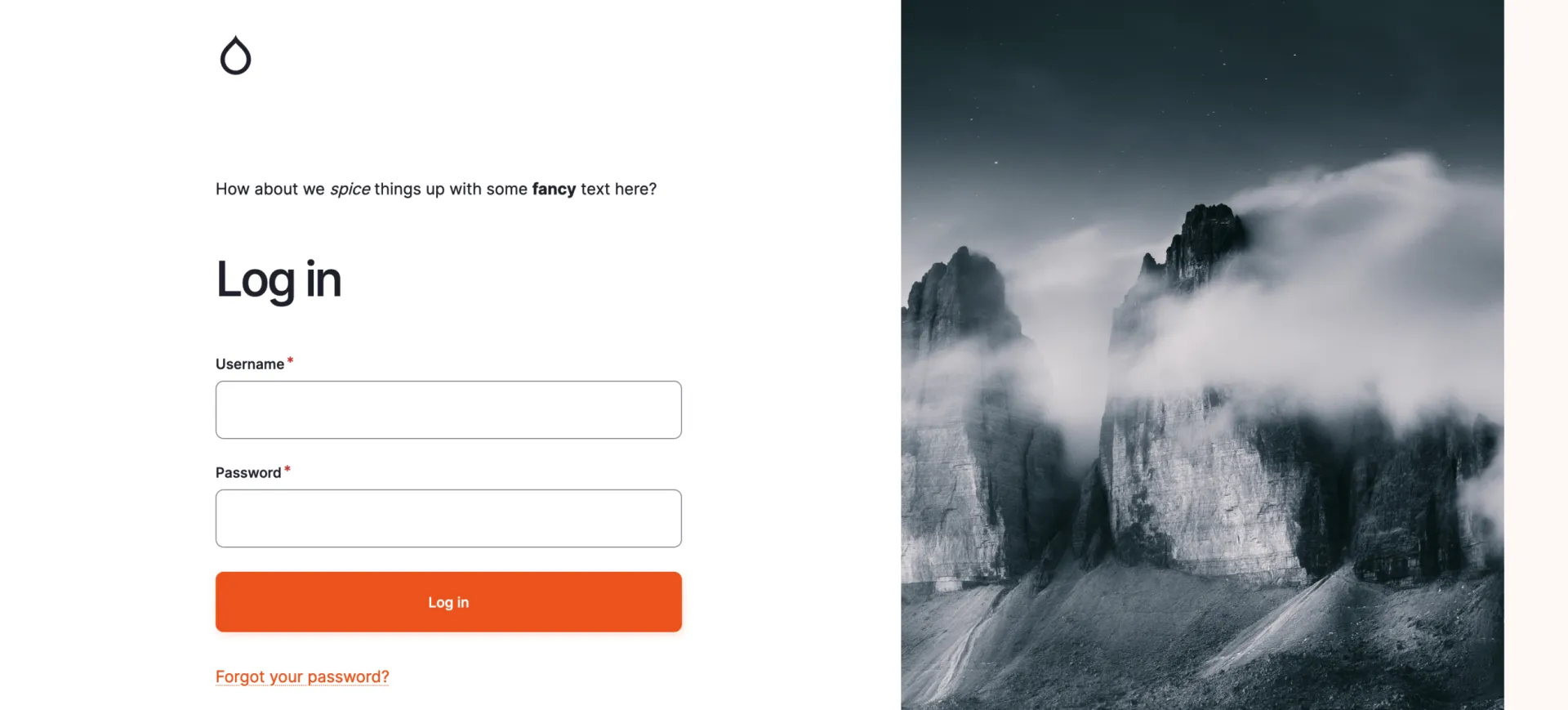
We will use the form_decorator module to alter the output of the gin_login module to look something like this:
 

An example what the result looks like when using gin_login_text.

This DevBit provides a step-by-step tutorial how to get there. 

First we create a module, lets name it 'gin_login_text'. If you have drush installed, you can generate a module using 'drush generate module'.

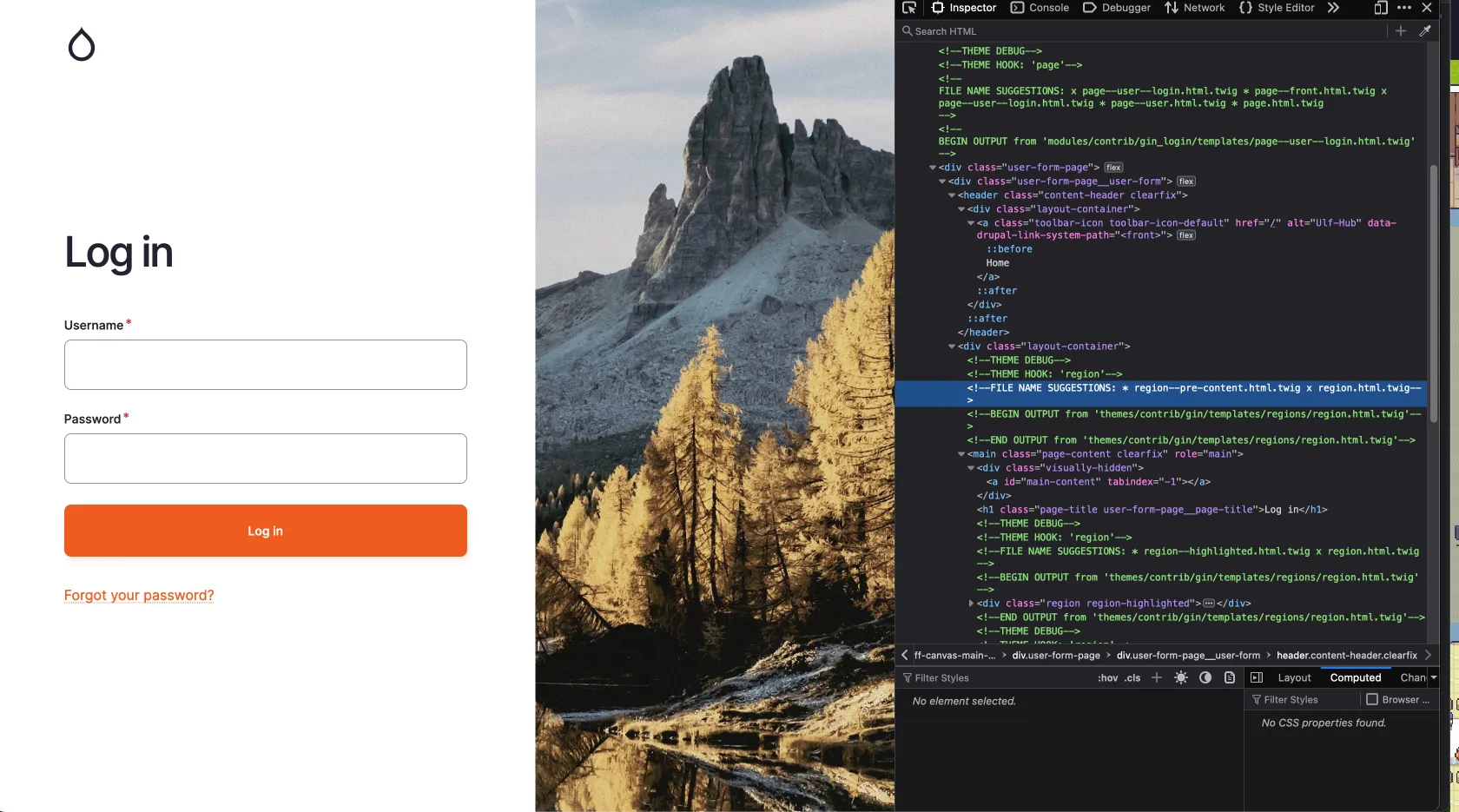
To insert our text into the gin_login we need to find the proper render array. For this we look up the logout screen with the inspector:

A screenshot from the gin_login screen with inspector.

In the picture we can see a FILE NAME SUGGESTION: 'region--pre-content.html.twig', thanks to the enabled Twig debug. If we now look into the templates for gin_login we find this:

...
    <div class="layout-container">
      {{ page.pre_content|without('claro_primary_local_tasks', 'gin_primary_local_tasks') }}
      <main class="page-content clearfix" role="main">
        <div class="visually-hidden"><a id="main-content" tabindex="-1"></a></div>
        {% block title %}
          <h1 class="page-title user-form-page__page-title">{{ 'Log in'|t }}</h1>
        {% endblock %}
        {{ page.highlighted }}
        {% if page.help %}
          <div class="help">
            {{ page.help }}
          </div>
        {% endif %}
        {{ page.content|without('claro_primary_local_tasks', 'gin_primary_local_tasks') }}
      </main>

    </div>
...

We are interested in the line `{{ page.pre_content ..... }}`

So now we need to put our text into the render array for the page with a hook:

<?php

declare(strict_types=1);

/**
 * @file
 * Implements hooks for gin_login_text.
 */

use Drupal\Core\Url;

/**
 * Implements hook_preprocess_page__user__login().
 */
function gin_login_text_preprocess_page__user__login(&$variables) {
  $config = \Drupal::config('gin_login.settings');

  $variables['page']['pre_content']['login_text']['#tree'] = TRUE;
  $variables['page']['pre_content']['login_text']['text'] = [
    '#type' => 'markup',
    '#format' => $config->get('login_text.text')['format'] ?? 'full_html',
    '#markup' => $config->get('login_text.text')['value'] ?? 'Default Heading Text',
  ];
}

$variables['page']['pre_content']['login_text'][''#tree] = TRUE;

This line is used to enable the nested array structure in a form which we will use to alter the form of gin_login to enter a text.

Last but not least add the dependencies to the info.yml:

name: gin_login_text
type: module
description: Provides a login text for gin_login
package: Custom
core_version_requirement: ^10 || ^11
dependencies:
  - form_decorator:form_decorator
  - gin_login:gin_login

As you already see in the info.yml, we have a dependency on the form_decorator. Using this module, we can decorate the form of gin_login which you can find at `/admin/config/system/configuration/gin-login`. The clue is in the title. Follow the example on the module site at https://www.drupal.org/project/form_decorator.

Your file should look like this: 

<?php

declare(strict_types=1);

namespace Drupal\gin_login_text\FormDecorator;

use Drupal\Core\Config\ConfigFactoryInterface;
use Drupal\Core\DependencyInjection\DependencySerializationTrait;
use Drupal\Core\Form\FormStateInterface;
use Drupal\Core\Plugin\ContainerFactoryPluginInterface;
use Drupal\Core\StringTranslation\StringTranslationTrait;
use Drupal\form_decorator\FormDecoratorBase;
use Drupal\multivalue_form_element\Element\MultiValue;
use Symfony\Component\DependencyInjection\ContainerInterface;

/**
 * Decorates the gin login form.
 *
 * @FormDecorator(hook = "form_gin_login_form_alter")
 */
final class GinLoginFormDecorator extends FormDecoratorBase implements ContainerFactoryPluginInterface {
  use StringTranslationTrait;
  use DependencySerializationTrait;

  /**
   * Constructs a GinLoginFormDecorator object.
   *
   * @param array $configuration
   *   A configuration array containing information about the plugin instance.
   * @param string $plugin_id
   *   The plugin_id for the plugin instance.
   * @param mixed $plugin_definition
   *   The plugin implementation definition.
   * @param \Drupal\Core\Config\ConfigFactoryInterface $configFactory
   *   The configuration factory.
   */
  public function __construct(
    array $configuration,
    string $plugin_id,
    mixed $plugin_definition,
    protected ConfigFactoryInterface $configFactory,
  ) {
    parent::__construct($configuration, $plugin_id, $plugin_definition);
  }

  /**
   * {@inheritdoc}
   */
  public static function create(ContainerInterface $container, $configuration, $plugin_id, $plugin_definition) {
    return new self(
      $configuration,
      $plugin_id,
      $plugin_definition,
      $container->get('config.factory'),
    );
  }

  /**
   * {@inheritdoc}
   */
  public function buildForm(array $form, FormStateInterface $form_state, ...$args): array {
    $form = $this->inner->buildForm($form, $form_state);
    $config = $this->configFactory->get('gin_login.settings');

    $form['login_text'] = [
      '#type' => 'details',
      '#title' => $this->t('Text'),
      '#open' => TRUE,
      '#tree' => TRUE,
    ];
    $form['login_text']['text'] = [
      '#type' => 'text_format',
      '#title' => $this->t('Text to appear as the login page heading.'),
      '#description' => $this->t('If textfield is left empty no text will be displayed on the login page'),
      '#format' => $config->get('login_text.text')['format'] ?? 'full_html',
      '#default_value' => $config->get('login_text.text')['value'] ?? '',
    ];

    return $form;
  }

  /**
   * {@inheritdoc}
   */
  public function submitForm(array &$form, FormStateInterface $form_state): void {
    $this->inner->submitForm($form, $form_state);
    // Get it editable or else its immutable.
    $config = $this->configFactory->getEditable('gin_login.settings');
    $config->set('login_text.text', $form_state->getValue('login_text')['text']);

    $config->save();
  }

}

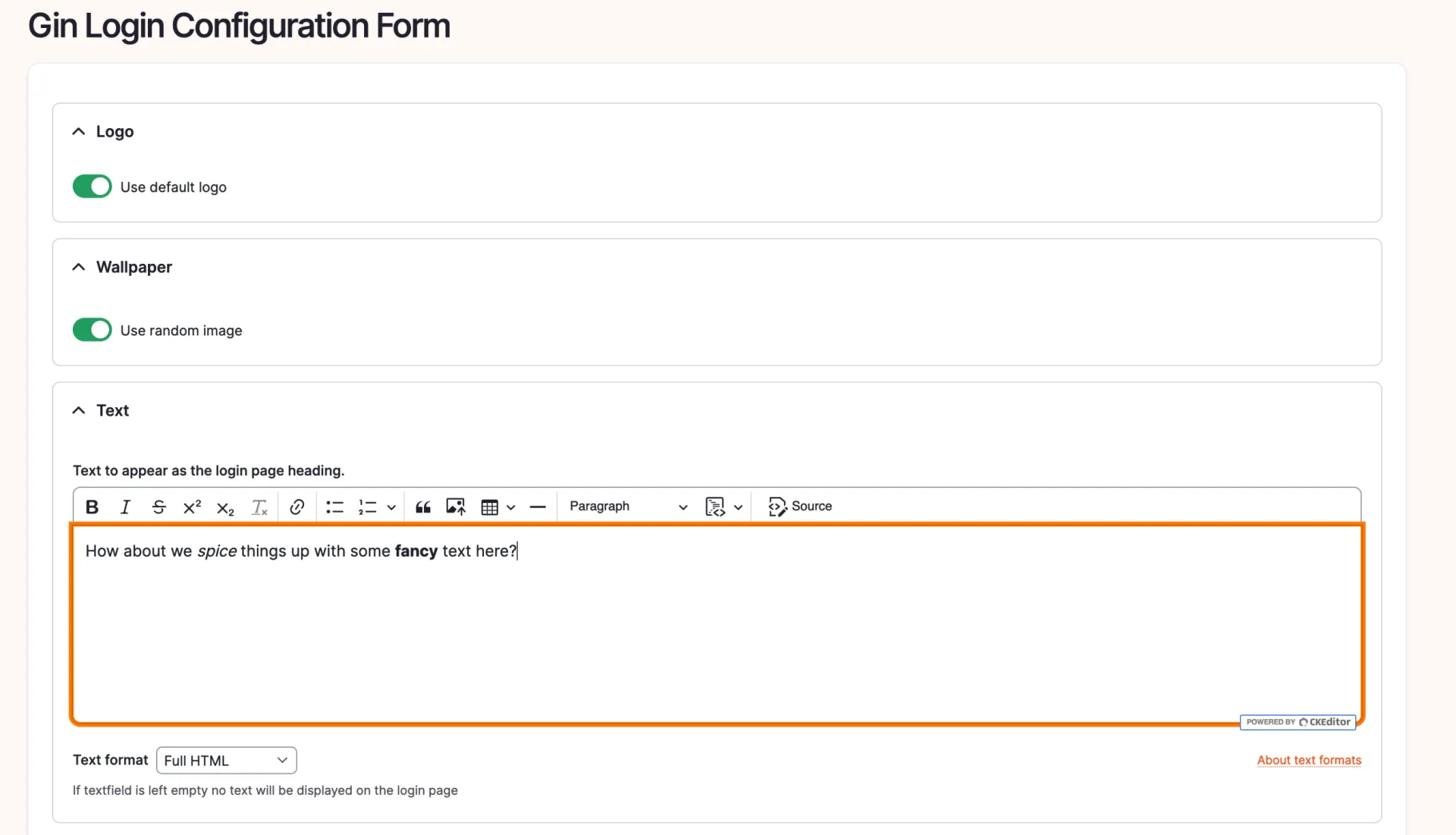
You should now be able to see this at the gin_login configuration under `/admin/config/system/configuration/gin-login`:

A fancy login_text for gin.

With the text added, even with some bold and italic modifications, let's observe the outcome:

An example what the result looks like when using gin_login_text.

On a site note, there is an issue to tackle that problem, but i wanted to elaborate the form_decorator usage here.
https://www.drupal.org/project/gin_login/issues/3252442 

Hopefully this article helped you alter your login site!
02.04.2026 | Michael Ebert

Set a custom theme to be used by Symfony Mailer

You have multiple themes enabled in your drupal page and need to select the theme that includes custom templates for send emails.

configuration:
  email_theme:
    theme: my_custom_theme

Prerequisite:

Installed and enabled the Symfony Mailer module.

Issue:

You have multiple themes enabled in your drupal page and need to select the theme that includes custom templates for send emails.

Solution:

Configure Symfony Mailer to use templates coming from your custom theme.

Go to `/admin/config/system/mailer` and edit the policy. There you can switch the theme that is used for sending your e-mails.

Symfony Mailer Policy Configuration

19.03.2026 | Peter Gerken

Block raw network access for a container

You can add this to your docker-compose.yml for any service ('web' is our example here) to prevent it from reaching the internet. This can be useful to isolate a potentially unsafe project for an audit for example.

services:
  web:
    cap_drop:
      - NET_RAW

Issue:

A containerised Drupal service – or any web service – running in an offline or restricted environment should not be able to send raw network packets. By default, Docker grants containers the NET_RAW Linux capability, which allows tools like ping and arping to craft raw IP packets. This is unnecessary for a web container and increases the attack surface.

Solution:

You can add this to your docker-compose.yml for any service ('web' is our example here) to prevent it from reaching the internet. This can be useful to isolate a potentially unsafe project for an audit for example.

05.02.2026 | Mathias Grab

How to create a <pubDate> date pattern (RFC822) to be used with Views RSS feeds

RSS feeds require the date pattern to use RFC-822 format ('D, d M Y h:i:s O' | Wed, 02 Oct 2002 08:00:00 EST). The main problem is that CET (Central European Time) is not supported by this RFC standard so we have to switch to GMT (Greenwich Mean Time) + hhmm to have a valid value.

 This snippet is an example config for a date format in Drupal which can be imported.

langcode: en
status: true
dependencies: {  }
id: rss_feed_date_format
label: RFC822
locked: false
pattern: 'D, d M Y h:i:s O'

Change the date format via Sitebuilding
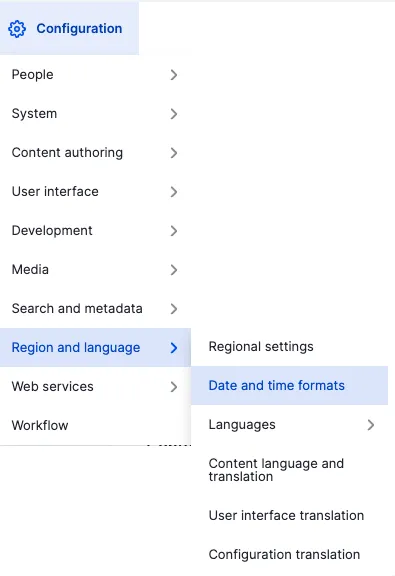
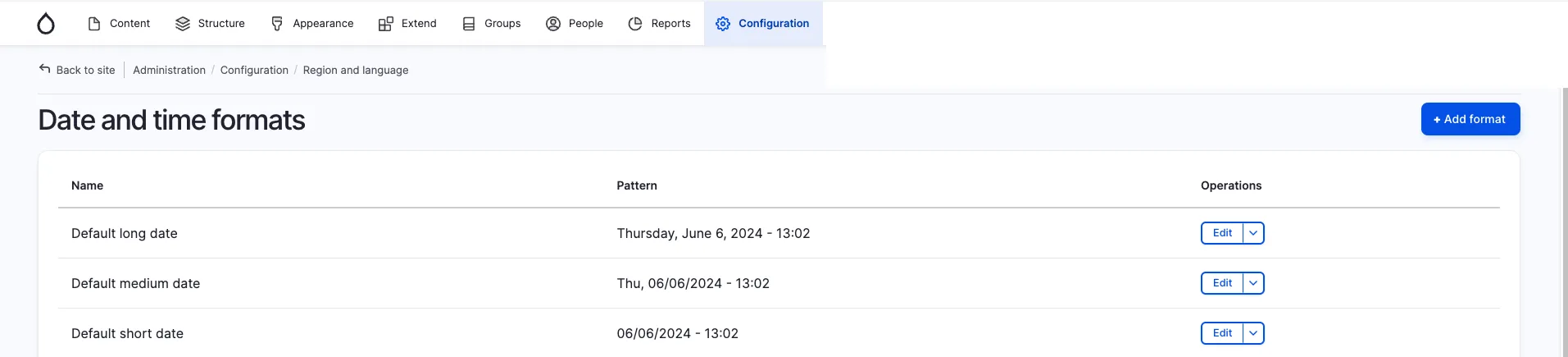
In the administrative menu open Configuration -> Region and language -> Date and time formats or open the path /admin/config/regional/date-time.
Then use the button "+ Add format".

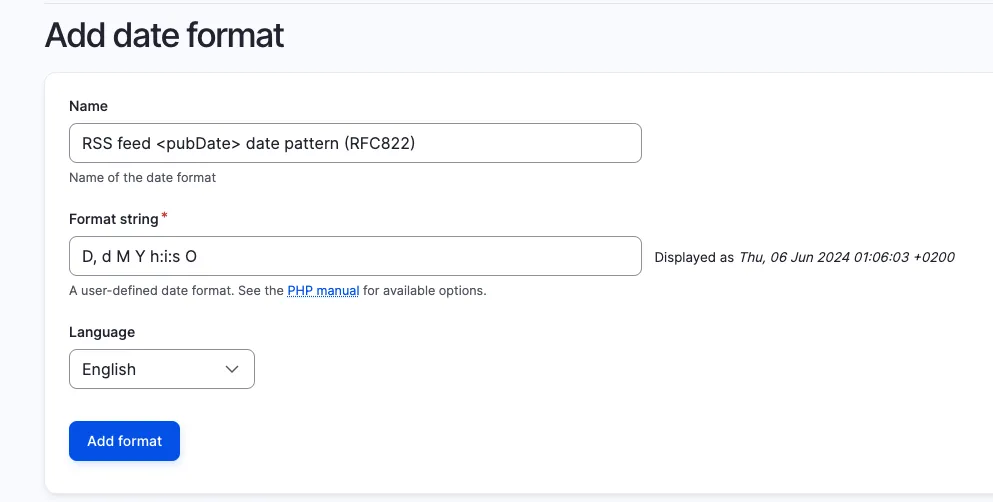
Sitebuilding date format 1
Sitebuilding date format 2
  

Here you can give your new date format a label and enter D, d M Y h:i:s O as a fitting RFC822 <pubDate> format.

Sitebuilding date format 3

For more information about PHP date format options, see the official PHP documentation.

Issue:

RSS feeds require the date pattern to use RFC-822 format ('D, d M Y h:i:s O' | Wed, 02 Oct 2002 08:00:00 EST). The main problem is that CET (Central European Time) is not supported by this RFC standard so we have to switch to GMT (Greenwich Mean Time) + hhmm to have a valid value.

Solution:

Switch to GMT (Greenwich Mean Time) + hhmm to have a valid value.

15.01.2026 | Lothar Ferreira Neumann

How to migrate latitude & longitude geodata into a unified geocode field

Migrating geographic coordinate data from the geofield module into a unified geofield requires correct source field mapping.

field_geofield:
  plugin: geofield_latlon
  source:
    - field_latitude
    - field_longitude

Issue:

Migrating geographic coordinate data from the geofield module into a unified geofield requires correct source field mapping.

Solution:

The code uses the geofield_latlon plugin to combine latitude and longitude fields in the specified order for proper geofield migration.

See the Drupal documentation for more info about the topic.

13.11.2025 | Lothar Ferreira Neumann

How to place HTML elements into webforms via the Source tab

You want to insert headings or other text elements into a web form, e.g. to subdivide it for better readability and/or understandability.

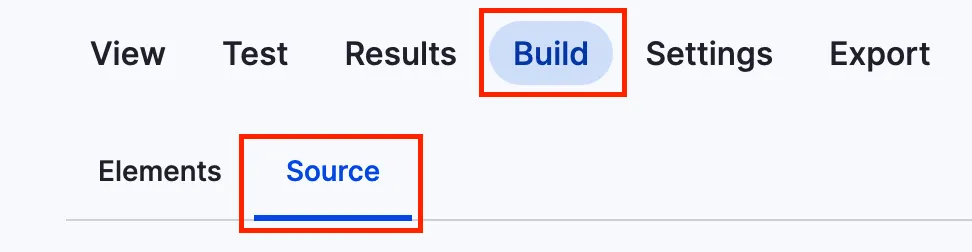
You can add headlines to a webform using the code below. To get to the source section, navigate to the form you want to alter, click on build and then on the source tab like in the screenshot.

Screenshot of the menu to add code to webform

This is just a short example on how to add a headline.

personal_data:
  '#type': html_tag
  '#tag': h3
  '#value': 'Personal data'

It will look something like this:

Headline within a webform

Issue:

You want to insert headings or other text elements into a web form, e.g. to subdivide it for better readability and/or understandability.

Solution:

Use a structured data format to define HTML elements that add the headline "Personal Data" to a web form.

13.11.2025 | Peter Majmesku

Autowire services with the Autowire attribute in Drupal

If dependencies are injected into a service class, changes must be made in both the `*.services.yml` file and the PHP class itself.

<?php

declare(strict_types=1);

namespace Drupal\my_module;

use Drupal\Core\Session\AccountInterface;
use Symfony\Component\DependencyInjection\Attribute\Autowire;

class Example {

  public function __construct(
    #[Autowire(service: 'current_user')]
    private readonly AccountInterface $currentUser,
  ) {
  }

  public function getCurrentUser(): AccountInterface {
    return $this->currentUser;
  }

}
services:
  my_module.example:
    class: Drupal\my_module\Service\Example
    autowire: true
  Drupal\my_module\Service\Example: '@my_module.example'

Issue: 

If dependencies are injected into a service class, changes must be made in both the `*.services.yml` file and the PHP class itself.

Solution:

If we set autowiring to true in the *.services.yml file, we can use the Autowire attribute in our PHP service class. This allows us to focus on the service class itself without having to switch between the *.services.yml file and the PHP service class.

13.11.2025 | Marc Hitscherich

Simple domain redirect in Kubernetes with nginx ingress

You want to establish a redirect from an old domain of a client to their new domain but the certificate should remain the same, supporting all URI arguments

apiVersion: networking.k8s.io/v1
kind: Ingress
metadata:
  name: old-domain-redirect
  namespace: my-namespace
  annotations:
    cert-manager.io/cluster-issuer: letsencrypt
    nginx.ingress.kubernetes.io/permanent-redirect: https://new-domain.com$request_uri
    nginx.ingress.kubernetes.io/ssl-redirect: 'true'
    nginx.ingress.kubernetes.io/rewrite-target: /
spec:
  rules:
  - host: old-domain.com
  tls:
  - hosts:
    - old-domain.com
    secretName: old-domain.com-cert

Issue:

You want to establish a redirect from an old domain of a client to their new domain but the certificate should remain the same, supporting all URI arguments

Prerequisites:

This only works for kubernetes / K8S and nginx ingress based infrastructure environments.

Solution:

Use the snippet provided.

13.11.2025 | Mathias Grab

How to create local task links

You want to create a local task link with a specific custom route.

my_module.my_local_task_link:
  route_name: my_module.custom_route
  title: "Title"
  base_route: route_where.local_task.should_be_placed

Issue:

You want to create a local task link with a specific custom route.

Solution:

To create a local task link, define it in my_module.local.task.yml, optionally accompanied by my_module.routing.yml and MyCustomController.php. Alternatively, you can use existing routes, specifying route_name as the target of the link and base_route as the location where the link should appear.
 

Explanations for the most important properties in yml files

my.module.links.task.yml

yml propertyDescription
my_module.my_local_task_linkMachine name of the link.
route_nameThe route the link leads to.
titleHuman readable title of the link. Is shown on buttons or menu links.
base_routeBase route where the link is placed on.

my_module.routing.yml

yml propertyDescription
my_module.custom_routeMachine name of the registered route.
pathPath in URL.
defaultsDefault values for the upcoming properties.
_controllerNamespace of the controller that handles the logic when the route is accessed.
_titleHuman readable title of the route.
requirementsRequirements that must be met to access the route.
_permissionPermission that must be fulfilled to access the route. 

See the official Drupal documentation for further in-depth information.