Direkt zum Inhalt

Devbits

Kleine Code-Schnipsel aus unserem Alltag mit Drupal, PHP und DevOps: Problem, Lösung, Code.

11.11.2026 | Pascal Crott

Provide content translation language block limited to available translations

Language blocks always show all languages but you only want to show the ones which content translations exist for.

<?php

namespace Drupal\content_translation_language_block\Plugin\Block;

use Drupal\Core\Block\Attribute\Block;
use Drupal\Core\Plugin\ContainerFactoryPluginInterface;
use Drupal\Core\Plugin\Context\ContextDefinition;
use Drupal\Core\StringTranslation\TranslatableMarkup;
use Drupal\language\Plugin\Block\LanguageBlock;
use Drupal\language\Plugin\Derivative\LanguageBlock as LanguageBlockDeriver;

/**
 * Provides a 'Content translation language switcher' block.
 */
#[Block(
  id: "content_translation_language_block",
  admin_label: new TranslatableMarkup("Language switcher"),
  category: new TranslatableMarkup("Content translation"),
  context_definitions: [
    "entity" => new ContextDefinition("entity",
      label: new TranslatableMarkup("Entity"),
      required: TRUE
    ),
  ],
  deriver: LanguageBlockDeriver::class
)]
class ContentTranslationLanguageBlock extends LanguageBlock implements ContainerFactoryPluginInterface {

  /**
   * {@inheritdoc}
   */
  public function build() {
    $build = parent::build();
    if ($entity = $this->getContextValue('entity')) {
      foreach ($build['#links'] as $langcode => $link) {
        if (!$entity->hasTranslation($langcode)) {
          unset($build['#links'][$langcode]);
        }
      }
      if (count($build['#links']) < 2) {
        unset($build['#links']);
      }
    }


    return $build;
  }

}

Issue:

Language blocks always show all languages but you only want to show the ones which content translations exist for.

Prerequisites:

  • You need to be in the context of a translatable content entity.
  • We make use of the Entity Route Context module which needs to be installed.

Solution:

Extend the Core plugin using the provided copy-and-paste snippet.

The snippet checks whether the current entity has translations. If any are found, the language options are reduced to those for which a translation exists.

08.10.2026 | Michael Ebert

Filter user entity reference field options to active users only

In a Drupal entity reference field configured to reference user accounts, the select list currently includes all users, including blocked or deactivated accounts.

Option 1 (recommended): custom entity reference selection handler. Further options down below.

<?php

namespace Drupal\my_module\Plugin\EntityReferenceSelection;

use Drupal\Core\Entity\Plugin\EntityReferenceSelection\UserSelction;
use Drupal\Core\StringTranslation\TranslatableMarkup;

#[EntityReferenceSelection(
  id: "default:active_user",
  label: new TranslatableMarkup("User selection (only active users)"),
  entity_types: ["user"],
  group: "default",
  weight: 1
)]
class ActiveUserSelection extends UserSelection {

  /**
   * {@inheritdoc}
   */
  protected function buildEntityQuery($match = NULL, $match_operator = 'CONTAINS') {
    $query = parent::buildEntityQuery($match, $match_operator);
    $query->condition('status', 1);

    return $query;
  }

}

After implementing that plugin, you need to activate it on the entity form display for the field you want it.

Issue:

In a Drupal entity reference field configured to reference user accounts, the select list currently includes all users, including blocked or deactivated accounts.

Expected behavior: only active users should be available for selection by default, or there should be a configurable option to exclude inactive accounts from the reference field results.

Solution:

See the three examples described above.

Option 1 (custom Selection handler, see above)

The best general-purpose solution. It uses the exact extension point Drupal designed for this problem, is scoped precisely to the fields where you assign it, is trivially unit/kernel-testable, and doesn't rely on fragile internals like query tags and metadata that can silently break across core updates.

Option 2: Query tag alter

Avoid this unless you have a very narrow, temporary need and full control over exactly which query is being altered. It's the least robust of the three and the easiest to get wrong (over-broad conditions affecting unrelated queries, or under-broad checks that silently stop working after a core update).

/**
 * Implements hook_entity_query_tag__TAG_alter().
 */
function my_module_entity_query_tag__entity_reference_alter(QueryInterface $query) {
  $handler = $query->getMetadata('entity_reference_selection_handler');

  if (!$handler) {
    return;
  }

  $configuration = $handler->getConfiguration();

  if (($configuration['target_type'] ?? NULL) !== 'user') {
    return;
  }

  // Filter for active users only.
  $query->condition('status', 1);
}

Option 3: entity reference view display

  1. Edit your Entity Reference field and select "Views: Filter by an entity reference view" as the reference method.
  2. Create or select a View that displays only the entities you want to show. Configure filters, sorting, and fields as needed.

The View's filters automatically control which options appear in the dropdown. No custom code required – it's all configured through the UI.

This can be chosen if (sitebuilders/editors need to have permissions to edit the view and maybe there is a config_ignore for that to prevent overrides during deployments):

  • Site builders/editors need to tweak the filtering criteria without a deployment (e.g., "also exclude role X" added later via UI), or
  • You need additional Views features (exposed filters, sorting by last login, relationships to other entities) in the same selection.
06.08.2026 | Lothar Ferreira Neumann

Change custom text field sizes in Gin Backend Theme using Asset Injector

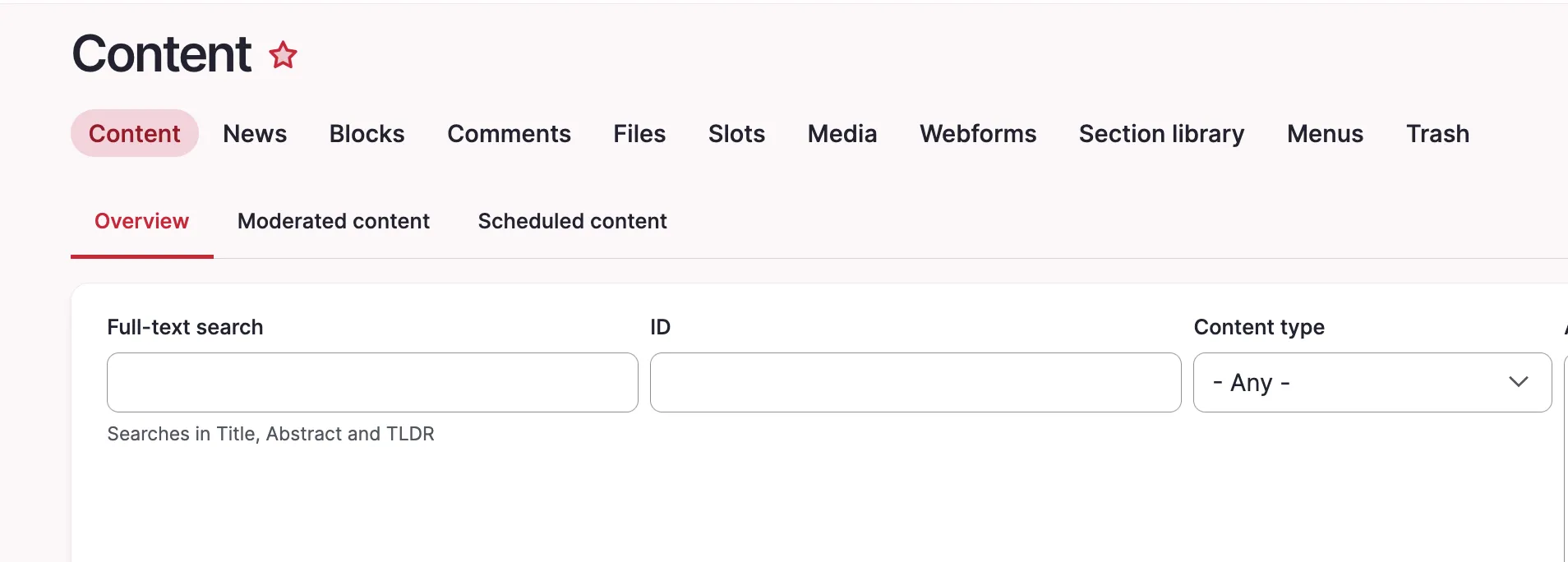
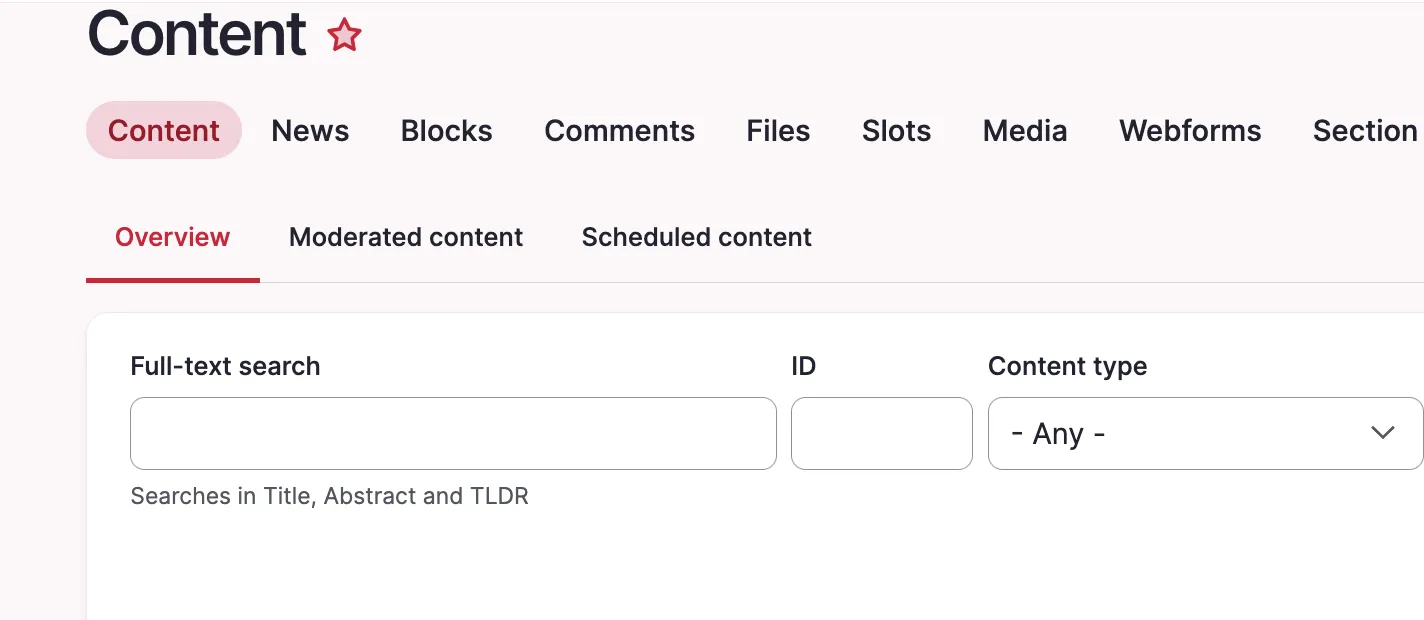
A custom text input field might appear too large in Gin. Our example uses an ID field which will usually never be filled with more than ~7 characters.

To alter the node ID field (nid) of our content view we add this to the file:

/* Views exposed filter: appropriate field widths */
.views-exposed-form #edit-nid {
  max-width: 10ch;
}

Issue:

A custom text input field might appear too large in Gin. Our example uses an ID field which will usually never be filled with more than ~7 characters.

Prerequisites:

Our solution uses the Asset Injector module. This module can be useful for small additions to backend theming. However, there may be cleaner solutions to this, e.g. extending Gin for your project with some custom CSS, defining a custom field type, and more. 

Solution:

Adjust the width of specific Views exposed filter fields using CSS through Asset Injection. This keeps short numeric fields like Node ID compact and improves the layout of the exposed filter form. We are using the Gin backend theme in this example. You can access the asset injector for Gin here:
/admin/config/development/asset-injector/css/gin

Please note:

Don't use Asset Injector for altering a frontend theme.

Before:

Screenshot of the content view with long nid field.

After:

Content view with short nid field

Quick note how to get the right ID for the CSS file, in our case #edit-nid:

The ID of the field is shown in the inspector

16.07.2026 | Lothar Ferreira Neumann

How to translate the Maxlength Countdown message label globally

When enabling the soft or hard character limit for a field using the Maxlength module, the module writes a default label into the field widget configuration. Because the label string is written directly into configuration, the fallback string logic is never used. As a result, the label cannot be…

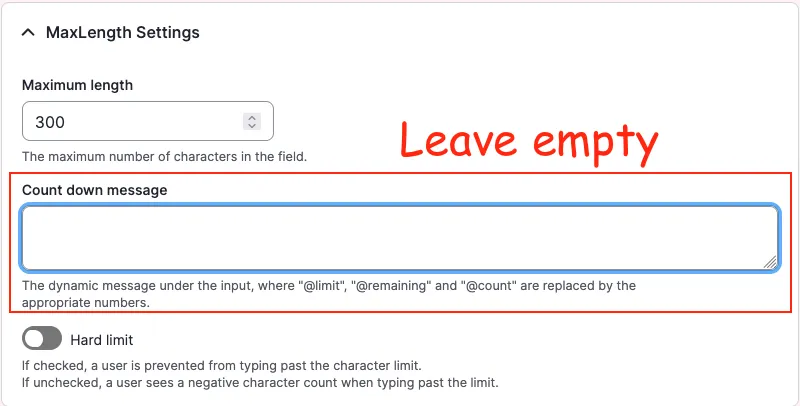
A Drupal backend screenshot showing the "Count down message" field

Example configuration created by enabling Maxlength:

# ...
content:
  field_copyright:
    type: text_textarea
    weight: 3
    region: content
    settings:
      rows: 2
      placeholder: ''
    third_party_settings:
      allowed_formats:
        hide_help: '1'
        hide_guidelines: '1'
      maxlength:
        maxlength_js: null
        maxlength_js_label: 'Content limited to @limit characters, remaining: <strong>@remaining</strong>'
        maxlength_js_enforce: false
# ...

However, the module already contains fallback logic for this label in maxlength.module: 

$maxlength_js_label = !empty($thirdPartySettings['maxlength']['maxlength_js_label']) ? $thirdPartySettings['maxlength']['maxlength_js_label'] : t('Content limited to @limit characters, remaining: <strong>@remaining</strong>');
$maxlength_js = $thirdPartySettings['maxlength']['maxlength_js'];

Working configuration: empty the label

# ...
content:
  field_copyright:
    type: text_textarea
    weight: 3
    region: content
    settings:
      rows: 2
      placeholder: ''
    third_party_settings:
      allowed_formats:
        hide_help: '1'
        hide_guidelines: '1'
      maxlength:
        maxlength_js: null
        maxlength_js_label: ''
        maxlength_js_enforce: false
# ...

With the label empty, the module falls back to its internal t() string, which can then be translated normally via the interface translation system.

Issue:

When enabling the soft or hard character limit for a field using the Maxlength module, the module writes a default label into the field widget configuration. Because the label string is written directly into configuration, the fallback string logic is never used. As a result, the label cannot be translated through the Interface Translation system, since Drupal treats it as configuration rather than a translatable interface string.

Solution:

To allow translating the countdown string via the Drupal interface translation, the label must be removed from the configuration so the module fallback is used instead.

  • There is alrady a fix for this problem for the maxlength module on drupal.org.

09.07.2026 | Michael Ebert

Install comment_notify module to have an easy solution to subscribe/unsubscribe to nodes like a forum topic.

You want to get informed about updates on nodes like forum topics and need an easy solution to subscribe to it.

Installation with composer:

composer require 'drupal/comment_notify'

Enable with drush:

drush pm:install comment_notify

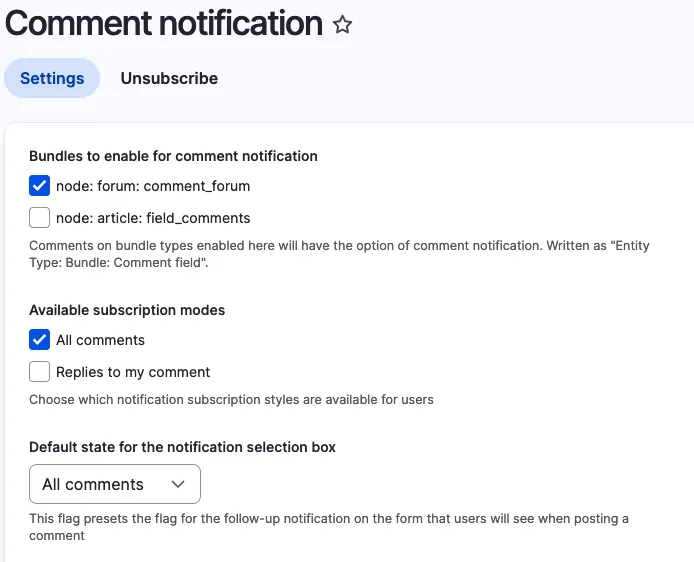
Configure it under ../admin/config/people/comment_notify.
Select the Bundle on that you want to enable it. Chose "All Comments" under availible subscription modes and set it as default state. 
 

Comment Notify Configuration

Issue:

You want to get informed about updates on nodes like forum topics and need an easy solution to subscribe to it. 

Solution:

During research we found the comment_notify module.

Conclusion:

Install the module, enable it, configure it. Thats it.

22.06.2026 | Pascal Crott

Gin: Make use of the simple table

Gin per default enhances all tables to use sticky headers and other goodies. But sometimes you just want to have a simple table without the enhancements.

<?php

/**
 * Implements hook_theme_suggestions_HOOK_alter() for table.
 */
function hook_theme_suggestions_table_alter(array &$suggestions, array $variables): void {
  if (empty($variables['attributes']['class'])) {
    return;
  }

  if (is_array($variables['attributes']['class']) && in_array('ief-entity-table', $variables['attributes']['class'])) {
    $suggestions[] = 'table__simple';
  }
}

Issue:

Gin per default enhances all tables to use sticky headers and other goodies. But sometimes you just want to have a simple table without the enhancements.

Solution:

There is a "table--simple" template provided by Gin which you can make use of by defining the theme suggestion for your table. In this example we use simple tables for inline entity form tables, since those are complex tables which don't always work together smoothly with gin tables.

22.06.2026 | Mathias Grab

How to enable Twig debug in Drupal

You work with Twig templates and need to use the debugger.

parameters:
  twig.config:
    debug: true
    auto_reload: null
    cache: false

Issue:

You work with Twig templates and need to use the debugger.

Solution:

Code solution:
Enable Twig debug by copying the snippet provided from root/web/sites/default.services.yml into root/web/sites/development.services.yml

See also: Drupal Docs on Twig

Sitebuilding solution:
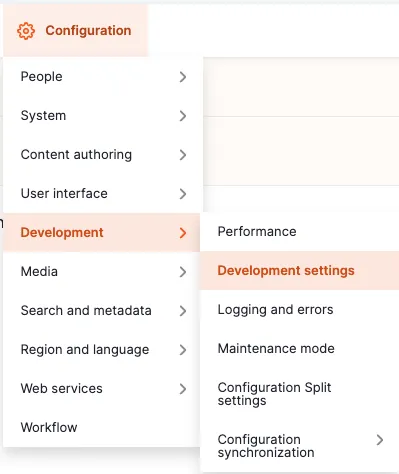
Navigate to the administrative area via the admin toolbar to Configuration -> Development -> Development settings or via the path /admin/config/development/settings
 

Enabling twig debug 1


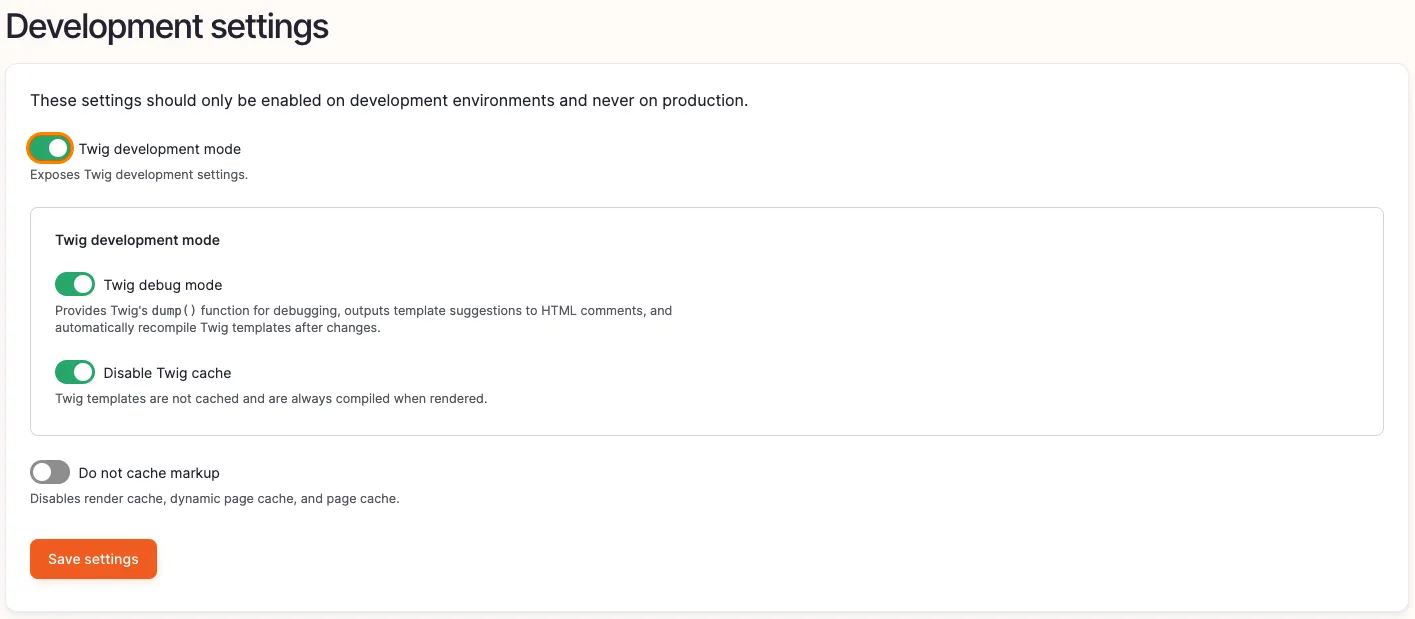
Enable the checkbox Twig development mode, as well as Twig debug mode and Disable Twig cache.
 

Enabling twig debug 3

For further information regarding Drupal and Twig take a look at  https://www.drupal.org/docs/develop/theming-drupal/twig-in-drupal/debugging-twig-templates

Info

This should only be used for local development environments but disabled in production.

02.04.2026 | Michael Ebert

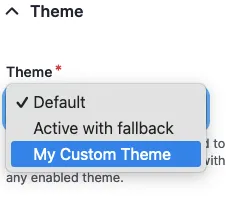
Set a custom theme to be used by Symfony Mailer

You have multiple themes enabled in your drupal page and need to select the theme that includes custom templates for send emails.

configuration:
  email_theme:
    theme: my_custom_theme

Prerequisite:

Installed and enabled the Symfony Mailer module.

Issue:

You have multiple themes enabled in your drupal page and need to select the theme that includes custom templates for send emails.

Solution:

Configure Symfony Mailer to use templates coming from your custom theme.

Go to `/admin/config/system/mailer` and edit the policy. There you can switch the theme that is used for sending your e-mails.

Symfony Mailer Policy Configuration

24.02.2026 | Lothar Ferreira Neumann

Hide a view if it yields no results

Displaying a view (a list of content) that has no items can be unnecessary if there is no need for a "no results" option. Views that are being hidden when empty can be useful for rich landing pages that aim to provide lots of relevant, additional recent content teasers to the user. However, there…

22.01.2026 | Michael Ebert

Set default access permissions for some roles in VAPN module

You installed the Views access per node (VAPN) module and activated it on node bundles from type 'my_bundle'. By default, no one except admin has now access to the nodes anymore. (If you are upgrading VAPN from earlier versions, this happens only to nodes that dont have any rolle assigned).

use Drupal\Core\Form\FormStateInterface;

function my_module_form_alter(&$form, FormStateInterface $form_state, $form_id) {
  // Add default values for vapn module so the editor don't need to check this.
  if (isset($form['vapn']) && $form_state->getFormObject()->getEntity()->isNew()) {
    $form['vapn']['content']['widget']['#default_value'] = ['anonymous', 'authenticated'];
  }
}
use Drupal\node\Entity\Node;

function my_module_deploy_vapn_install() {
  $entity_type_manager = \Drupal::service('entity_type.manager');
  $role_storage = $entity_type_manager->getStorage('user_role');
  $node_storage = $entity_type_manager->getStorage('node');
  $nodes = $node_storage->loadByProperties([
    'type' => 'my_bundle'
  ]);

  $roles = array_values($role_storage->loadMultiple(['anonymous', 'authenticated']));
  foreach ($nodes as $node) {
    // First check if already some roles are set. Only needed if you are upgrading vapn.
    if ($node->vapn->isEmpty()) {
      $node->setSyncing(TRUE)
        ->set('vapn', $roles)
        ->save();
    }
  }
}

Issue:

You installed the Views access per node (VAPN) module and activated it on node bundles from type 'my_bundle'. By default, no one except admin has now access to the nodes anymore. (If you are upgrading VAPN from earlier versions, this happens only to nodes that dont have any rolle assigned).

But you would like the restrictions to be "opt-in". By default everything should be accessible and only certain bits of content shall be restricted.

Prerequisites:

Solution:

  1. Alter forms that are enabled for vapn and set "anonymous" and "authenticated" as the default for new nodes.
  2. Implement a deploy hook that sets these permissions as a default to all exsting nodes - if no roles already assigned - in my case only from type "my_bundle".

13.11.2025 | Lothar Ferreira Neumann

How to place HTML elements into webforms via the Source tab

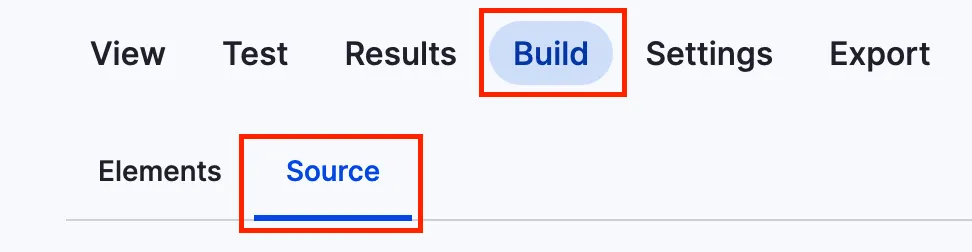
You want to insert headings or other text elements into a web form, e.g. to subdivide it for better readability and/or understandability.

You can add headlines to a webform using the code below. To get to the source section, navigate to the form you want to alter, click on build and then on the source tab like in the screenshot.

Screenshot of the menu to add code to webform

This is just a short example on how to add a headline.

personal_data:
  '#type': html_tag
  '#tag': h3
  '#value': 'Personal data'

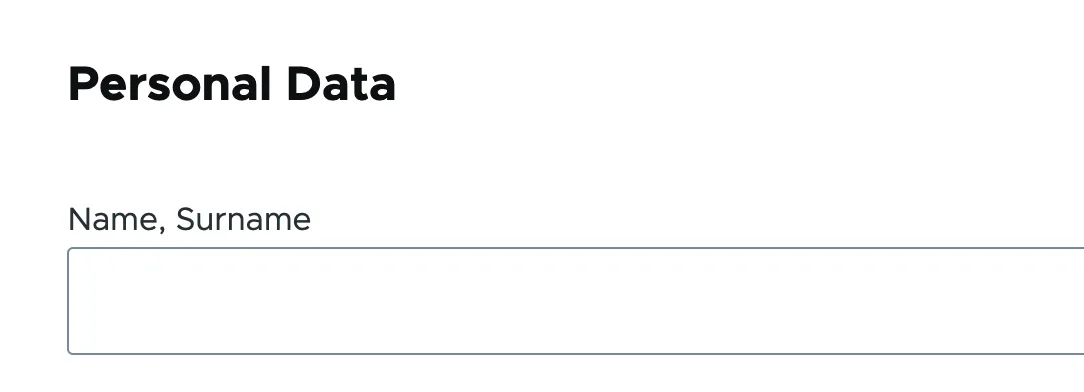
It will look something like this:

Headline within a webform

Issue:

You want to insert headings or other text elements into a web form, e.g. to subdivide it for better readability and/or understandability.

Solution:

Use a structured data format to define HTML elements that add the headline "Personal Data" to a web form.

13.11.2025 | Lothar Ferreira Neumann

Set the homepage for anonymous users to login page

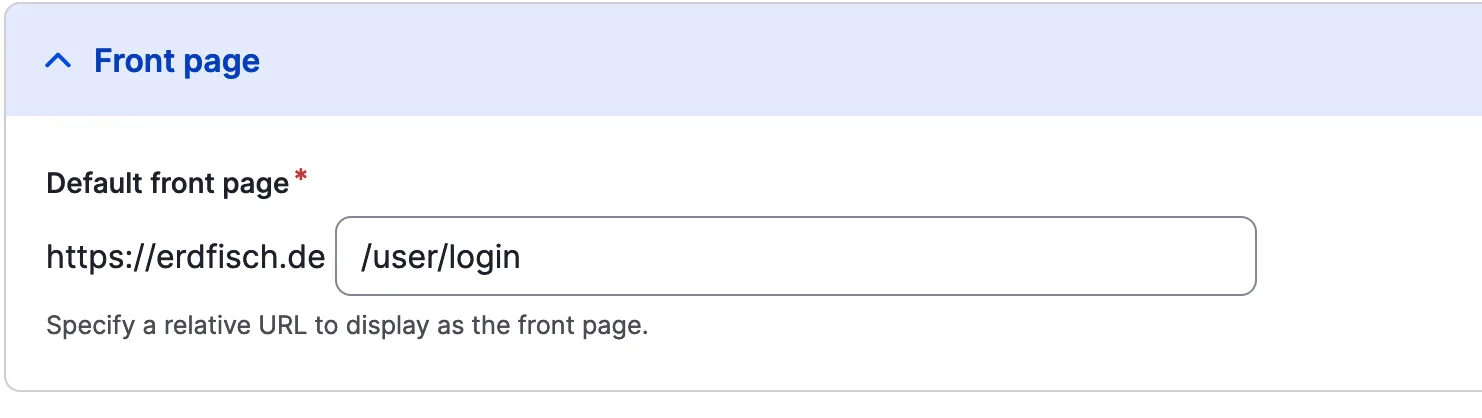
The homepage for visitors of your system should be the user login page (/user/login). This might make sense for logged-in only platforms and similar projects.

Access front page setting here: /admin/config/system/site-information

Set home page to user login
page:
  front: /user/login

Issue:

The homepage for visitors of your system should be the user login page (/user/login). This might make sense for logged-in only platforms and similar projects.

Solution:

Add /user/login in the `system.site.yml` to manipulate the front page.

13.11.2025 | Peter Gerken

Open all HTML details elements via browser console

You are on a page which has a large amount of HTML details elements, for instance translations, and you need to find a certain bit of information by searching the page.

let details = document.getElementsByTagName('details');
for (i = 0; i < details.length; ++i) {
  details.item(i).open = true;
}

Issue:

You are on a page which has a large amount of HTML details elements, for instance translations, and you need to find a certain bit of information by searching the page.

Solution:

The provided snippet opens all details on a page. This can be copy-and-pasted to the browser console to easily access all the fields hidden behind the nested details.

13.11.2025 | Pascal Crott

Prevent the user profile from being displayed in backend theme using RouteSubscriber

Authenticated users should never see the admin/backend theme in your websystem

<?php

namespace Drupal\scp_base\Routing;

use Drupal\Core\Routing\RouteSubscriberBase;
use Symfony\Component\Routing\RouteCollection;

class RouteSubscriber extends RouteSubscriberBase {

  /**
   * {@inheritdoc}
   */
  protected function alterRoutes(RouteCollection $collection) {
    // Make sure profile pages are not admin pages, in order to load the right
    // translation.
    if ($route = $collection->get('profile.user_page.single')) {
      $route->setOption('_admin_route', FALSE);
    }
  }

}

Issue:

Authenticated users should never see the admin/backend theme in your websystem

Prerequisites:

You need to have the profile module installed in your project.

Solution:

Paste the provided code snippet into your RouteSubscriber.php file.

13.11.2025 | Pascal Crott

Fix broken media previews

The error log is full of the warning "Warning: copy(public://media-icons/generic/generic.png)" and the media library shows no previews. This can happen when environments are set up based on a database dump and without properly transferring the files. The media icons are usually created during the…

drush php-eval "\Drupal::moduleHandler()->loadInclude('media', 'install');media_install();";

Issue:

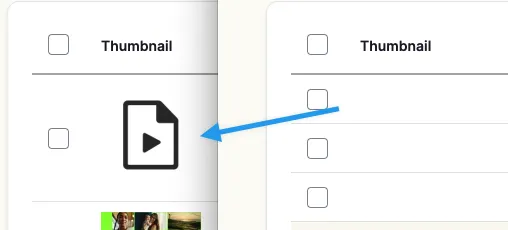
The error log is full of the warning "Warning: copy(public://media-icons/generic/generic.png)" and the media library shows no previews. This can happen when environments are set up based on a database dump and without properly transferring the files. The media icons are usually created during the installation of the media module, which will never happen in this scenario.

Devbit broken media preview icons

Solution:

Trigger the install hook of the Core Media module. It will take care of creating those files. Use the provided snippet.

See also https://www.drupal.org/project/drupal/issues/3060509