16.07.2026 | Lothar Ferreira Neumann
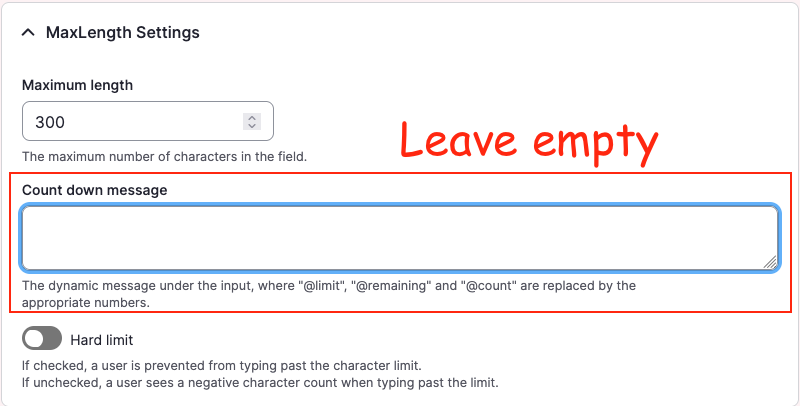
Example configuration created by enabling Maxlength:
core.entity_form_display.node.article_not_translatable.default.yml
# ...
content:
  field_copyright:
    type: text_textarea
    weight: 3
    region: content
    settings:
      rows: 2
      placeholder: ''
    third_party_settings:
      allowed_formats:
        hide_help: '1'
        hide_guidelines: '1'
      maxlength:
        maxlength_js: null
        maxlength_js_label: 'Content limited to @limit characters, remaining: <strong>@remaining</strong>'
        maxlength_js_enforce: false
# ...
However, the module already contains fallback logic for this label in maxlength.module:
maxlength.module
$maxlength_js_label = !empty($thirdPartySettings['maxlength']['maxlength_js_label']) ? $thirdPartySettings['maxlength']['maxlength_js_label'] : t('Content limited to @limit characters, remaining: <strong>@remaining</strong>');
$maxlength_js = $thirdPartySettings['maxlength']['maxlength_js'];
Working configuration: empty the label
core.entity_form_display.node.article_translatable.default.yml
# ...
content:
  field_copyright:
    type: text_textarea
    weight: 3
    region: content
    settings:
      rows: 2
      placeholder: ''
    third_party_settings:
      allowed_formats:
        hide_help: '1'
        hide_guidelines: '1'
      maxlength:
        maxlength_js: null
        maxlength_js_label: ''
        maxlength_js_enforce: false
# ...
With the label empty, the module falls back to its internal t() string, which can then be translated normally via the interface translation system.