Starting with Drupal 11.5, the .module file extension is deprecated. It will be no longer autoladed in Drupal 13. This means all functions inside this file have to move to classes and services, otherwise they stop running.
Old Implementation
<?php

/**
 * @file
 * Legacy procedural hooks – deprecated since Drupal 11.5.
 */

use Drupal\Core\Form\FormStateInterface;
use Drupal\node\NodeInterface;

/**
 * Implements hook_form_alter().
 */
function my_module_form_alter(array &$form, FormStateInterface $form_state, $form_id) {
  if ($form_id === 'user_login_form') {
    $form['#attributes']['class'][] = 'my-module-login';
  }
}

/**
 * Implements hook_ENTITY_TYPE_presave() for node entities.
 */
function my_module_node_presave(NodeInterface $node) {
  $node->setTitle(trim($node->getTitle()));
}
New Implementation
<?php

declare(strict_types=1);

namespace Drupal\my_module\Hook;

use Drupal\Core\Form\FormStateInterface;
use Drupal\Core\Hook\Attribute\Hook;
use Drupal\Core\Hook\Order\Order;
use Drupal\node\NodeInterface;

/**
 * Hook implementations for my_module.
 */
class MyModuleHooks {

  /**
   * Implements hook_form_alter().
   */
  #[Hook('form_alter', order: Order::Last)]
  public function formAlter(array &$form, FormStateInterface $form_state, string $form_id): void {
    if ($form_id === 'user_login_form') {
      $form['#attributes']['class'][] = 'my-module-login';
    }
  }

  /**
   * Implements hook_ENTITY_TYPE_presave() for node entities.
   */
  #[Hook('node_presave')]
  public function nodePresave(NodeInterface $node): void {
    $node->setTitle(trim($node->getTitle()));
  }

}
parameters:
  # All hooks are OOP now – tell core not to scan .module/.inc files.
  my_module.skip_procedural_hook_scan: true
Issue:
Starting with Drupal 11.5, the .module file extension is deprecated. It will be no longer autoladed in Drupal 13. This means all functions inside this file have to move to classes and services, otherwise they stop running.
As long as Core supports procedual hooks, it scans every .module or .inc files for hooks, which costs performance even when a module has nothing procedual left.
Prerequisites:
drupal ≥ 11.5
Solution:
Hook class: Any class in the Drupal\my_module\Hook namespace or its subdirectories is registered automatically as an autowired service, so no services.yml entry is needed. The #[Hook('...')] attribute defines which hook a method implements. One method can carry several #[Hook] attributes and an order parameter. To change hooks of other modules you can use #[RemoveHook] or #[ReorderHook].
Skip the scan: Once no more regular procedual hooks are left in our services.yml, we set my_module.skip_procedural_hook_scan: true so that Core is skipping parsing our modules .module or .inc files. Procedual hooks that are not #[LegacyHook] would not be found anymore.
Move remaining helper functions to services or methods on the hook class. If other projects call your public functions, keep them as deprecated wrappers that call the new service.
To help you upgrading your code for Drupal 13, there is a ddev script listed in the additional links section.
Extend the Core plugin using the provided copy-and-paste snippet.
The snippet checks whether the current entity has translations. If any are found, the language options are reduced to those for which a translation exists.
By default, git flow hotfix finish creates a release tag. Small fixes, such as config changes or typos, don't always need a new version, but they still need to land in main and develop.
By default, git flow hotfix finish creates a release tag. Small fixes, such as config changes or typos, don't always need a new version, but they still need to land in main and develop.
Prerequisites:
git-flow (AVH Edition) is installed and the repository is initialized with git flow init. Ensure that your local main and develop branches are up to date.
Solution:
The -n (--notag) flag finishes the hotfix without creating a tag. The hotfix branch is merged into main and develop and then deleted. The -p (--push) flag then pushes main and develop to origin.
You have created a custom Drupal configuration form but no Translate tab appears when you access it.
The config_translation module automatically derives the Translate tab from the configuration mapper. However, Drupal only renders the local task (tab) navigation when there are at least two tabs on the same level. Since the Translate tab is the only local task available, Drupal does not display the tab navigation, causing the Translate tab to remain hidden.
Prerequisites:
You have the config_translations module enabled.
Solution:
Drupal Core solves the issue for settings forms by providing a default tab. We apply the same approach in our module by adding a default local task, which allows Drupal to render the tab navigation and display the Translate tab.
In many editor or form workflows fields need to be prefilled (for example based on a selected entity or computed data) without overwriting input the user may have already entered.
<?php

declare(strict_types=1);

namespace Drupal\my_module\Ajax;

use Drupal\Core\Ajax\CommandInterface;

/**
 * Ajax command: fill empty form elements with a predefined value.
 *
 * This command targets one or more form elements via a CSS selector and sets
 * their value only if the current value is empty (after trimming).
 *
 * The command also triggers `input` and `change` events so Drupal behaviors and
 * other listeners react as if the user entered the value manually.
 */
final class SetValueIfEmptyCommand implements CommandInterface {

  /**
   * The Ajax command name used by Drupal.AjaxCommands.
   */
  public const COMMAND = 'setValueIfEmpty';

  /**
   * Default selector used when none is provided.
   */
  public const DEFAULT_SELECTOR = '[data-my-fill-target]';

  /**
   * Creates a command instance.
   *
   * @param string $fillValue
   *   The value to set when the target element is empty.
   * @param string|null $targetSelector
   *   CSS selector for the target elements. If omitted, DEFAULT_SELECTOR is used.
   */
  public function __construct(
    protected string $fillValue,
    protected ?string $targetSelector = null,
  ) {}

  /**
   * {@inheritdoc}
   */
  public function render(): array {
    return [
      'command' => self::COMMAND,
      'selector' => $this->targetSelector ?? self::DEFAULT_SELECTOR,
      'value' => $this->fillValue,
    ];
  }

}
/**
 * @file Field empty check.
 */
(function (Drupal) {
  'use strict';

  Drupal.AjaxCommands.prototype.setValueIfEmpty = function (ajax, response) {
    const targetSelector = response && response.selector ? response.selector : '';
    const fillValue = response && typeof response.value === 'string' ? response.value : '';

    if (!targetSelector) {
      return;
    }

    const elements = document.querySelectorAll(targetSelector);
    for (const element of elements) {
      let currentValue = '';

      if (typeof element.value === 'string') {
        currentValue = element.value.trim();
      }
      else if (element.isContentEditable) {
        currentValue = (element.textContent || '').trim();
      }

      if (currentValue !== '') {
        continue;
      }

      if (typeof element.value === 'string') {
        element.value = fillValue;
      }
      else if (element.isContentEditable) {
        element.textContent = fillValue;
      }
      else {
        continue;
      }

      element.dispatchEvent(new Event('input', { bubbles: true }));
      element.dispatchEvent(new Event('change', { bubbles: true }));
    }
  };

})(Drupal);
use Drupal\Core\Ajax\AjaxResponse;
use Drupal\my_module\Ajax\SetValueIfEmptyCommand;

$response = new AjaxResponse();

// Example: fill a media name field if it's empty.
$fill_value = 'foo-bar';

// Selector for a specific element in this use-case.
$target_selector = '[data-drupal-selector$="my_field"]';

$response->addAttachments([
  'library' => [
    'my_module/set_value_if_empty',
  ],
]);

$response->addCommand(new SetValueIfEmptyCommand($fill_value, $target_selector));

return $response;
Issue
In many editor or form workflows fields need to be prefilled (for example based on a selected entity or computed data) without overwriting input the user may have already entered.
Built-in AJAX setters such as InvokeCommand('val') always assign values unconditionally. When an AJAX update happens after the user started typing, this can unintentionally replace user-provided content.
Prerequisites
This approach only works when executed within an AJAX callback returning an AjaxResponse.
Solution
Use a lightweight custom AJAX command that runs in the browser and checks the current value of the target element(s). The command sets the provided value only if the field is empty (after trimming).
The server supplies the selector and value while the client performs the final emptiness check and applies the update conditionally, preventing accidental overwrites of user input.
The single_value plugin is necessary since the skip_on_empty plugin doesn't work with an empty array properly. See Issue: https://www.drupal.org/project/drupal/issues/3239410
Managing dependencies in a Drupal project where certain modules may not be compatible with the Core version you are using.
# Get lenient.
composer require mglaman/composer-drupal-lenient

# Add the module to the allow list. Use escapes for the quote signs. \" ... \"
composer config --merge --json extra.drupal-lenient.allowed-list '[\"drupal/module_with_incompatible_core_version\"]'

# You can check if the merge worked, either just take a look
# into the composer.json or use this command.
composer config --merge --json extra.drupal-lenient.allowed-list
Managing dependencies in a Drupal project where certain modules may not be compatible with the Core version you are using.
Prerequisites:
Your project needs to be Composer managed.
Solution:
The code uses the mglaman/composer-drupal-lenient package to allow specific Drupal modules that are incompatible with the core version to be installed without causing version conflicts.
In a Drupal entity reference field configured to reference user accounts, the select list currently includes all users, including blocked or deactivated accounts.
Option 1 (recommended): custom entity reference selection handler. Further options down below.
<?php

namespace Drupal\my_module\Plugin\EntityReferenceSelection;

use Drupal\Core\Entity\Plugin\EntityReferenceSelection\UserSelction;
use Drupal\Core\StringTranslation\TranslatableMarkup;

#[EntityReferenceSelection(
  id: "default:active_user",
  label: new TranslatableMarkup("User selection (only active users)"),
  entity_types: ["user"],
  group: "default",
  weight: 1
)]
class ActiveUserSelection extends UserSelection {

  /**
   * {@inheritdoc}
   */
  protected function buildEntityQuery($match = NULL, $match_operator = 'CONTAINS') {
    $query = parent::buildEntityQuery($match, $match_operator);
    $query->condition('status', 1);

    return $query;
  }

}
After implementing that plugin, you need to activate it on the entity form display for the field you want it.
Issue:
In a Drupal entity reference field configured to reference user accounts, the select list currently includes all users, including blocked or deactivated accounts.
Expected behavior: only active users should be available for selection by default, or there should be a configurable option to exclude inactive accounts from the reference field results.
Solution:
See the three examples described above.
Option 1 (custom Selection handler, see above)
The best general-purpose solution. It uses the exact extension point Drupal designed for this problem, is scoped precisely to the fields where you assign it, is trivially unit/kernel-testable, and doesn't rely on fragile internals like query tags and metadata that can silently break across core updates.
Option 2: Query tag alter
Avoid this unless you have a very narrow, temporary need and full control over exactly which query is being altered. It's the least robust of the three and the easiest to get wrong (over-broad conditions affecting unrelated queries, or under-broad checks that silently stop working after a core update).
/**
 * Implements hook_entity_query_tag__TAG_alter().
 */
function my_module_entity_query_tag__entity_reference_alter(QueryInterface $query) {
  $handler = $query->getMetadata('entity_reference_selection_handler');

  if (!$handler) {
    return;
  }

  $configuration = $handler->getConfiguration();

  if (($configuration['target_type'] ?? NULL) !== 'user') {
    return;
  }

  // Filter for active users only.
  $query->condition('status', 1);
}
Option 3: entity reference view display
Edit your Entity Reference field and select "Views: Filter by an entity reference view" as the reference method.
Create or select a View that displays only the entities you want to show. Configure filters, sorting, and fields as needed.
The View's filters automatically control which options appear in the dropdown. No custom code required – it's all configured through the UI.
This can be chosen if (sitebuilders/editors need to have permissions to edit the view and maybe there is a config_ignore for that to prevent overrides during deployments):
Site builders/editors need to tweak the filtering criteria without a deployment (e.g., "also exclude role X" added later via UI), or
You need additional Views features (exposed filters, sorting by last login, relationships to other entities) in the same selection.
Handling a situation where a function might return an error since it returns NULL.
/**
 * Retrieves the name of a role based on its ID.
 *
 * @param string $role_id
 *   The ID of the role to retrieve.
 *
 * @return string|null
 *   The name of the role if it exists, or NULL if the role is not found.
 */
public function getRoleName(string $role_id): ?string {
  // Example roles array.
  $roles = [
    'admin' => 'Administrator',
    'editor' => 'Content Editor',
    'viewer' => 'Viewer',
  ];

  // Use the null coalescing operator to return the role name or null.
  return $roles[$role_id] ?? NULL;
}
Issue:
Handling a situation where a function might return an error since it returns NULL.
Solution:
Utilizes the "?" in the definition of the return type.
You are registering a new route and would like it to be displayed using the administrative theme.
my_module.edit:
  options:
    # Enable the admin theme for this route.
    _admin_route: TRUE
Issue:
You are registering a new route and would like it to be displayed using the administrative theme.
Solution:
To enable the admin theme on your custom route, you can add it as option in your routing.yml file. But keep in mind that this will only work for users that have permission to use the admin theme!
A contrib module (in this example, Tagify) declares its JavaScript library with type: external, loading it from a third-party CDN such as cdnjs.cloudflare.com. However, for privacy and digital sovereignity reasons we want to reduce the amount of data potentially being exchanged with an external…
composer require npm-asset/yaireo--tagify:4.35.4
/**
 * Implements hook_library_info_alter().
 *
 * The tagify module loads Tagify from cdnjs.cloudflare.com. Serve it from
 * npm-asset/yaireo--tagify in /libraries instead, so no request reaches a
 * third party and the widget keeps working behind restrictive firewalls.
 */
function my_module_library_info_alter(array &$libraries, string $extension): void {
  if ($extension !== 'tagify') {
    return;
  }

  // Assigning replaces the CDN entries. The npm package ships an unminified
  // UMD build and no *.min.css; Drupal aggregates them either way.
  $libraries['tagify']['js'] = [
    '/libraries/yaireo--tagify/dist/tagify.js' => ['minified' => FALSE],
  ];
  $libraries['tagify']['css']['component'] = [
    '/libraries/yaireo--tagify/dist/tagify.css' => ['minified' => FALSE],
  ];
  $libraries['tagify_polyfils']['js'] = [
    '/libraries/yaireo--tagify/dist/tagify.polyfills.min.js' => ['minified' => TRUE],
  ];

  unset($libraries['tagify']['remote'], $libraries['tagify_polyfils']['remote']);
}
Issue
A contrib module (in this example, Tagify) declares its JavaScript library with type: external, loading it from a third-party CDN such as cdnjs.cloudflare.com. However, for privacy and digital sovereignity reasons we want to reduce the amount of data potentially being exchanged with an external provider like Cloudflare.
Prerequisites
Composer with the npm-asset repository configured, or composer/installers plus oomphinc/composer-installers-extender for asset packages
An affected contrib module (in this example, the Tagify module)
Solution
How to find external libraries? Check out this DevBit!
composer require npm-asset/yaireo--tagify:4.35.4 pulls the library from npm via the npm-asset Composer repository, placing it under /libraries where Drupal's library system expects locally vendored assets.
hook_library_info_alter() is the key mechanism that rewires the library definition without patching the contrib module. Reassigning $libraries['tagify']['js'] and ['css']['component'] replaces the CDN-hosted files with paths into /libraries/yaireo--tagify/dist/. Crucially, unset($libraries['tagify']['remote'], ...) removes the remote key – without this, Drupal still treats the library metadata as pointing to an external library, even though the file paths were changed.
Further information
Use the CDN fetcher module to automatically save external libraries in your Drupal project. This reduces the amount of externally loaded assets.
When using the merge function in Twig, the new element is appended to the array. However, we would like the new element to prepend the existing array.
{# The elements array we want to add a '0' to at the beginning. #}
{% set elements = ['1', '2', '3'] %}
{# Working: Merge elements to a new array and override the variable. The result will be ['0', '1', '2', '3']. #}
{% set elements = ['0']|merge(elements) %}
{# Not working: The result will be ['1', '2', '3', '0']. #}
{% set elements = elements|merge(['0']) %}
Issue:
When using the merge function in Twig, the new element is appended to the array. However, we would like the new element to prepend the existing array.
Solution:
Create a new array and append the original array to it.
When working with entities dynamically, the base field name of a specific entity key (e.g., the primary ID field) is not always known beforehand. Given only the entity type ID, the entity key needs to be determined dynamically.
When working with entities dynamically, the base field name of a specific entity key (e.g., the primary ID field) is not always known beforehand. Given only the entity type ID, the entity key needs to be determined dynamically.
Solution:
Load all base field definitions of the given entity type via entityTypeManager() and return the ID with the method getKey().
An ECA (Event-Condition-Action) model's config can end up referencing an event, condition, or action plugin ID that no longer exists on the current site, for example, after a submodule was uninstalled or after importing a config export from an environment with different ECA submodules enabled.…
// web/modules/contrib/eca/src/Entity/Eca.php (simplified excerpt)

protected function isValidationDisabled(): bool {
  return $this->request()->query->get('eca_validation', '') === 'off';
}

public function getPluginCollections(): array {
  if ($this->isValidationDisabled()) {
    return [];
  }
  // Otherwise every referenced event/condition/action plugin is
  // instantiated here, throwing PluginNotFoundException if one
  // of them no longer exists.
  ...
}
# Delete URL — load this directly, don't click through from a listing page
/admin/config/workflow/eca/{eca_id}/delete?eca_validation=off
Issue:
An ECA (Event-Condition-Action) model's config can end up referencing an event, condition, or action plugin ID that no longer exists on the current site, for example, after a submodule was uninstalled or after importing a config export from an environment with different ECA submodules enabled. Opening that model to edit or even delete it in the ECA admin UI (/admin/config/workflow/eca) throws Drupal\Component\Plugin\Exception\PluginNotFoundException: The "..." plugin does not exist. and lands on an error page. This happens because Drupal's entity form eagerly instantiates every plugin referenced in the model as soon as it builds the entity object - even on the delete-confirmation form, before anything is submitted.
Solution:
ECA already ships a way around this: Eca::getPluginCollections() checks Eca::isValidationDisabled() which reads the eca_validation query parameter off the current request. When it's off, plugin collections are skipped entirely, so no plugin gets instantiated and the exception never fires. Load the model's edit or delete URL with ?eca_validation=off appended directly in the address bar.
Drupal's FormBuilder copies the current request's query string into the form's #action, so the parameter survives the confirm-button POST too. The model can then be viewed, edited, or deleted cleanly, with zero code changes. Info: The parameter has to be on the URL you actually load. Clicking a normal link - e.g. the "Delete" link from the ECA listing page - navigates to a fresh URL without it, so the error still happens.
Paste the full URL with ?eca_validation=off into the address bar instead.
You want to show the status report inside your shell or terminal window instead of opening it in the browser, or if access to the status page is not possible for some reason.
drush core:requirements
Issue:
You want to show the status report inside your shell or terminal window instead of opening it in the browser, or if access to the status page is not possible for some reason.
Solution:
The Drush command in the snippet will show you the same output as the status report does (/admin/reports/status).
A standalone script – for example a monitoring, backup, or migration helper – needs direct database access without bootstrapping the full Drupal framework. Duplicating database credentials in the script is undesirable since they would need to be kept in sync with settings.php.
Solution:
The snippet provided allows PHP debugging. Use it to check whether your database connection works on PHP level.
The script includes settings.php directly, which populates the $databases array as Drupal itself does during bootstrap. Credentials are then read from $databases['default']['default'], avoiding hardcoded or duplicated connection details.
A PDO connection is built from these values. PDO::MYSQL_ATTR_SSL_VERIFY_SERVER_CERT => TRUE enforces SSL certificate verification on the connection – relevant when the database host requires or supports TLS, such as many managed hosting environments.
Since settings.php is plain PHP, including it outside of Drupal's bootstrap process only defines variables and does not require Drupal's autoloader or dependency injection container.
Sometimes you can't save entity_autocomplete fields when selecting to many items. This comes from the fact that the form element is technically based on the textfield element. This results in inheriting all of the textfield specific properties and behaviors and one of them is a maxlength which…
Sometimes you can't save entity_autocomplete fields when selecting to many items. This comes from the fact that the form element is technically based on the textfield element. This results in inheriting all of the textfield specific properties and behaviors and one of them is a maxlength which limits the text input to 128 characters.
Solution:
To fix this, increase the maxlength value for your autocomplete field.
You want to have a coloured output of a var_dump() or your stack trace when debugging with XDebug.
// Default, only plaintext.
xdebug.cli_color=0
// Coloured if your terminal will support it.
xdebug.cli_color=1
// Forced coloured output.
xdebug.cli_color=2
Prerequisite:
You have a setup runnig with PHP XDebug (>= version 2.2) enabled.
Issue:
You want to have a coloured output of a var_dump() or your stack trace when debugging with XDebug.
Solution:
You can enable coloured output of XDebug in your `php.ini` settings.
In mode 1 it tries to automatically detect if your terminal will support it. In mode 2 it will force coloured output, but if your terminal does not support syntax highlighting it might occur that you see some escaped code.
For more information about the settings of XDebug please consider the official XDebug documentation on xdebug.org.
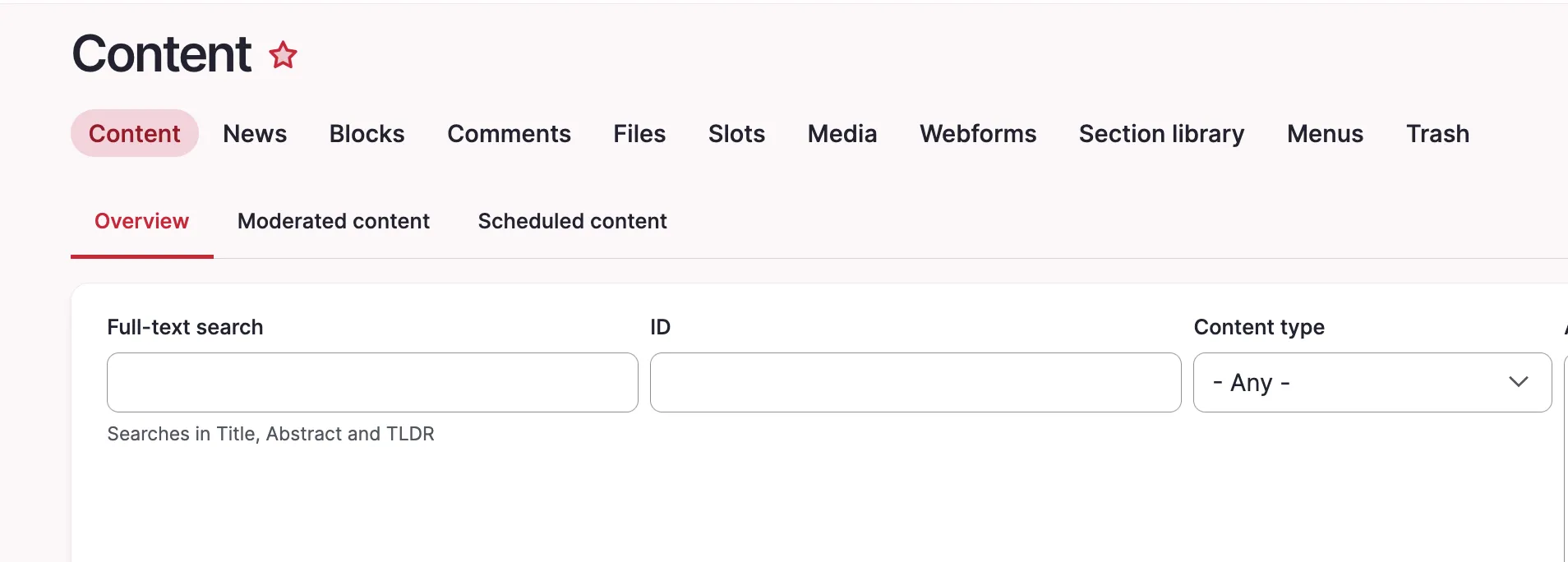
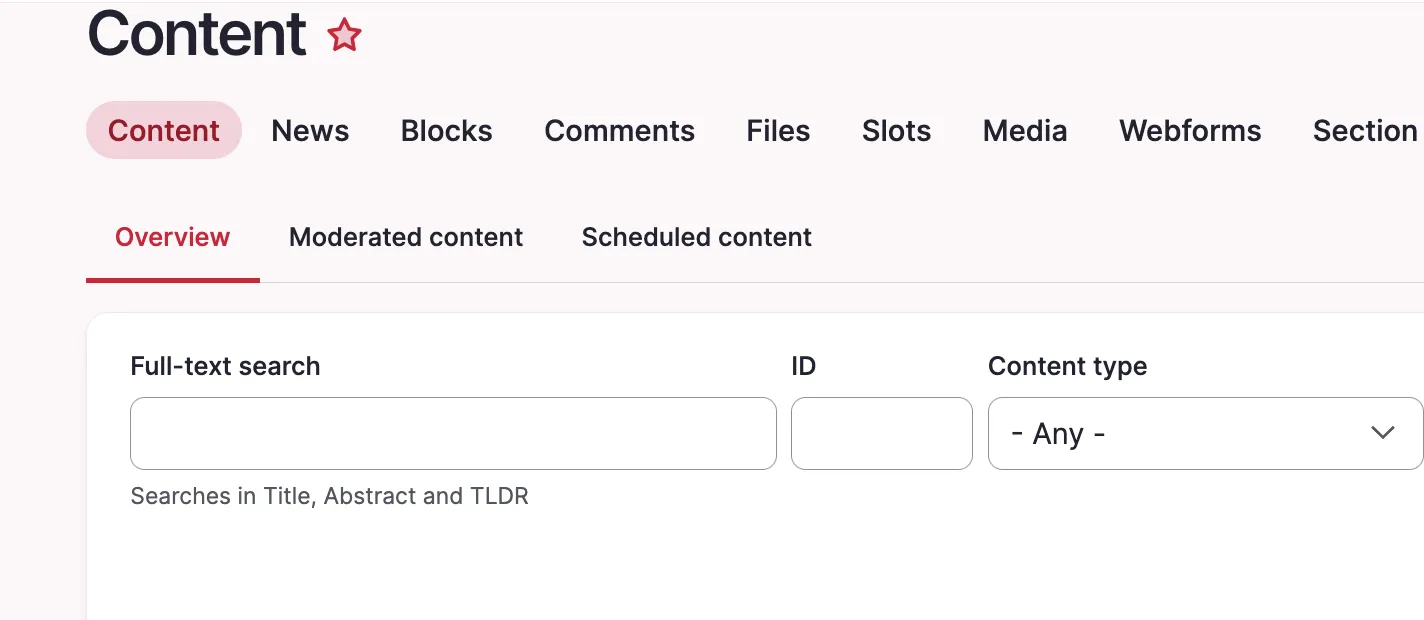
A custom text input field might appear too large in Gin. Our example uses an ID field which will usually never be filled with more than ~7 characters.
Prerequisites:
Our solution uses the Asset Injector module. This module can be useful for small additions to backend theming. However, there may be cleaner solutions to this, e.g. extending Gin for your project with some custom CSS, defining a custom field type, and more.
Solution:
Adjust the width of specific Views exposed filter fields using CSS through Asset Injection. This keeps short numeric fields like Node ID compact and improves the layout of the exposed filter form. We are using the Gin backend theme in this example. You can access the asset injector for Gin here: /admin/config/development/asset-injector/css/gin
Please note:
Don't use Asset Injector for altering a frontend theme.
Before:
After:
Quick note how to get the right ID for the CSS file, in our case #edit-nid:
You need to format datetime objects before printing them.
Example for a single datetime field
use Drupal\Core\Datetime\DrupalDateTime;

/** @var Drupal\Core\Datetime\DateFormatterInterface $date_formatter */
$date_formatter = \Drupal::service('date.formatter');

// Get DateTime object from stored date from a DateTimeFieldItemList field.
$my_date = $node->field_my_date->date;

// Get unix timestamp.
$my_date_timestamp = $my_date->getTimestamp();

// For formatting your DateTime object all other arguments are optional:
// See DateFormatterInterface for built-in options, or use machine name of a date format in config.
$type = 'medium';
// Custom PHP date format if $type="custom".
$format = '';

$formatted = $date_formatter->format($my_date_timestamp, $type, $format, $timezone = NULL, $langcode = NULL);
Example for a daterange field
use Drupal\Core\Datetime\DrupalDateTime;

/** @var Drupal\Core\Datetime\DateFormatterInterface $date_formatter */
$date_formatter = \Drupal::service('date.formatter');

// Get DateTime objects from stored date from a DateTimeFieldItemList field.
$start_date = $node->field_my_date->start_date;
$end_date = $node->field_my_date->end_date;

// For formatting your DateTime object all other arguments are optional:
// See DateFormatterInterface for built-in options, or use machine name of a date format in config.
$type = 'medium';
// Custom PHP date format if $type="custom".
$format = '';

$start_date_formatted = $date_formatter->format($start_date, $type, $format, $timezone = NULL, $langcode = NULL);
$end_date_formatted = $date_formatter->format($end_date, $type, $format, $timezone = NULL, $langcode = NULL);
Issue:
You need to format datetime objects before printing them.
Solution:
The Drupal date formatter service will be your friend. If you have enabled the datetime and/or datetime_range Core modules, you can set it to a defined date format (/admin/config/regional/date-time) or use a custom one. Details about the parameters you can use can be found on php.net.
We recommend always choosing the Drupal solution instead of a custom solution whenever possible.
Sometimes you might want to alter the behavior of a route controller. By default, a controller can only be exchanged once by altering the route and replacing the route controller.
<?php

namespace Drupal\layout_builder_collapse_categories\Routing;

use Drupal\Core\Routing\RoutingEvents;
use Drupal\Core\Routing\RouteSubscriberBase;
use Symfony\Component\Routing\RouteCollection;
use Drupal\layout_builder_collapse_categories\Controller\ChooseBlockController;

/**
 * Override the controller for layout_builder.move_block.
 */
class RouteSubscriber extends RouteSubscriberBase {

  /**
   * {@inheritdoc}
   */
  public static function getSubscribedEvents() {
    $events[RoutingEvents::ALTER] = ['onAlterRoutes', -1000];
    return $events;
  }

  /**
   * {@inheritdoc}
   */
  public function alterRoutes(RouteCollection $collection) {
    // Add a decorator for the choose_block conroller
    if ($route = $collection->get('layout_builder.choose_block')) {
      $defaults = $route->getDefaults();
      $route->setOption('original_controller', substr($defaults['_controller'], 0, strpos($defaults['_controller'], '::')));
      $defaults['_controller'] = ChooseBlockController::class . '::build';
      $route->setDefaults($defaults);
    }

  }
}
<?php

namespace Drupal\layout_builder_collapse_categories\Controller;

use Drupal\Core\Controller\ControllerBase;
use Drupal\Core\Routing\RouteMatchInterface;
use Drupal\layout_builder\SectionStorageInterface;
use Drupal\Core\Controller\ControllerResolverInterface;
use Symfony\Component\DependencyInjection\ContainerInterface;

class ChooseBlockController extends ControllerBase {


  /**
   * The original ChooseBlockController
   *
   * @var \Drupal\layout_builder\Controller\ChooseBlockController $originalController
   */
  protected $originalController;

  /**
   * @param \Drupal\Core\Controller\ControllerResolverInterface $controller_resolver
   */
  public function __construct(ControllerResolverInterface $controller_resolver, RouteMatchInterface $route_match) {
    $original_controller_class = $route_match->getRouteObject()->getOption('original_controller');
    $this->originalController = $controller_resolver->getControllerFromDefinition($original_controller_class);
  }

  /**
   * {@inheritdoc}
   */
  public static function create(ContainerInterface $container) {
    return new static(
      $container->get('controller_resolver'),
      $container->get('current_route_match')
    );
  }

  public function build(SectionStorageInterface $section_storage, $delta, $region) {
    $build = $this->originalController->build($section_storage, $delta, $region);

    foreach ($build['block_categories'] as &$category) {
      if (isset($category['#open'])) {
        $category['#open'] = FALSE;
      }

    }

    return $build;
  }

}
Issue:
Sometimes you might want to alter the behavior of a route controller. By default, a controller can only be exchanged once by altering the route and replacing the route controller.
Solution:
Use the provided snippet to simulate a decorator pattern for an existing controller like you would do with services. This enables you to alter the outcome multiple times.
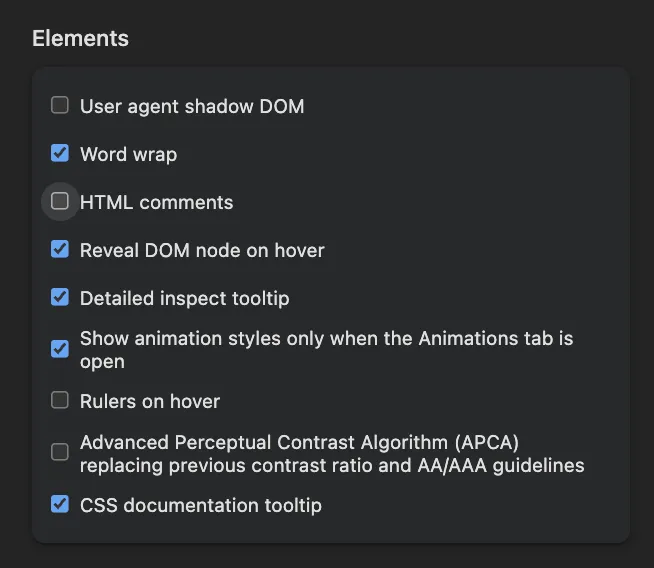
provide an option to hide comments in the Elements panel. Open the Inspector and click on Settings. Then scroll down to the Elements section. Uncheck the “show HTML comments” option.
1. Open the browser's Developer Tools:
Press F12, or
Press Ctrl + Shift + I (Windows/Linux), or
Right-click an element and select Inspect.
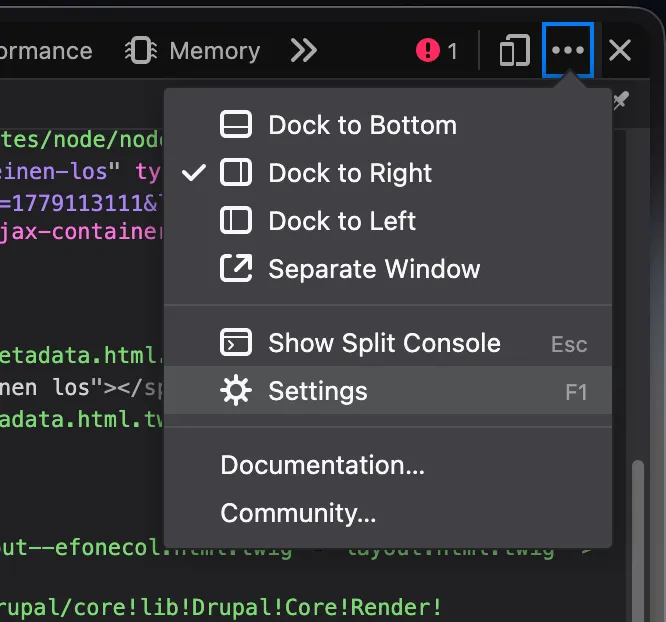
2. Open the DevTools settings:
Click the Settings (⚙) icon in the DevTools toolbar.
The Settings icon is located near the upper-right corner of DevTools, immediately to the left of the three-dot menu.
3. In the Preferences tab, scroll down to the Elements section.
4. Clear the Show HTML comments checkbox. (as shown in the screenshot above)
5. Close the Settings panel.
HTML comments (<!-- comment -->) are now hidden in the Elements panel, making the DOM tree easier to navigate and debug. To display comments again, re-enable the Show HTML comments option.
Firefox
Recent Firefox versions provide a similar setting in the Inspector. If the option is not available in your Firefox installation, update to the latest version.
Gin per default enhances all tables to use sticky headers and other goodies. But sometimes you just want to have a simple table without the enhancements.
<?php

/**
 * Implements hook_theme_suggestions_HOOK_alter() for table.
 */
function hook_theme_suggestions_table_alter(array &$suggestions, array $variables): void {
  if (empty($variables['attributes']['class'])) {
    return;
  }

  if (is_array($variables['attributes']['class']) && in_array('ief-entity-table', $variables['attributes']['class'])) {
    $suggestions[] = 'table__simple';
  }
}
Issue:
Gin per default enhances all tables to use sticky headers and other goodies. But sometimes you just want to have a simple table without the enhancements.
Solution:
There is a "table--simple" template provided by Gin which you can make use of by defining the theme suggestion for your table. In this example we use simple tables for inline entity form tables, since those are complex tables which don't always work together smoothly with gin tables.
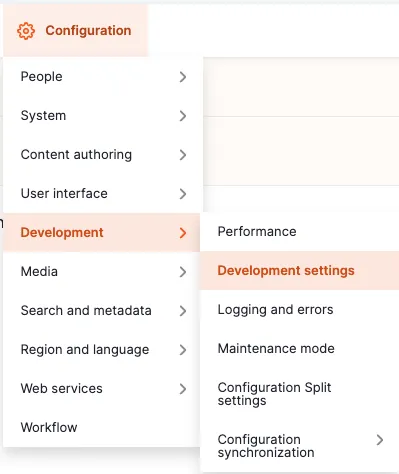
Sitebuilding solution: Navigate to the administrative area via the admin toolbar to Configuration -> Development -> Development settings or via the path /admin/config/development/settings
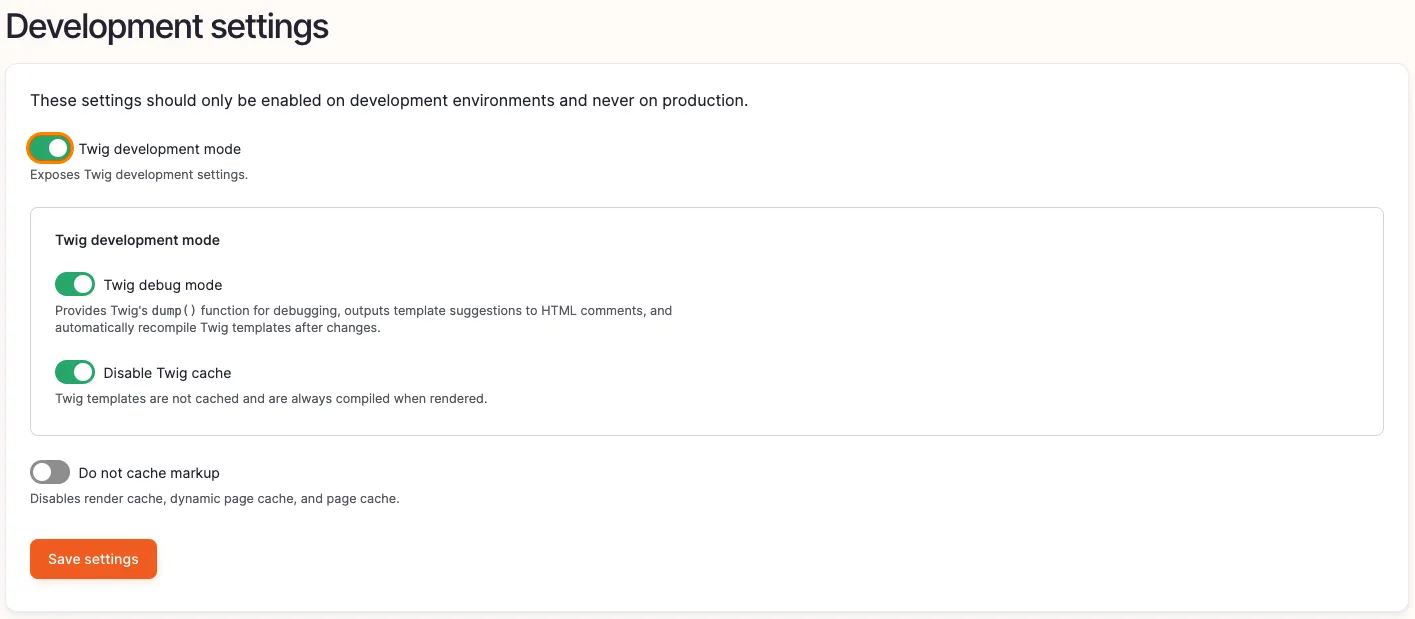
Enable the checkbox Twig development mode, as well as Twig debug mode and Disable Twig cache.
You are dissatisfied with the order of the local tasks (tabs) and want to rearrange them. If you have a view with multiple displays, it is easy to reorder the tabs by adjusting the order of the view displays. In my case, I have different views that provide the tabs for routes starting with…
function my_module_local_tasks_alter(&$local_tasks) {
  if (isset($local_tasks['entity.section_library_template.collection'])) {
    $local_tasks['entity.section_library_template.collection']['weight'] = 110;
  }

  if (isset($local_tasks['feeds.admin'])) {
    $local_tasks['feeds.admin']['weight'] = 120;
  }

}
Issue:
You are dissatisfied with the order of the local tasks (tabs) and want to rearrange them. If you have a view with multiple displays, it is easy to reorder the tabs by adjusting the order of the view displays. In my case, I have different views that provide the tabs for routes starting with "/admin/content".
Solution:
Change the weight of the local tasks. In my example, I have the the Layout Builder Library and the Feeds module installed. I chose these two to explain where you can find the local task you need to adjust the weight.
For the Feeds module, we needed to look up where the route "admin/content/feed" is defined. We will find it inside the routing.yml file of the module. It is defined under feeds.admin.
The Layout Builder Library Module defines the route we are looking for (admin/content/section-library) in the annotation of the entity. The route name can be found in the links.task.yml file. It is defined as entity.[entity_id].[link].
A developer needs to find which bundles of a given entity type have a specific view mode enabled – for example, to conditionally apply logic only to bundles where a teaser or custom view mode is configured.
A developer needs to find which bundles of a given entity type have a specific view mode enabled – for example, to conditionally apply logic only to bundles where a teaser or custom view mode is configured.
Solution:
This snippet finds all bundles for a certain entity type which have a certain view mode enabled.
Example: Find all node bundles that have a teaser view display. → php $this->getBundlesWithViewmode('node', 'teaser'); Result: php ['article', 'blog']
You want to combine multiple image fields from a legacy system into a single media field in a new Drupal system during migration.
Solution:
The code uses the migration API of Drupal to merge multiple source image fields into a single media field. It employs the merge plugin to combine the fields and a sub-process to transform the references into media entities using a migration lookup.
A page contains multiple Views blocks showing entities of the same type – for example teasers, lists, or cards. Without coordination between them, the same entity can appear in more than one block on the same page.
Sometimes blocks are rendered even when they are empty and even if the setting in views is activated that they should not be rendered when empty. This might be the case in combination i.e. with lazy loading. If an empty block is rendered, this may have impact on the layout because the empty block…
<?php

use Drupal\views\Plugin\Block\ViewsBlock;

/**
 * Implements hook_block_alter().
 */
function hook_block_alter(array &$definitions) {
  foreach ($definitions as $block_id => &$block_definition) {
    if ($block_definition['class'] === ViewsBlock::class) {
      $block_definition['class'] = 'Drupal\my_module\Plugin\Block\ViewsBlock';
    }
  }
}
<?php

namespace Drupal\my_module\Plugin\Block;

use Drupal\views\Plugin\Block\ViewsBlock as ViewsBlockCore;

/**
 * Replaces the generic Views block.
 */
class ViewsBlock extends ViewsBlockCore {

  /**
   * {@inheritdoc}
   */
  public function build() {
    if (empty($this->view->result) && empty($this->view->empty)) {
      // Without caching.
      // return ['#cache' => ['max-age' => 0]];
      // With hard caching.
      return [];
    }

    return parent::build();
  }

}
Issue:
Sometimes blocks are rendered even when they are empty and even if the setting in views is activated that they should not be rendered when empty. This might be the case in combination i.e. with lazy loading. If an empty block is rendered, this may have impact on the layout because the empty block might still have margins or paddings
Solution:
This snippet replaces the generic Views block and checks "manually" whether or not the block is empty.
The custom weight system controls the display order of elements, where lower weight values appear earlier, as shown in the example: content_2 (with weight 5) is rendered before content_1 (with weight 10).
Issue:
You would like to order elements of an array for rendering based on a custom weight value.
Solution:
The code assigns a custom weight property to each element in an array and then sorts the array using a custom sorting function based on these weights. Here is the link to the documentation of the function: https://www.php.net/manual/en/function.uasort.php
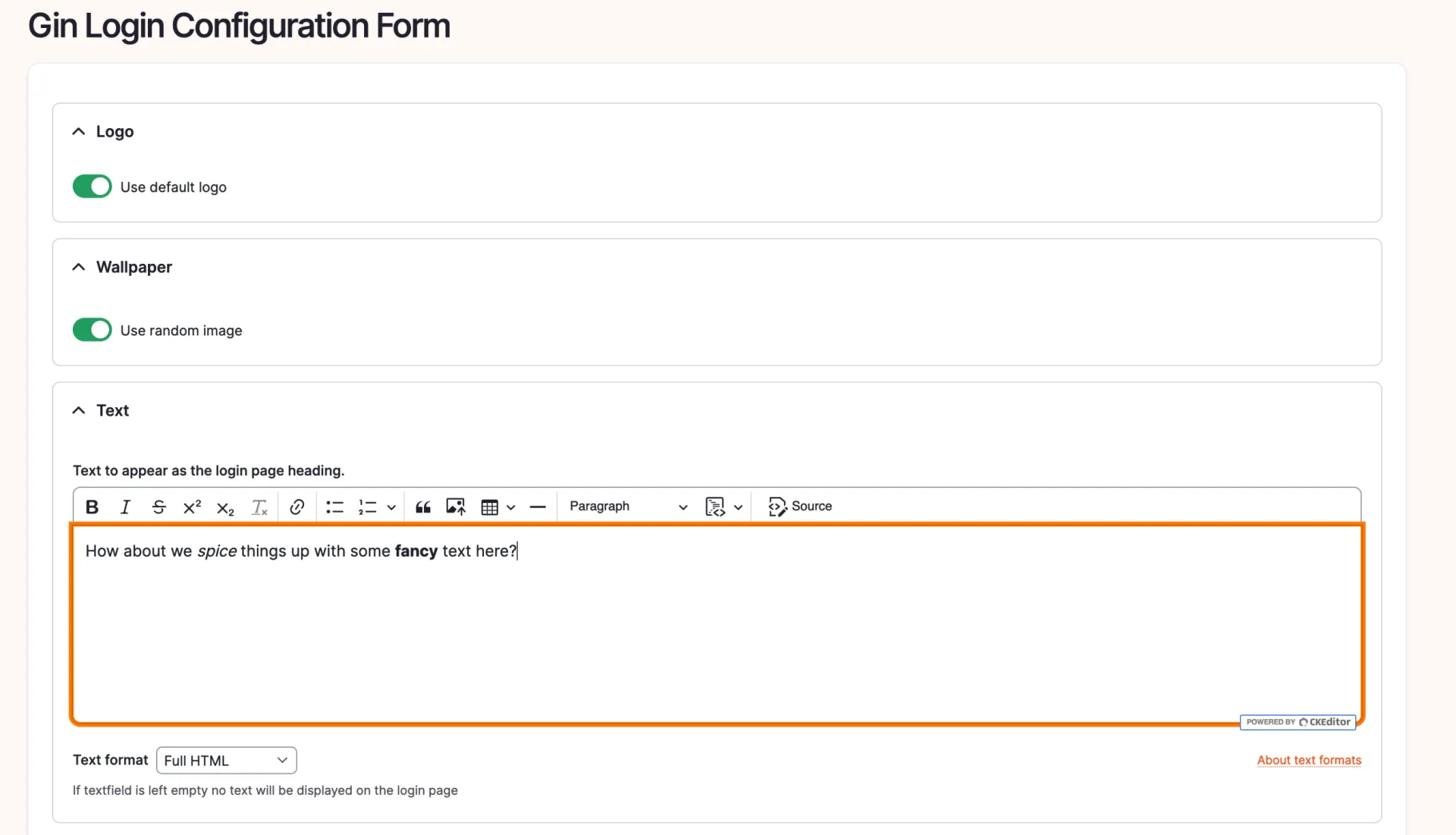
First we create a module, lets name it 'gin_login_text'. If you have drush installed, you can generate a module using 'drush generate module'.
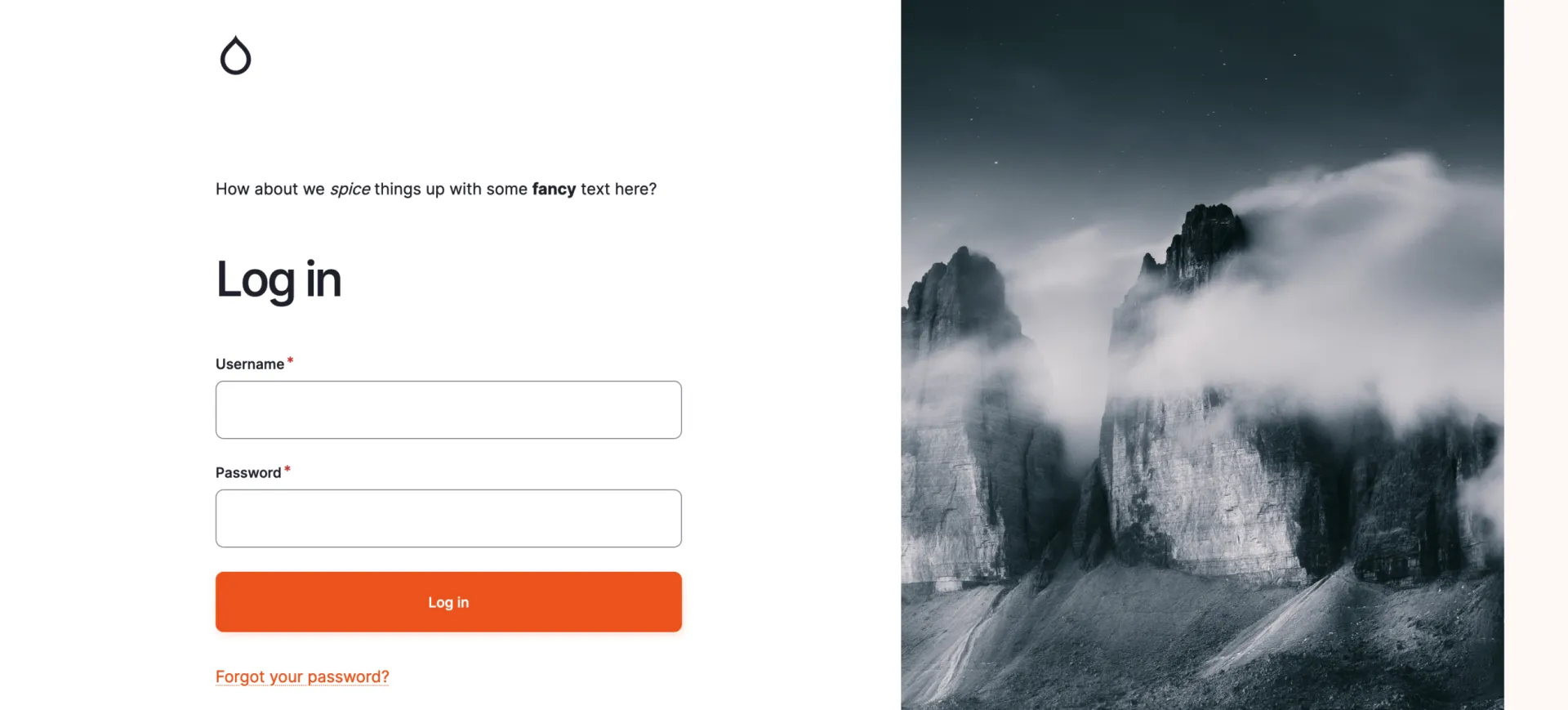
We will use the form_decorator module to alter the output of the gin_login module to look something like this:
This DevBit provides a step-by-step tutorial how to get there.
First we create a module, lets name it 'gin_login_text'. If you have drush installed, you can generate a module using 'drush generate module'.
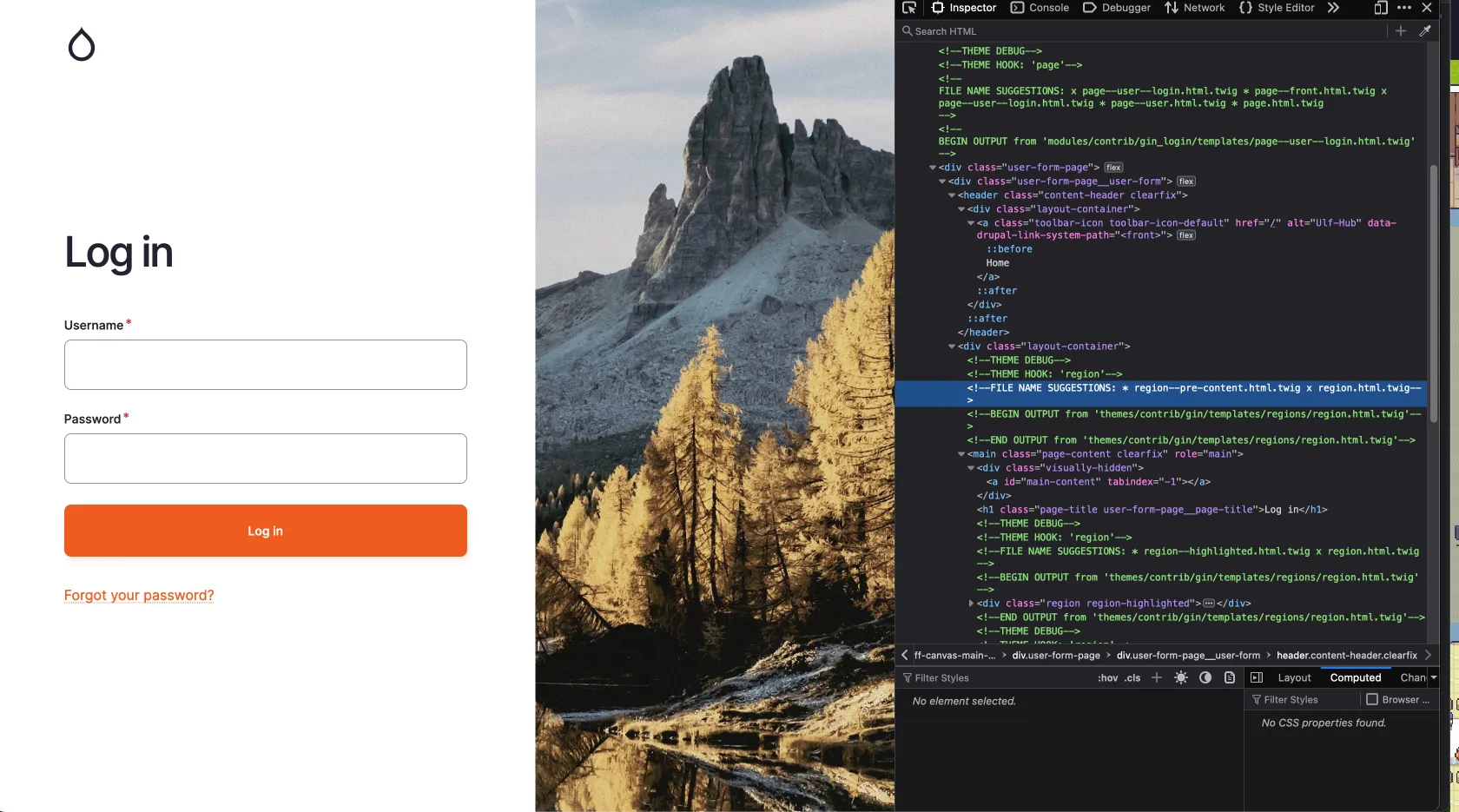
To insert our text into the gin_login we need to find the proper render array. For this we look up the logout screen with the inspector:
In the picture we can see a FILE NAME SUGGESTION: 'region--pre-content.html.twig', thanks to the enabled Twig debug. If we now look into the templates for gin_login we find this:
This line is used to enable the nested array structure in a form which we will use to alter the form of gin_login to enter a text.
Last but not least add the dependencies to the info.yml:
name: gin_login_text
type: module
description: Provides a login text for gin_login
package: Custom
core_version_requirement: ^10 || ^11
dependencies:
  - form_decorator:form_decorator
  - gin_login:gin_login
As you already see in the info.yml, we have a dependency on the form_decorator. Using this module, we can decorate the form of gin_login which you can find at `/admin/config/system/configuration/gin-login`. The clue is in the title. Follow the example on the module site at https://www.drupal.org/project/form_decorator.
Your file should look like this:
<?php

declare(strict_types=1);

namespace Drupal\gin_login_text\FormDecorator;

use Drupal\Core\Config\ConfigFactoryInterface;
use Drupal\Core\DependencyInjection\DependencySerializationTrait;
use Drupal\Core\Form\FormStateInterface;
use Drupal\Core\Plugin\ContainerFactoryPluginInterface;
use Drupal\Core\StringTranslation\StringTranslationTrait;
use Drupal\form_decorator\FormDecoratorBase;
use Drupal\multivalue_form_element\Element\MultiValue;
use Symfony\Component\DependencyInjection\ContainerInterface;

/**
 * Decorates the gin login form.
 *
 * @FormDecorator(hook = "form_gin_login_form_alter")
 */
final class GinLoginFormDecorator extends FormDecoratorBase implements ContainerFactoryPluginInterface {
  use StringTranslationTrait;
  use DependencySerializationTrait;

  /**
   * Constructs a GinLoginFormDecorator object.
   *
   * @param array $configuration
   *   A configuration array containing information about the plugin instance.
   * @param string $plugin_id
   *   The plugin_id for the plugin instance.
   * @param mixed $plugin_definition
   *   The plugin implementation definition.
   * @param \Drupal\Core\Config\ConfigFactoryInterface $configFactory
   *   The configuration factory.
   */
  public function __construct(
    array $configuration,
    string $plugin_id,
    mixed $plugin_definition,
    protected ConfigFactoryInterface $configFactory,
  ) {
    parent::__construct($configuration, $plugin_id, $plugin_definition);
  }

  /**
   * {@inheritdoc}
   */
  public static function create(ContainerInterface $container, $configuration, $plugin_id, $plugin_definition) {
    return new self(
      $configuration,
      $plugin_id,
      $plugin_definition,
      $container->get('config.factory'),
    );
  }

  /**
   * {@inheritdoc}
   */
  public function buildForm(array $form, FormStateInterface $form_state, ...$args): array {
    $form = $this->inner->buildForm($form, $form_state);
    $config = $this->configFactory->get('gin_login.settings');

    $form['login_text'] = [
      '#type' => 'details',
      '#title' => $this->t('Text'),
      '#open' => TRUE,
      '#tree' => TRUE,
    ];
    $form['login_text']['text'] = [
      '#type' => 'text_format',
      '#title' => $this->t('Text to appear as the login page heading.'),
      '#description' => $this->t('If textfield is left empty no text will be displayed on the login page'),
      '#format' => $config->get('login_text.text')['format'] ?? 'full_html',
      '#default_value' => $config->get('login_text.text')['value'] ?? '',
    ];

    return $form;
  }

  /**
   * {@inheritdoc}
   */
  public function submitForm(array &$form, FormStateInterface $form_state): void {
    $this->inner->submitForm($form, $form_state);
    // Get it editable or else its immutable.
    $config = $this->configFactory->getEditable('gin_login.settings');
    $config->set('login_text.text', $form_state->getValue('login_text')['text']);

    $config->save();
  }

}
You should now be able to see this at the gin_login configuration under `/admin/config/system/configuration/gin-login`:
With the text added, even with some bold and italic modifications, let's observe the outcome:
You need to migrate users from one role to another – for example, due to changes in permissions, content access strategy, or a cleanup of legacy roles. Manually updating each user is inefficient, especially on sites with many users.
<?php

use Drupal\user\RoleInterface;

/**
 * Remove the old roles and replace them with the new ones.
 */
function MY_MODULE_update_9041(): void {
  $em = \Drupal::entityTypeManager();
  $user_storage = $em->getStorage('user');

  // Ensure the new role exists. If not, create it first.
  $role_storage = $em->getStorage('user_role');
  if ($role_storage->load('new_role') === NULL) {
    /** @var \Drupal\user\RoleInterface $role */
    $role = $role_storage->create([
      'id' => 'new_role',
      'label' => 'New role',
    ]);
    $role->save();
  }

  $uids = \Drupal::entityQuery('user')
    ->accessCheck(FALSE)
    ->execute();

  if (empty($uids)) {
    return;
  }

  /** @var \Drupal\user\UserInterface[] $users */
  $users = $user_storage->loadMultiple($uids);

  foreach ($users as $user) {
    if ($user->hasRole('old_role')) {
      $user->addRole('new_role');
      $user->removeRole('old_role');
    }

    $user->save();
  }
}
Issue:
You need to migrate users from one role to another – for example, due to changes in permissions, content access strategy, or a cleanup of legacy roles. Manually updating each user is inefficient, especially on sites with many users.
Solution:
This update hook first checks whether the target role (new_role) exists. If it does not, the role is created programmatically.
It then fetches all user IDs using entityQuery with accessCheck(FALSE) to ensure all users are included. The user entities are loaded via user storage, and each user is checked for the presence of the legacy role (old_role). If found, the hook adds new_role, removes old_role, and saves the user entity.
This approach ensures consistency across the user base and allows role migration to be handled safely and repeatably as part of a structured deployment process.
You can add this to your docker-compose.yml for any service ('web' is our example here) to prevent it from reaching the internet. This can be useful to isolate a potentially unsafe project for an audit for example.
services:
  web:
    cap_drop:
      - NET_RAW
Issue:
A containerised Drupal service – or any web service – running in an offline or restricted environment should not be able to send raw network packets. By default, Docker grants containers the NET_RAW Linux capability, which allows tools like ping and arping to craft raw IP packets. This is unnecessary for a web container and increases the attack surface.
Solution:
You can add this to your docker-compose.yml for any service ('web' is our example here) to prevent it from reaching the internet. This can be useful to isolate a potentially unsafe project for an audit for example.
You changed config and want to see the changes before it is exported to your config sync directory or you want to see what will be changed if you import changed config.
First, you could check if there are different states of your config between database and local file system.
drush config:status
There is an option `--diff` for the drush command that will print the changes first.
drush config:import --diff
This also works for config export.
drush config:export --diff
Issue:
You changed config and want to see the changes before it is exported to your config sync directory or you want to see what will be changed if you import changed config.
Solution:
There is an option for the drush commands that will print the changes first.
This is a small but useful snippet for generating menu tree render arrays for any menu from a custom controller.
    $menu_name = 'my_custom_menu_machine_name';

    $menu_tree = \Drupal::menuTree();
    // Build the typical default set of menu tree parameters.
    $parameters = $menu_tree->getCurrentRouteMenuTreeParameters($menu_name);
    // Load the tree based on this set of parameters.
    $tree = $menu_tree->load($menu_name, $parameters);
    // Transform the tree using the manipulators you want.
    $manipulators = [
      // Only show links that are accessible for the current user.
      ['callable' => 'menu.default_tree_manipulators:checkAccess'],
      // Use the default sorting of menu links.
      ['callable' => 'menu.default_tree_manipulators:generateIndexAndSort'],
    ];

    $tree = $menu_tree->transform($tree, $manipulators);

    $menu = $menu_tree->build($tree);

     // Set theme for custom styling.
    $menu['#theme'] = 'my_custom_theme';
Issue:
Sometimes you might need to load and render a custom menu inside a controller – for example on a user dashboard – with access checking, default sorting, and a custom theme hook applied.
Solution:
This is a small but useful snippet for generating menu tree render arrays for any menu from a custom controller.
Just change $menu_name to the machine name of your menu.
Extra: For similar use cases, you might want to use the Drupal Twig Tweak module. You can also use the {{ drupal_menu('my_menu') }} function directly in your template.
We want to make sure the local 'stage' branch is updated with the latest changes from a specific remote branch before pushing updates back to the 'stage' branch in the repository.
git fetch --all
git checkout stage
# This resets your local stage branch to the version of remote.
# The origin/stage could diverge from the local due to resetting the branch.
git reset --hard origin/stage
git merge origin/BRANCHNAME
git push origin stage
git checkout BRANCHNAME
Issue:
We want to make sure the local 'stage' branch is updated with the latest changes from a specific remote branch before pushing updates back to the 'stage' branch in the repository.
Solution:
The code snippet updates the local 'stage' branch with the latest changes from the remote 'stage' branch, merges updates from another specified branch and pushes these combined updates back to the remote 'stage' branch. Finally, it switches back to the original branch.
You want JavaScript to execute something based on a breakpoint in a CSS media query.
// Retrieve all computed styles from the root HTML element (:root)
const rootStyles = getComputedStyle(document.documentElement);

// Get the value of the CSS variable --Breakpoint.
// Use a fallback (e.g., 768px) if the variable is not defined.
const breakpoint = rootStyles.getPropertyValue('--Breakpoint').trim() || '768px';

// Create a MediaQueryList based on the breakpoint value
const mediaQuery = window.matchMedia(`(min-width: ${breakpoint})`);

// Function that runs when the viewport is at or above the breakpoint
function handleDesktopLayout() {
    console.log("Viewport is at or above the breakpoint.");
}

// Function that runs when the viewport drops below the breakpoint
function handleMobileLayout() {
    console.log("Viewport is below the breakpoint.");
}

// Early return for the initial state:
// If the viewport does NOT meet the breakpoint requirement, run mobile logic and exit
if (!mediaQuery.matches) {
    handleMobileLayout();
    // No desktop logic needed at this point
} else {
    handleDesktopLayout();
}

// Listen for changes in viewport size relative to the breakpoint
mediaQuery.addEventListener('change', (event) => {
    if (event.matches) {
        // The viewport just became equal to or larger than the breakpoint
        handleDesktopLayout();
    } else {
        // The viewport just became smaller than the breakpoint
        handleMobileLayout();
    }
});
Issue:
You want JavaScript to execute something based on a breakpoint in a CSS media query.
Solution:
Read the breakpoint value directly from the --Breakpoint CSS variable, create a matchMedia query from it, and use an event listener to run JavaScript whenever the viewport crosses that breakpoint.
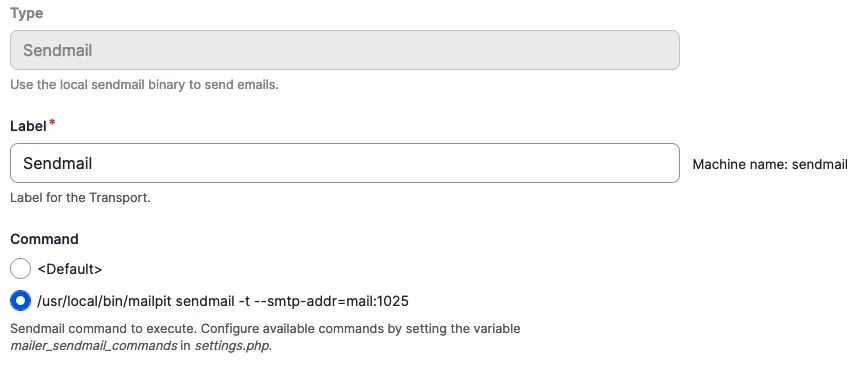
You had problems to receive mails in mailhog in a local setup with sendmail configuration.
Solution:
Add this custom command to the sendmail configuration in your settings.local.php.
After adding go to `/admin/config/system/mailer/transport` and create a transport type 'sendmail'. Chose our newly added command and save the configuration.
Add the `symfony_mailer.mailer_transport.sendmail` config to your partial split configuration for your local split and then export the configuration.
You often need to access a value of a field within a Drupal entity programmatically, but you may encounter challenges in doing so due to the complexity of Drupal's data structure.
// For single value fields.
$entity->field_name->value;

// If you don`t know the main property.
$main_property_name = $entity->field_name->getMainPropertyName();

// For multiple value fields.
$entity->field_name->getValue();
Issue:
You often need to access a value of a field within a Drupal entity programmatically, but you may encounter challenges in doing so due to the complexity of Drupal's data structure.
Solution:
$entity->field_myfield->value
Direct Access: This approach directly accesses the value property of the field item.
Single Value: This is typically used when you are certain that the field holds a single value (e.g., a single text value, a single number, etc.). This is common with fields that are configured to store only one value.
Simplicity: It provides a simple and straightforward way to get the value if the field only holds one item.
Assumptions: It assumes that the field item exists and that the value property is the correct way to access the field data.
$entity->field_myfield->getMainPropertyName()
Main Property of the Field:getMainPropertyName() returns the main property of a field. For most fields, this is the value property, but it can also be another property depending on the field type. For example, for a reference field, the main property might be target_id.
Field Data Model: Each field in Drupal has a data model that can contains various properties. The main property is considered the primary piece of information for the field.
Usage in Entities: This method is useful when you want to use the field in a general context without knowing exactly which specific property represents the main information.
$entity->field_myfield->getValue()
Method Access: This approach uses the getValue() method to retrieve the field's value.
Array of Values:getValue() returns an array of all the field values. This is useful for fields that can hold multiple values (e.g., multiple text values, multiple references, etc.).
Structured Data: The returned array provides more structure and includes potentially other properties of the field items, not just the value property. For example, an image field might return an array with target_id, alt, title, etc.
Flexibility: This method is more flexible and can be used for both single and multi-value fields. You will need to handle the array appropriately in your code.
Conclusion:
Use $entity->field_myfield->value if you are dealing with a single-value field and want a straightforward, direct access to the field value.
Use $entity->field_myfield->getMainPropertyName() if you want to determine the main property of the field in a general way without knowing the specific field type.
Use $entity->field_myfield->getValue() if you need to handle multiple values or require the complete array structure of the field data, providing more flexibility and additional information.
A views filter based on taxonomy terms should not show all terms as filterable options, e.g. because they are internal
<?php

use Drupal\Component\Utility\Html;
use Drupal\Core\Form\FormStateInterface;


/**
 * Implements hook_form_FORM_ID_alter() for 'views_exposed_form'.
 */
function hook_form_views_exposed_form_alter(&$form, FormStateInterface $form_state) {
  // Configure the values to your needs.
  $view_name = 'my_view';
  $display_name = 'my_display';
  $entity_type_id = 'taxonomy_term';
  $reference_field = 'field_category';
  // The field on the referenced entity.
  $flag_on_reference_field = 'field_hide_on_exposed_form';

  if ($form['#id'] == Html::getId("views-exposed-form-{$view_name}-{$display_name}")) {
    $entity_storage = \Drupal::entityTypeManager()->getStorage($entity_type_id);
    $options = &$form[$reference_field]['#options'];
    foreach ($entity_storage->loadMultiple(array_keys($options)) as $id => $entity) {
      if ($entity->hasField($flag_on_reference_field) && !$entity->{$flag_on_reference_field}->isEmpty()) {
        unset($options[$id]);
      }
    }
  }
}
Issue:
A views filter based on taxonomy terms should not show all terms as filterable options, e.g. because they are internal
Solution:
Create a field on your taxonomy to determine whether it should be included in filters, then alter your form so it reacts to the field setting. You can copy-paste the code provided into your module.
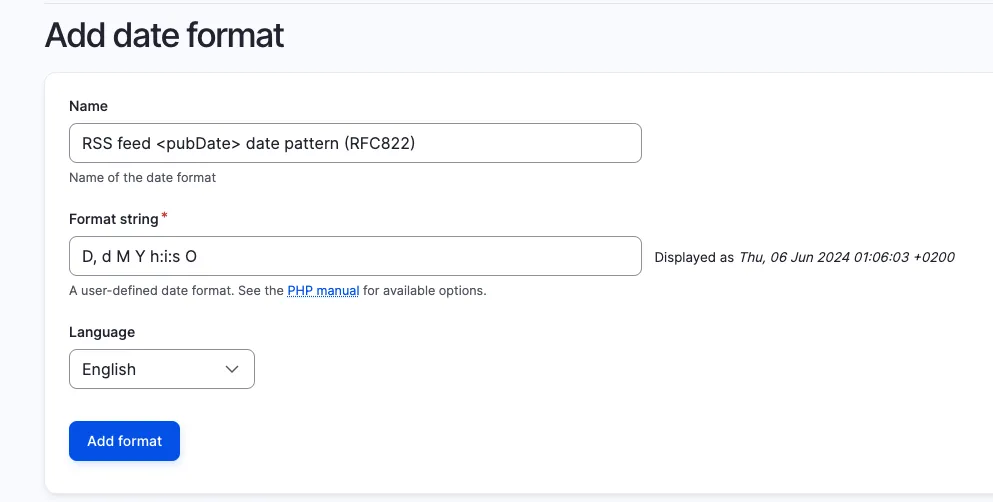
RSS feeds require the date pattern to use RFC-822 format ('D, d M Y h:i:s O' | Wed, 02 Oct 2002 08:00:00 EST). The main problem is that CET (Central European Time) is not supported by this RFC standard so we have to switch to GMT (Greenwich Mean Time) + hhmm to have a valid value.
This snippet is an example config for a date format in Drupal which can be imported.
langcode: en
status: true
dependencies: {  }
id: rss_feed_date_format
label: RFC822
locked: false
pattern: 'D, d M Y h:i:s O'
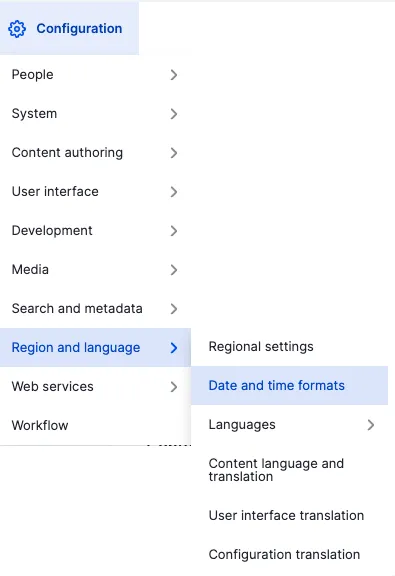
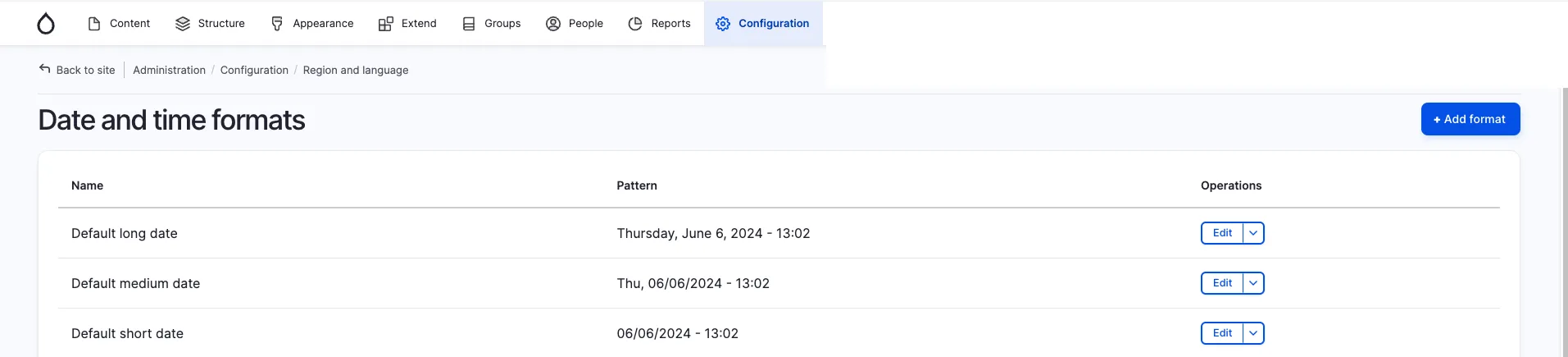
Change the date format via Sitebuilding In the administrative menu open Configuration -> Region and language -> Date and time formats or open the path /admin/config/regional/date-time. Then use the button "+ Add format".
Here you can give your new date format a label and enter D, d M Y h:i:s O as a fitting RFC822 <pubDate> format.
For more information about PHP date format options, see the official PHP documentation.
Issue:
RSS feeds require the date pattern to use RFC-822 format ('D, d M Y h:i:s O' | Wed, 02 Oct 2002 08:00:00 EST). The main problem is that CET (Central European Time) is not supported by this RFC standard so we have to switch to GMT (Greenwich Mean Time) + hhmm to have a valid value.
Solution:
Switch to GMT (Greenwich Mean Time) + hhmm to have a valid value.
Using the provided solution will enable sharing of a set filter and ensures that whoever opens the link will see all teasers corresponding to the exposed filters. The map will be fully zoomed out so no teasers are 'accidentally' filtered out.
// Modifies form data on submit.
form.addEventListener("formdata", (e) => {
  const formData = e.formData;
  geoLocationFieldNames.forEach((name) => {
    formData.delete(name);
  });
});
Issue:
A list of teasers should be filtered by the set "area of detail" (boundaries) on an embedded map and additionaly by exposed filters
A filtered version of the view should be shareable by link, ensuring no items are unwantedly filtered out
Solution:
use "formdata event" which is supported by recent versions of all major browsers
form data is being manipulated on submit
map viewport boundaries will be injected into the get request, but not included into exposed filters
Conclusion:
Using the provided solution will enable sharing of a set filter and ensures that whoever opens the link will see all teasers corresponding to the exposed filters. The map will be fully zoomed out so no teasers are 'accidentally' filtered out.
You cannot change the specification of an existing field if it already has content. The reason for this is that the content itself may need to be changed as well.
<?php

/**
 * Change my_basefield max_length to 255.
 */
function my_module_update_10001() {
  $entity_type_id = 'my_entity';
  $field_name = 'my_basefield';
  $field_length = 255;

  /** @var \Drupal\Core\Entity\EntityLastInstalledSchemaRepositoryInterface $schema_repository */
  $schema_repository = \Drupal::service('entity.last_installed_schema.repository');
  /** @var \Drupal\Core\Entity\EntityFieldManager $entity_field_manager */
  $entity_field_manager = \Drupal::service('entity_field.manager');
  /** @var Drupal\Core\Field\BaseFieldDefinition[] $base_field_definitions */
  $base_field_definitions = $entity_field_manager->getBaseFieldDefinitions($entity_type_id);
  $schema_repository->setLastInstalledFieldStorageDefinition($base_field_definitions[$field_name]);
  $field_storage_definitions = $schema_repository->getLastInstalledFieldStorageDefinitions($entity_type_id);

  // Update the serialized schema property.
  $rc = new \ReflectionClass($field_storage_definitions[$field_name]);
  $schema_property = $rc->getProperty('schema');
  $schema_property->setAccessible(TRUE);
  $schema = $field_storage_definitions[$field_name]->getSchema();
  $schema['columns']['value']['length'] = $field_length;
  $schema_property->setValue($field_storage_definitions[$field_name], $schema);

  // Update the field definition in the last installed schema repository.
  $schema_repository->setLastInstalledFieldStorageDefinitions($entity_type_id, $field_storage_definitions);

  // Update the storage schema.
  $key_value = \Drupal::keyValue('entity.storage_schema.sql');
  $key_name = $entity_type_id . '.field_schema_data.' . $field_name;
  $storage_schema = $key_value->get($key_name);
  // Update all tables where the field is present.
  foreach ($storage_schema as &$table_schema) {
    $table_schema['fields'][$field_name]['length'] = $field_length;
  }
  $key_value->set($key_name, $storage_schema);

  // Update the database tables where the field is part of.
  $db = Drupal::database();
  foreach ($storage_schema as $table_name => $table_schema) {
    $db->schema()->changeField($table_name, $field_name, $field_name, $table_schema['fields'][$field_name]);
  }

}
Issue:
You cannot change the specification of an existing field if it already has content. The reason for this is that the content itself may need to be changed as well.
Solution:
In case you just want to increase the size of a varchar field, here is an example of an update hook. Don't forget to also update the max_length in the baseFieldDefinitions method of your Entity class.
If you have moved to a new server and want to access it with SSH via domain name, you will get the warning "Remote host identification has changed" due to changed SSH fingerprints in your `~/.ssh/known_host` file.
# Remove all old entries for my.example.com
ssh-keygen -R my.example.com

# Scan all supported fingerprints from the new server and insert them in your known_hosts file
ssh-keyscan my.example.com >> ~/.ssh/known_hosts
Issue:
If you have moved to a new server and want to access it with SSH via domain name, you will get the warning "Remote host identification has changed" due to changed SSH fingerprints in your `~/.ssh/known_host` file.
The code snippet addresses the challenge of updating SSH fingerprints in the known_hosts file for a server, particularly in cases where the server's keys have been changed, or there are discrepancies with the existing entries.
Solution:
Remove all old entries from the `~/.ssh/known_host` file and insert the new fingerprint(s). Hint: Only do this if you are sure that the new server is under your control.
This code snippet provides a solution to update the SSH fingerprints in the known_hosts file. It first removes any old entries related to a specific hostname (my.example.com) using the ssh-keygen command with the -R option. Then, it scans and appends all supported fingerprints from the new server to the known_hosts file using the ssh-keyscan command.
When working on a Composer based project, you may need to check the installed version, dependencies, and other details of a specific package.
# Syntax.
composer show vendor/package

# Example.
composer show drupal/eca
name     : drupal/eca
descrip. : Event, Conditions, Actions - powerful, versatile, and user-friendly rules engine for Drupal
keywords :
versions : * 2.1.0
type     : drupal-module
license  : GNU General Public License v2.0 or later (GPL-2.0-or-later) (OSI approved) https://spdx.org/licenses/GPL-2.0-or-later.html#licenseText
homepage : https://www.drupal.org/project/eca
source   : [git] https://git.drupalcode.org/project/eca.git 2.1.0
dist     : [zip] https://ftp.drupal.org/files/projects/eca-2.1.0.zip 2.1.0
path     : /var/www/html/web/modules/contrib/eca
names    : drupal/eca

support
source : https://drupal.org/project/eca
issues : https://drupal.org/project/issues/eca

requires
dragonmantank/cron-expression ^3.1
drupal/core ^10.3||^11
ext-dom *
ext-json *
mtownsend/xml-to-array ^2.0
php >=8.1

requires (dev)
drupal/eca_ui *
drupal/entity_reference_revisions ^1.12
drupal/inline_entity_form ^3.0
drupal/paragraphs ^1.18
drupal/token ^1.15
drupal/webform dev-3465838-drupal-11-compatibility
Issue:
When working on a Composer based project, you may need to check the installed version, dependencies, and other details of a specific package.
Solution:
Use the command composer show vendor/package to retrieve detailed information about the package, including its version, description, dependencies, license, and more. This helps in debugging, verifying versions, and managing dependencies effectively.
You want to manually create a condition instance (e.g.: "am I on an article?") but it will initially lack a runtime context which would usually be provided by the integrating UI / system, e.g. visibility settings on blocks.
You want to manually create a condition instance (e.g.: "am I on an article?") but it will initially lack a runtime context which would usually be provided by the integrating UI / system, e.g. visibility settings on blocks.
Solution:
Use the snippet provided to insert all available runtime contexts. This way, yours will be included.
You want to add a password field to an entity via the field_ui. It does not work, and – as a reminder to recurring devs – is not supposed to work. The UI is switched off in the core definition.
/**
 * Defines the 'password' entity field type.
 *
 * @FieldType(
 *   id = "password",
 *   label = @Translation("Password"),
 *   description = @Translation("An entity field containing a password value."),
 *   no_ui = TRUE,
 * )
 */
Issue:
You want to add a password field to an entity via the field_ui. It does not work, and – as a reminder to recurring devs – is not supposed to work. The UI is switched off in the core definition.
Solution:
If you need a password field, first evaluate the necessity to save a password in the database – this might create a serious security risk.
If your project requires it anyway, you either have to create a custom widget for a textfield or use the module Password field.
You want to print out a field in a given formatter type.
$field_render_array = $entity->{$field_name}->view([
  'type' => 'default_formatter', // Replace with desired formatter type.
  'label' => 'hidden', // If you want to hide the label of the field (optional).
  'settings' => [
    'trim_length' => 100, // Example for textfields: Trim the text to 100 characters.
  ],
]);
Issue:
You want to print out a field in a given formatter type.
Solution:
An easy way would be to use the configuration on the view display of your entity and select the wanted field formatter there. But in some cases (e.g. you don't want to render the field on the node where it is defined) this does not work.
This snippet shows you how to do it programmatically (for example in a preprocess hook).
As fields themselves do not have a `view()` method, we need to manipulate the render array of a field item list you get when loading an entity.
Blocks inside a layout region are not sorted by weight property per default, even though the weight is used for rendering in the rendering process. But when you work with the blocks in a template directly you can't make sure they appear in the right order.
/**
 * Implements hook_preprocess_HOOK() for layout.html.twig.
 */
function hook_preprocess_layout(&$variables) {
  $layout = $variables['layout'];
  foreach ($layout->getRegionNames() as $region_name) {
    if (array_key_exists($region_name, $variables['content'])) {
      uasort($variables['content'][$region_name], [\Drupal\Component\Utility\SortArray::class, 'sortByWeightProperty']);
    }
  }
}
Issue:
Blocks inside a layout region are not sorted by weight property per default, even though the weight is used for rendering in the rendering process. But when you work with the blocks in a template directly you can't make sure they appear in the right order.
Solution:
Preprocess the regions and use the Drupal Core sortByWeightProperty mechanism to change the order of the blocks in the array before entering the template.
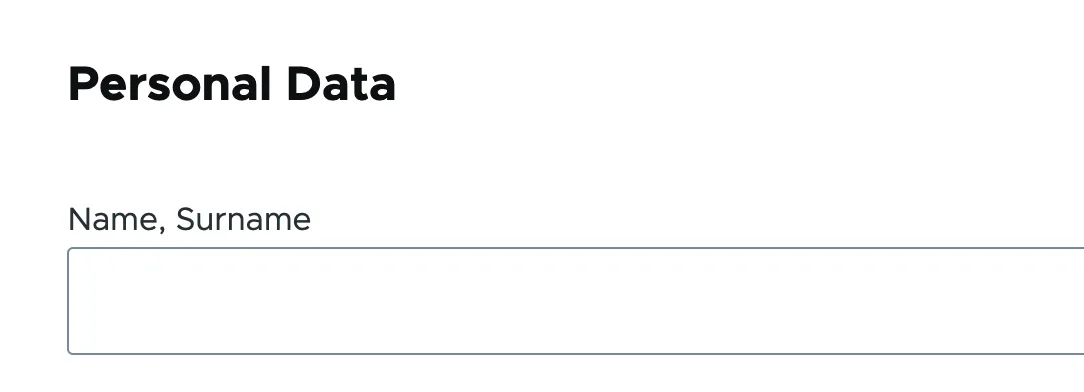
You want to insert headings or other text elements into a web form, e.g. to subdivide it for better readability and/or understandability.
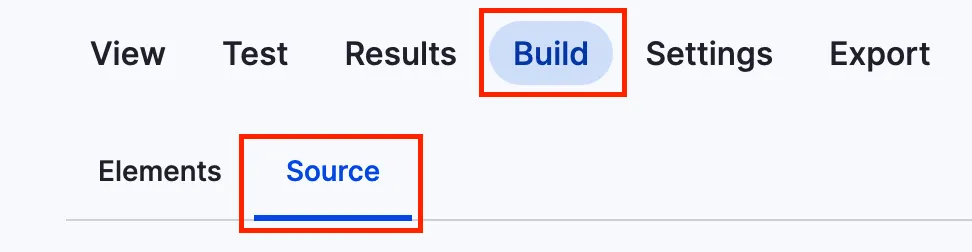
You can add headlines to a webform using the code below. To get to the source section, navigate to the form you want to alter, click on build and then on the source tab like in the screenshot.
This is just a short example on how to add a headline.
You want to conditionally pass values to components in Twig based on variable existence or content.
{# Checks if a URL exists and passes it to the component. Otherwise, sets it to false. Works with primitive data types. #}
{% set link = url ? { url: url } : false %}

{# Checks if the media object is not empty and passes it to the component. Otherwise, sets it to false. Suitable for complex data types like objects. #}
{% set media = media is not empty ? { media: media } : false %}
Issue:
You want to conditionally pass values to components in Twig based on variable existence or content.
Solution:
Uses Twig’s ternary operator to check variable conditions and pass either an object with the variable or false.
If you're working with more complex objects, make sure to handle the empty test according to the Twig documentation on empty, as its behavior may vary depending on the object's implementation.
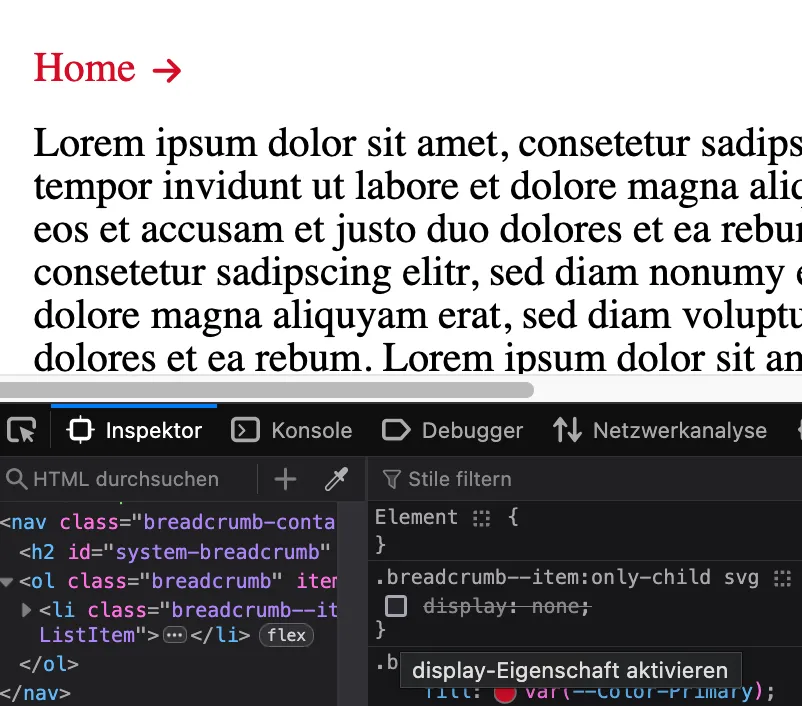
In breadcrumbs, for example, icons are often assigned for illustrating the following entries. However, under certain circumstances there may only be the initial entry, so the icon points to a blank space.
In breadcrumbs, for example, icons are often assigned for illustrating the following entries. However, under certain circumstances there may only be the initial entry, so the icon points to a blank space.
Breadcrumb <ol> with only one child <li> and icon <svg>
Solution:
Make use of the `:only-child` pseudo-class to determine whether there is only one item in the breadcrumb. See more in the Mozilla Dev Documentation
While developing a frontend theme you want to debug in a similar fashion as you would do with PHP code in your IDE, including the option to stop code interpretation at certain lines.
Before Drush version 12 we needed to write a drush.services.yml file for having dependency injection. This leads to errors when we're installing new custom Drupal modules, because the modules *.services.yml file must be instantiated before the drush.services.yml file. That makes a workaround…
<?php

declare(strict_types=1);

namespace Drupal\nice_module\Drush\Commands;

use Drupal\Component\DependencyInjection\ContainerInterface;
use Drupal\nice_module\HelloWorldService;
use Drush\Attributes as CLI;
use Drush\Commands\DrushCommands;

/**
 * A Drush command class for saying "hello" to the world.
 */
final class HelloWorldCommands extends DrushCommands {

  public function __construct(
    private readonly HelloWorldService $helloWorldService,
  ) {
    parent::__construct();
  }

  /**
   * {@inheritdoc}
   */
  public static function create(ContainerInterface $container): self {
    return new static($container->get('nice_module.hello_world_service'));
  }

  #[CLI\Command(name: 'nice_module:say-hello', aliases: ['smci'])]
  #[CLI\Argument(name: 'userName', description: 'The name of the user.')]
  public function sayHello(?string $userName = NULL): void {
    $this->helloWorldService->sayHello($userName, $this->output());
    $this->logger()->success('I said "hello" to the user.');
  }

}
Issue:
Before Drush version 12 we needed to write a drush.services.yml file for having dependency injection. This leads to errors when we're installing new custom Drupal modules, because the modules *.services.yml file must be instantiated before the drush.services.yml file. That makes a workaround necessary, where we do rename the drush.services.yml file, before we rebuild the cache for having the services from our modules *.services.yml instantiated. Also the old approach was not leveraging PHP attributes, which are available since PHP 8.
Solution:
The snippet file is meant to be located here: web/modules/custom/nice_module/src/Drush/Commands/HelloWorldCommands.php
By this approach there are no errors on new module installation, where we do have a modules `*.services.yml` and `drush.service.yml`.
Via PHP attributes our command, argument, and usage descriptions are also validated with PHP. This makes our Drush commands less error prone.
If dependencies are injected into a service class, changes must be made in both the `*.services.yml` file and the PHP class itself.
<?php

declare(strict_types=1);

namespace Drupal\my_module;

use Drupal\Core\Session\AccountInterface;
use Symfony\Component\DependencyInjection\Attribute\Autowire;

class Example {

  public function __construct(
    #[Autowire(service: 'current_user')]
    private readonly AccountInterface $currentUser,
  ) {
  }

  public function getCurrentUser(): AccountInterface {
    return $this->currentUser;
  }

}
If dependencies are injected into a service class, changes must be made in both the `*.services.yml` file and the PHP class itself.
Solution:
If we set autowiring to true in the *.services.yml file, we can use the Autowire attribute in our PHP service class. This allows us to focus on the service class itself without having to switch between the *.services.yml file and the PHP service class.
SELECT table_name AS `table`, round(((data_length + index_length) / 1024 / 1024), 2) `size in MB`
FROM information_schema.TABLES
WHERE table_schema = "DATABASE_NAME"
ORDER BY `size in MB` DESC
LIMIT 10;
Issue:
You need to sort MySQL tables by size.
Solution:
The snippet shows the size of the 10 biggest tables. DATABASE_NAME needs to be replaced by your database name.
You would like to create a custom error message shown on the page. Also, if the error occurs, it should be properly logged in the recent log messages backend area (`/admin/reports/dblog`) of your site.
<?php

$error_message = t('There is an error with this.');

\Drupal::messenger()->addError($error_message));
\Drupal::logger('my_module')->log('error', $error_message);
Issue:
You would like to create a custom error message shown on the page. Also, if the error occurs, it should be properly logged in the recent log messages backend area (`/admin/reports/dblog`) of your site.
Solution:
Use the Drupal logger and messenger service to create the errors.
A - None - option often appears in select fields, causing ambiguity for users and content editors. This option shows up even though it's not defined in the Sitebuilding configuration, leading to questions about its origin and purpose.
You want to create a local task link with a specific custom route.
Solution:
To create a local task link, define it in my_module.local.task.yml, optionally accompanied by my_module.routing.yml and MyCustomController.php. Alternatively, you can use existing routes, specifying route_name as the target of the link and base_route as the location where the link should appear.
Explanations for the most important properties in yml files
my.module.links.task.yml
yml property
Description
my_module.my_local_task_link
Machine name of the link.
route_name
The route the link leads to.
title
Human readable title of the link. Is shown on buttons or menu links.
base_route
Base route where the link is placed on.
my_module.routing.yml
yml property
Description
my_module.custom_route
Machine name of the registered route.
path
Path in URL.
defaults
Default values for the upcoming properties.
_controller
Namespace of the controller that handles the logic when the route is accessed.
_title
Human readable title of the route.
requirements
Requirements that must be met to access the route.
_permission
Permission that must be fulfilled to access the route.
Out of the box there are plenty of tokens available from the group module. In case those don't fit your needs, you can chain the group_relationship's entity tokens to get the desired value from the referenced entity.
Out of the box there are plenty of tokens available from the group module. In case those don't fit your needs, you can chain the group_relationship's entity tokens to get the desired value from the referenced entity.
Solution:
Use the snippet to gain access to chained tokens, e.g. users via group relationships.
You need to get to know the caching settings for render elements.
Solution:
Drupal 9.5 introduced a debug setting for the renderer configuration to display cache information for each rendered element (see also: https://www.drupal.org/node/3162480).
Authenticated users should never see the admin/backend theme in your websystem
<?php

namespace Drupal\scp_base\Routing;

use Drupal\Core\Routing\RouteSubscriberBase;
use Symfony\Component\Routing\RouteCollection;

class RouteSubscriber extends RouteSubscriberBase {

  /**
   * {@inheritdoc}
   */
  protected function alterRoutes(RouteCollection $collection) {
    // Make sure profile pages are not admin pages, in order to load the right
    // translation.
    if ($route = $collection->get('profile.user_page.single')) {
      $route->setOption('_admin_route', FALSE);
    }
  }

}
Issue:
Authenticated users should never see the admin/backend theme in your websystem
Prerequisites:
You need to have the profile module installed in your project.
Solution:
Paste the provided code snippet into your RouteSubscriber.php file.
The error log is full of the warning "Warning: copy(public://media-icons/generic/generic.png)" and the media library shows no previews. This can happen when environments are set up based on a database dump and without properly transferring the files. The media icons are usually created during the…
The error log is full of the warning "Warning: copy(public://media-icons/generic/generic.png)" and the media library shows no previews. This can happen when environments are set up based on a database dump and without properly transferring the files. The media icons are usually created during the installation of the media module, which will never happen in this scenario.
Solution:
Trigger the install hook of the Core Media module. It will take care of creating those files. Use the provided snippet.
You want to assign a language to a certain part of your node which differs from the set content language. That could be the case if you need to make it more readable for disabled persons who use a screenreader.
function my_module_preprocess_field(&$variables): void {
  if ($variables['element']['#bundle'] == 'my_bundle') {
    if (in_array($variables['element']['#field_name'], ['my_field'])) {
      $variables['attributes']['lang'] = 'en';
    }
  }
}
Issue:
You want to assign a language to a certain part of your node which differs from the set content language. That could be the case if you need to make it more readable for disabled persons who use a screenreader.
Solution:
Use a preprocess_field hook and set the lang attribute of that field to e.g. "en" for English. We only want this to work on nodes from the "my_bundle" type.
Search engines might index URLs multiple times if they have different destination parameters. For example if you have a login form in the sidebar the action URL might be different on each page.
Search engines might index URLs multiple times if they have different destination parameters. For example if you have a login form in the sidebar the action URL might be different on each page.
Solution:
Insert the provided entries into your robots.txt file.
You need to load an object by a value in a nested data structure, e.g. by its ID.
/**
 * Loads an object from another object by value of a certain key.
 *
 * @usage
 *   data = [
 *     'foo': {
 *         'id' => 5,
 *         'label' => 'Foo'
 *     },
 *     'bar': {
 *         'id' => 6,
 *         'label' => 'Bar'
 *     }
 *   ]
 *   foo = getObjectFromDataByKeyValue('id', 5, data)
 *
 * @param key
 *   The key we are comparing our value with.
 * @param value
 *   The value the key should have.
 * @param data
 *   The data you want to search in.
 * @returns {unknown}
 */
function getObjectFromDataByKeyValue(key, value, data) {
  return Object.values(data).find(o => o[key] === value)
}
Issue:
You need to load an object by a value in a nested data structure, e.g. by its ID.