Direkt zum Inhalt

Devbits

Kleine Code-Schnipsel aus unserem Alltag mit Drupal, PHP und DevOps: Problem, Lösung, Code.

23.10.2026 | Michael Ebert

Translate tab missing on custom config form

You have created a custom Drupal configuration form but no Translate tab appears when you access it.

my_module.my_form_configuration_tab:
  route_name: my_module.my_form_configuration
  title: Configuration
  base_route: my_module.my_form_configuration

Issue:

You have created a custom Drupal configuration form but no Translate tab appears when you access it.

The config_translation module automatically derives the Translate tab from the configuration mapper. However, Drupal only renders the local task (tab) navigation when there are at least two tabs on the same level. Since the Translate tab is the only local task available, Drupal does not display the tab navigation, causing the Translate tab to remain hidden.

Prerequisites:

You have the config_translations module enabled.

Solution:

Drupal Core solves the issue for settings forms by providing a default tab. We apply the same approach in our module by adding a default local task, which allows Drupal to render the tab navigation and display the Translate tab.

08.10.2026 | Michael Ebert

Filter user entity reference field options to active users only

In a Drupal entity reference field configured to reference user accounts, the select list currently includes all users, including blocked or deactivated accounts.

Option 1 (recommended): custom entity reference selection handler. Further options down below.

<?php

namespace Drupal\my_module\Plugin\EntityReferenceSelection;

use Drupal\Core\Entity\Plugin\EntityReferenceSelection\UserSelction;
use Drupal\Core\StringTranslation\TranslatableMarkup;

#[EntityReferenceSelection(
  id: "default:active_user",
  label: new TranslatableMarkup("User selection (only active users)"),
  entity_types: ["user"],
  group: "default",
  weight: 1
)]
class ActiveUserSelection extends UserSelection {

  /**
   * {@inheritdoc}
   */
  protected function buildEntityQuery($match = NULL, $match_operator = 'CONTAINS') {
    $query = parent::buildEntityQuery($match, $match_operator);
    $query->condition('status', 1);

    return $query;
  }

}

After implementing that plugin, you need to activate it on the entity form display for the field you want it.

Issue:

In a Drupal entity reference field configured to reference user accounts, the select list currently includes all users, including blocked or deactivated accounts.

Expected behavior: only active users should be available for selection by default, or there should be a configurable option to exclude inactive accounts from the reference field results.

Solution:

See the three examples described above.

Option 1 (custom Selection handler, see above)

The best general-purpose solution. It uses the exact extension point Drupal designed for this problem, is scoped precisely to the fields where you assign it, is trivially unit/kernel-testable, and doesn't rely on fragile internals like query tags and metadata that can silently break across core updates.

Option 2: Query tag alter

Avoid this unless you have a very narrow, temporary need and full control over exactly which query is being altered. It's the least robust of the three and the easiest to get wrong (over-broad conditions affecting unrelated queries, or under-broad checks that silently stop working after a core update).

/**
 * Implements hook_entity_query_tag__TAG_alter().
 */
function my_module_entity_query_tag__entity_reference_alter(QueryInterface $query) {
  $handler = $query->getMetadata('entity_reference_selection_handler');

  if (!$handler) {
    return;
  }

  $configuration = $handler->getConfiguration();

  if (($configuration['target_type'] ?? NULL) !== 'user') {
    return;
  }

  // Filter for active users only.
  $query->condition('status', 1);
}

Option 3: entity reference view display

  1. Edit your Entity Reference field and select "Views: Filter by an entity reference view" as the reference method.
  2. Create or select a View that displays only the entities you want to show. Configure filters, sorting, and fields as needed.

The View's filters automatically control which options appear in the dropdown. No custom code required – it's all configured through the UI.

This can be chosen if (sitebuilders/editors need to have permissions to edit the view and maybe there is a config_ignore for that to prevent overrides during deployments):

  • Site builders/editors need to tweak the filtering criteria without a deployment (e.g., "also exclude role X" added later via UI), or
  • You need additional Views features (exposed filters, sorting by last login, relationships to other entities) in the same selection.
05.10.2026 | Michael Ebert

Enable the admin theme for your custom route

You are registering a new route and would like it to be displayed using the administrative theme.

my_module.edit:
  options:
    # Enable the admin theme for this route.
    _admin_route: TRUE

Issue:

You are registering a new route and would like it to be displayed using the administrative theme.

Solution:

To enable the admin theme on your custom route, you can add it as option in your routing.yml file. But keep in mind that this will only work for users that have permission to use the admin theme!

See the Drupal documentation for further information.

13.08.2026 | Pascal Crott

Can't save Form API autocomplete when referencing too many elements

Sometimes you can't save entity_autocomplete fields when selecting to many items. This comes from the fact that the form element is technically based on the textfield element. This results in inheriting all of the textfield specific properties and behaviors and one of them is a maxlength which…

If this does not work...

$form['nodes'] = [
    '#title' => $this->t('Select articles'),
    '#type' => 'entity_autocomplete',
    '#target_type' => 'node',
    '#tags' => TRUE,
    '#selection_handler' => 'default',
    '#selection_settings' => ['target_bundles' => ['article']],
    '#default_value' => $default_nodes,
];

...try adding an increased maxlength value:

$form['nodes'] = [
    '#title' => $this->t('Select articles'),
    '#type' => 'entity_autocomplete',
    '#target_type' => 'node',
    '#maxlength' => 1024,
    '#tags' => TRUE,
    '#selection_handler' => 'default',
    '#selection_settings' => ['target_bundles' => ['article']],
    '#default_value' => $default_nodes,
];

Issue: 

Sometimes you can't save entity_autocomplete fields when selecting to many items. This comes from the fact that the form element is technically based on the textfield element. This results in inheriting all of the textfield specific properties and behaviors and one of them is a maxlength which limits the text input to 128 characters.

Solution: 

To fix this, increase the maxlength value for your autocomplete field.

13.11.2025 | Lothar Ferreira Neumann

How to place HTML elements into webforms via the Source tab

You want to insert headings or other text elements into a web form, e.g. to subdivide it for better readability and/or understandability.

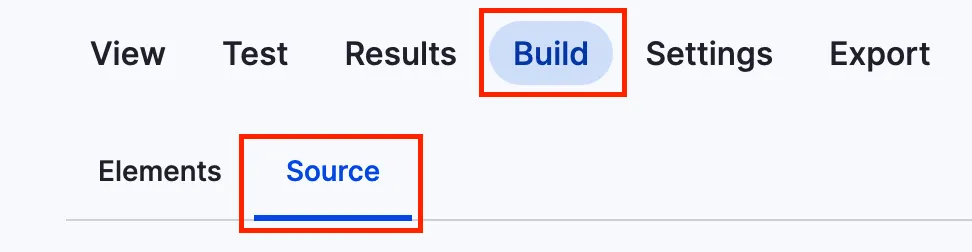
You can add headlines to a webform using the code below. To get to the source section, navigate to the form you want to alter, click on build and then on the source tab like in the screenshot.

Screenshot of the menu to add code to webform

This is just a short example on how to add a headline.

personal_data:
  '#type': html_tag
  '#tag': h3
  '#value': 'Personal data'

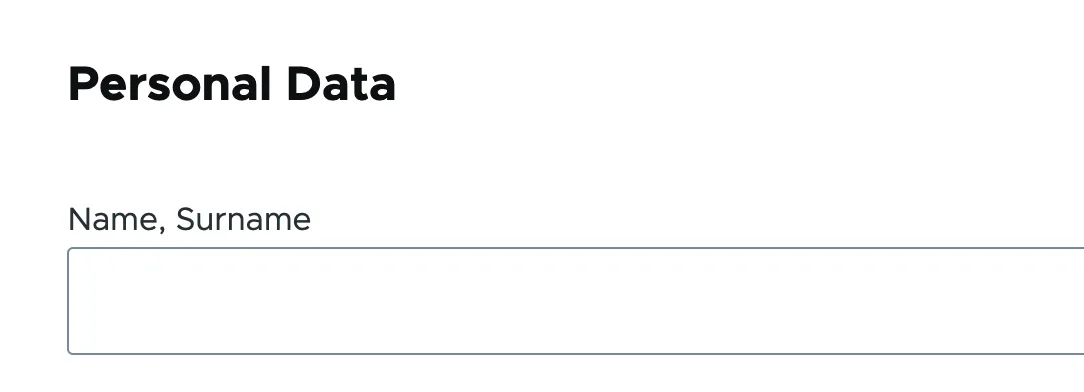
It will look something like this:

Headline within a webform

Issue:

You want to insert headings or other text elements into a web form, e.g. to subdivide it for better readability and/or understandability.

Solution:

Use a structured data format to define HTML elements that add the headline "Personal Data" to a web form.

13.11.2025 | Pascal Crott

Prevent the user profile from being displayed in backend theme using RouteSubscriber

Authenticated users should never see the admin/backend theme in your websystem

<?php

namespace Drupal\scp_base\Routing;

use Drupal\Core\Routing\RouteSubscriberBase;
use Symfony\Component\Routing\RouteCollection;

class RouteSubscriber extends RouteSubscriberBase {

  /**
   * {@inheritdoc}
   */
  protected function alterRoutes(RouteCollection $collection) {
    // Make sure profile pages are not admin pages, in order to load the right
    // translation.
    if ($route = $collection->get('profile.user_page.single')) {
      $route->setOption('_admin_route', FALSE);
    }
  }

}

Issue:

Authenticated users should never see the admin/backend theme in your websystem

Prerequisites:

You need to have the profile module installed in your project.

Solution:

Paste the provided code snippet into your RouteSubscriber.php file.