Direkt zum Inhalt

Devbits

Kleine Code-Schnipsel aus unserem Alltag mit Drupal, PHP und DevOps: Problem, Lösung, Code.

14.10.2026 | Lothar Ferreira Neumann

Require a module that is incompatible with your Drupal Core version

Managing dependencies in a Drupal project where certain modules may not be compatible with the Core version you are using.

# Get lenient.
composer require mglaman/composer-drupal-lenient

# Add the module to the allow list. Use escapes for the quote signs. \" ... \"
composer config --merge --json extra.drupal-lenient.allowed-list '[\"drupal/module_with_incompatible_core_version\"]'

# You can check if the merge worked, either just take a look
# into the composer.json or use this command.
composer config --merge --json extra.drupal-lenient.allowed-list
"drupal-lenient": {
  "allowed-list": [
    "drupal/module_with_incompatible_core_version"
  ]
}

Issue:

Managing dependencies in a Drupal project where certain modules may not be compatible with the Core version you are using.

Prerequisites:

Your project needs to be Composer managed.

Solution:

The code uses the mglaman/composer-drupal-lenient package to allow specific Drupal modules that are incompatible with the core version to be installed without causing version conflicts.

Learn more in the Lenient install tutorial.

09.07.2026 | Michael Ebert

Install comment_notify module to have an easy solution to subscribe/unsubscribe to nodes like a forum topic.

You want to get informed about updates on nodes like forum topics and need an easy solution to subscribe to it.

Installation with composer:

composer require 'drupal/comment_notify'

Enable with drush:

drush pm:install comment_notify

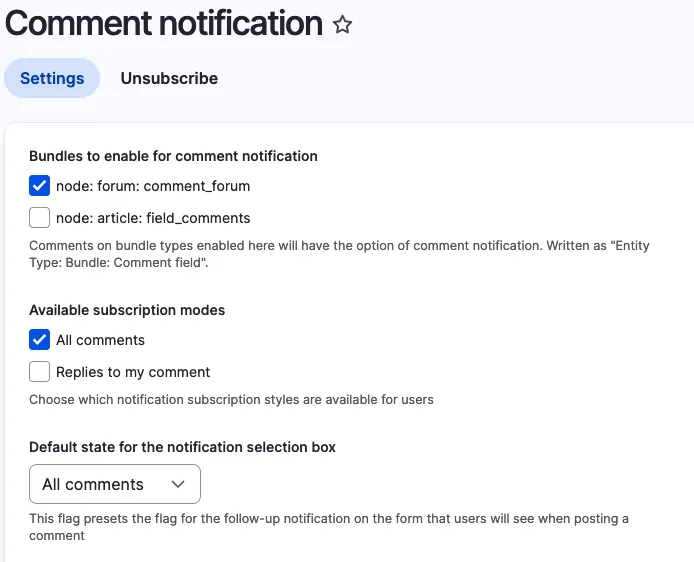
Configure it under ../admin/config/people/comment_notify.
Select the Bundle on that you want to enable it. Chose "All Comments" under availible subscription modes and set it as default state. 
 

Comment Notify Configuration

Issue:

You want to get informed about updates on nodes like forum topics and need an easy solution to subscribe to it. 

Solution:

During research we found the comment_notify module.

Conclusion:

Install the module, enable it, configure it. Thats it.

15.01.2026 | Mathias Grab

Show installed module information via composer

When working on a Composer based project, you may need to check the installed version, dependencies, and other details of a specific package.

# Syntax.
composer show vendor/package

# Example.
composer show drupal/eca
name     : drupal/eca
descrip. : Event, Conditions, Actions - powerful, versatile, and user-friendly rules engine for Drupal
keywords : 
versions : * 2.1.0
type     : drupal-module
license  : GNU General Public License v2.0 or later (GPL-2.0-or-later) (OSI approved) https://spdx.org/licenses/GPL-2.0-or-later.html#licenseText
homepage : https://www.drupal.org/project/eca
source   : [git] https://git.drupalcode.org/project/eca.git 2.1.0
dist     : [zip] https://ftp.drupal.org/files/projects/eca-2.1.0.zip 2.1.0
path     : /var/www/html/web/modules/contrib/eca
names    : drupal/eca

support
source : https://drupal.org/project/eca
issues : https://drupal.org/project/issues/eca

requires
dragonmantank/cron-expression ^3.1
drupal/core ^10.3||^11
ext-dom *
ext-json *
mtownsend/xml-to-array ^2.0
php >=8.1

requires (dev)
drupal/eca_ui *
drupal/entity_reference_revisions ^1.12
drupal/inline_entity_form ^3.0
drupal/paragraphs ^1.18
drupal/token ^1.15
drupal/webform dev-3465838-drupal-11-compatibility

Issue:

When working on a Composer based project, you may need to check the installed version, dependencies, and other details of a specific package.

Solution:

Use the command composer show vendor/package to retrieve detailed information about the package, including its version, description, dependencies, license, and more. This helps in debugging, verifying versions, and managing dependencies effectively.

See the Composer documentation for more info.