Extend the Core plugin using the provided copy-and-paste snippet.
The snippet checks whether the current entity has translations. If any are found, the language options are reduced to those for which a translation exists.
A standalone script – for example a monitoring, backup, or migration helper – needs direct database access without bootstrapping the full Drupal framework. Duplicating database credentials in the script is undesirable since they would need to be kept in sync with settings.php.
Solution:
The snippet provided allows PHP debugging. Use it to check whether your database connection works on PHP level.
The script includes settings.php directly, which populates the $databases array as Drupal itself does during bootstrap. Credentials are then read from $databases['default']['default'], avoiding hardcoded or duplicated connection details.
A PDO connection is built from these values. PDO::MYSQL_ATTR_SSL_VERIFY_SERVER_CERT => TRUE enforces SSL certificate verification on the connection – relevant when the database host requires or supports TLS, such as many managed hosting environments.
Since settings.php is plain PHP, including it outside of Drupal's bootstrap process only defines variables and does not require Drupal's autoloader or dependency injection container.
Gin per default enhances all tables to use sticky headers and other goodies. But sometimes you just want to have a simple table without the enhancements.
<?php

/**
 * Implements hook_theme_suggestions_HOOK_alter() for table.
 */
function hook_theme_suggestions_table_alter(array &$suggestions, array $variables): void {
  if (empty($variables['attributes']['class'])) {
    return;
  }

  if (is_array($variables['attributes']['class']) && in_array('ief-entity-table', $variables['attributes']['class'])) {
    $suggestions[] = 'table__simple';
  }
}
Issue:
Gin per default enhances all tables to use sticky headers and other goodies. But sometimes you just want to have a simple table without the enhancements.
Solution:
There is a "table--simple" template provided by Gin which you can make use of by defining the theme suggestion for your table. In this example we use simple tables for inline entity form tables, since those are complex tables which don't always work together smoothly with gin tables.
You can add this to your docker-compose.yml for any service ('web' is our example here) to prevent it from reaching the internet. This can be useful to isolate a potentially unsafe project for an audit for example.
services:
  web:
    cap_drop:
      - NET_RAW
Issue:
A containerised Drupal service – or any web service – running in an offline or restricted environment should not be able to send raw network packets. By default, Docker grants containers the NET_RAW Linux capability, which allows tools like ping and arping to craft raw IP packets. This is unnecessary for a web container and increases the attack surface.
Solution:
You can add this to your docker-compose.yml for any service ('web' is our example here) to prevent it from reaching the internet. This can be useful to isolate a potentially unsafe project for an audit for example.
A views filter based on taxonomy terms should not show all terms as filterable options, e.g. because they are internal
<?php

use Drupal\Component\Utility\Html;
use Drupal\Core\Form\FormStateInterface;


/**
 * Implements hook_form_FORM_ID_alter() for 'views_exposed_form'.
 */
function hook_form_views_exposed_form_alter(&$form, FormStateInterface $form_state) {
  // Configure the values to your needs.
  $view_name = 'my_view';
  $display_name = 'my_display';
  $entity_type_id = 'taxonomy_term';
  $reference_field = 'field_category';
  // The field on the referenced entity.
  $flag_on_reference_field = 'field_hide_on_exposed_form';

  if ($form['#id'] == Html::getId("views-exposed-form-{$view_name}-{$display_name}")) {
    $entity_storage = \Drupal::entityTypeManager()->getStorage($entity_type_id);
    $options = &$form[$reference_field]['#options'];
    foreach ($entity_storage->loadMultiple(array_keys($options)) as $id => $entity) {
      if ($entity->hasField($flag_on_reference_field) && !$entity->{$flag_on_reference_field}->isEmpty()) {
        unset($options[$id]);
      }
    }
  }
}
Issue:
A views filter based on taxonomy terms should not show all terms as filterable options, e.g. because they are internal
Solution:
Create a field on your taxonomy to determine whether it should be included in filters, then alter your form so it reacts to the field setting. You can copy-paste the code provided into your module.
You cannot change the specification of an existing field if it already has content. The reason for this is that the content itself may need to be changed as well.
<?php

/**
 * Change my_basefield max_length to 255.
 */
function my_module_update_10001() {
  $entity_type_id = 'my_entity';
  $field_name = 'my_basefield';
  $field_length = 255;

  /** @var \Drupal\Core\Entity\EntityLastInstalledSchemaRepositoryInterface $schema_repository */
  $schema_repository = \Drupal::service('entity.last_installed_schema.repository');
  /** @var \Drupal\Core\Entity\EntityFieldManager $entity_field_manager */
  $entity_field_manager = \Drupal::service('entity_field.manager');
  /** @var Drupal\Core\Field\BaseFieldDefinition[] $base_field_definitions */
  $base_field_definitions = $entity_field_manager->getBaseFieldDefinitions($entity_type_id);
  $schema_repository->setLastInstalledFieldStorageDefinition($base_field_definitions[$field_name]);
  $field_storage_definitions = $schema_repository->getLastInstalledFieldStorageDefinitions($entity_type_id);

  // Update the serialized schema property.
  $rc = new \ReflectionClass($field_storage_definitions[$field_name]);
  $schema_property = $rc->getProperty('schema');
  $schema_property->setAccessible(TRUE);
  $schema = $field_storage_definitions[$field_name]->getSchema();
  $schema['columns']['value']['length'] = $field_length;
  $schema_property->setValue($field_storage_definitions[$field_name], $schema);

  // Update the field definition in the last installed schema repository.
  $schema_repository->setLastInstalledFieldStorageDefinitions($entity_type_id, $field_storage_definitions);

  // Update the storage schema.
  $key_value = \Drupal::keyValue('entity.storage_schema.sql');
  $key_name = $entity_type_id . '.field_schema_data.' . $field_name;
  $storage_schema = $key_value->get($key_name);
  // Update all tables where the field is present.
  foreach ($storage_schema as &$table_schema) {
    $table_schema['fields'][$field_name]['length'] = $field_length;
  }
  $key_value->set($key_name, $storage_schema);

  // Update the database tables where the field is part of.
  $db = Drupal::database();
  foreach ($storage_schema as $table_name => $table_schema) {
    $db->schema()->changeField($table_name, $field_name, $field_name, $table_schema['fields'][$field_name]);
  }

}
Issue:
You cannot change the specification of an existing field if it already has content. The reason for this is that the content itself may need to be changed as well.
Solution:
In case you just want to increase the size of a varchar field, here is an example of an update hook. Don't forget to also update the max_length in the baseFieldDefinitions method of your Entity class.
Blocks inside a layout region are not sorted by weight property per default, even though the weight is used for rendering in the rendering process. But when you work with the blocks in a template directly you can't make sure they appear in the right order.
/**
 * Implements hook_preprocess_HOOK() for layout.html.twig.
 */
function hook_preprocess_layout(&$variables) {
  $layout = $variables['layout'];
  foreach ($layout->getRegionNames() as $region_name) {
    if (array_key_exists($region_name, $variables['content'])) {
      uasort($variables['content'][$region_name], [\Drupal\Component\Utility\SortArray::class, 'sortByWeightProperty']);
    }
  }
}
Issue:
Blocks inside a layout region are not sorted by weight property per default, even though the weight is used for rendering in the rendering process. But when you work with the blocks in a template directly you can't make sure they appear in the right order.
Solution:
Preprocess the regions and use the Drupal Core sortByWeightProperty mechanism to change the order of the blocks in the array before entering the template.
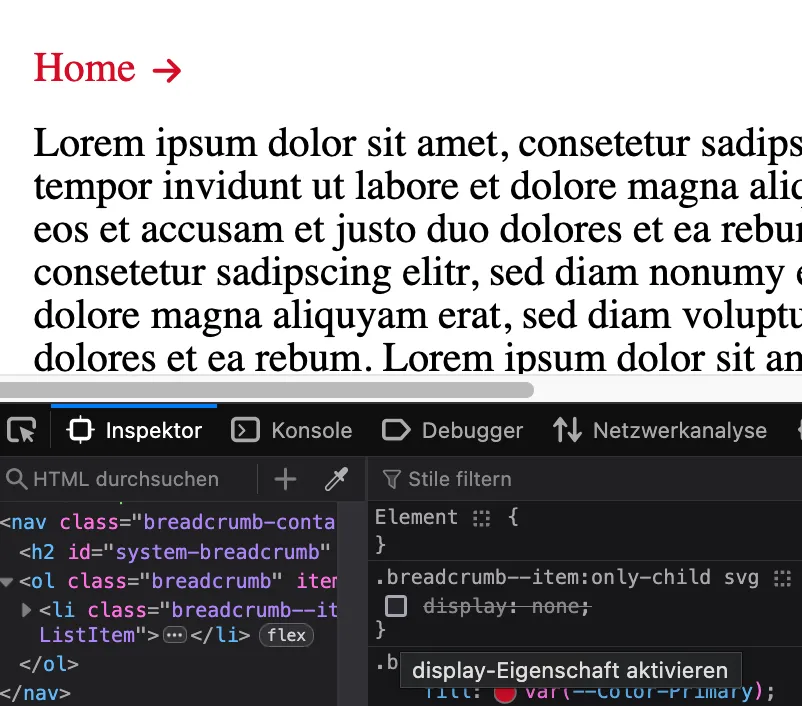
In breadcrumbs, for example, icons are often assigned for illustrating the following entries. However, under certain circumstances there may only be the initial entry, so the icon points to a blank space.
In breadcrumbs, for example, icons are often assigned for illustrating the following entries. However, under certain circumstances there may only be the initial entry, so the icon points to a blank space.
Breadcrumb <ol> with only one child <li> and icon <svg>
Solution:
Make use of the `:only-child` pseudo-class to determine whether there is only one item in the breadcrumb. See more in the Mozilla Dev Documentation
You are on a page which has a large amount of HTML details elements, for instance translations, and you need to find a certain bit of information by searching the page.
let details = document.getElementsByTagName('details');
for (i = 0; i < details.length; ++i) {
  details.item(i).open = true;
}
Issue:
You are on a page which has a large amount of HTML details elements, for instance translations, and you need to find a certain bit of information by searching the page.
Solution:
The provided snippet opens all details on a page. This can be copy-and-pasted to the browser console to easily access all the fields hidden behind the nested details.
You want to establish a redirect from an old domain of a client to their new domain but the certificate should remain the same, supporting all URI arguments
You want to establish a redirect from an old domain of a client to their new domain but the certificate should remain the same, supporting all URI arguments
Prerequisites:
This only works for kubernetes / K8S and nginx ingress based infrastructure environments.