Direkt zum Inhalt

Devbits

Kleine Code-Schnipsel aus unserem Alltag mit Drupal, PHP und DevOps: Problem, Lösung, Code.

09.07.2026 | Holger Weischenberg

Hide HTML comments in Chrome and Firefox browser inspector

Long HTML comments disturb the developer while debugging the HTML structure.

Image showing various settings options in a developer tools interface.

Issue:

Long HTML comments disturb the developer while debugging the HTML structure.

An example:

<main role="main">
    <a id="main-content" tabindex="-1"></a>
    <div class="layout-content">
      

<!-- THEME DEBUG -->
<!-- THEME HOOK: 'region' -->
<!-- FILE NAME SUGGESTIONS:
   ▪️ region--content.html.twig
   ✅ region.html.twig
-->
<!-- BEGIN OUTPUT from 'themes/contrib/classy/templates/layout/region.html.twig' -->
  <div class="region region-content">
    

<!-- THEME DEBUG -->
<!-- THEME HOOK: 'block' -->
<!-- FILE NAME SUGGESTIONS:
   ▪️ block--ef10-messages.html.twig
   ✅ block--system-messages-block.html.twig
   ▪️ block--system.html.twig
   ▪️ block.html.twig
-->

Solution:

Chrome and other Chromium-based browsers 

provide an option to hide comments in the Elements panel. Open the Inspector and click on Settings. Then scroll down to the Elements section. Uncheck the “show HTML comments” option.

1. Open the browser's Developer Tools:

  • Press F12, or
  • Press Ctrl + Shift + I (Windows/Linux), or
  • Right-click an element and select Inspect.

2. Open the DevTools settings:

  • Click the Settings (⚙) icon in the DevTools toolbar.
  • The Settings icon is located near the upper-right corner of DevTools, immediately to the left of the three-dot menu.

3. In the Preferences tab, scroll down to the Elements section. 

4. Clear the Show HTML comments checkbox. (as shown in the screenshot above)

5. Close the Settings panel.

HTML comments (<!-- comment -->) are now hidden in the Elements panel, making the DOM tree easier to navigate and debug. To display comments again, re-enable the Show HTML comments option.

Firefox

Recent Firefox versions provide a similar setting in the Inspector. If the option is not available in your Firefox installation, update to the latest version.
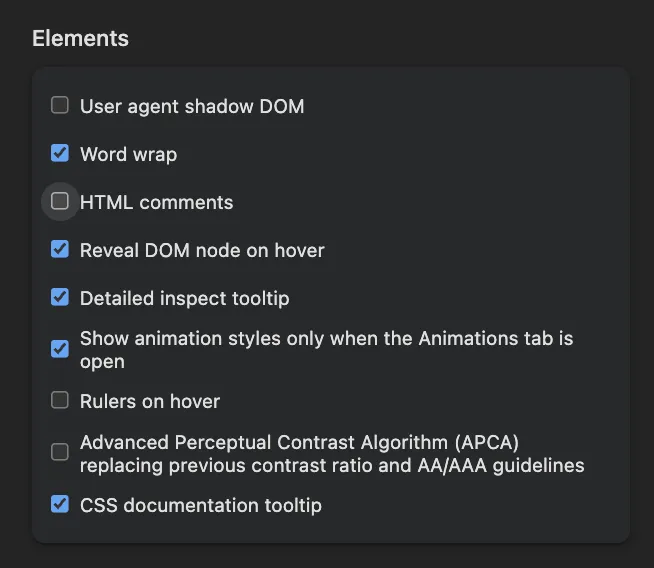
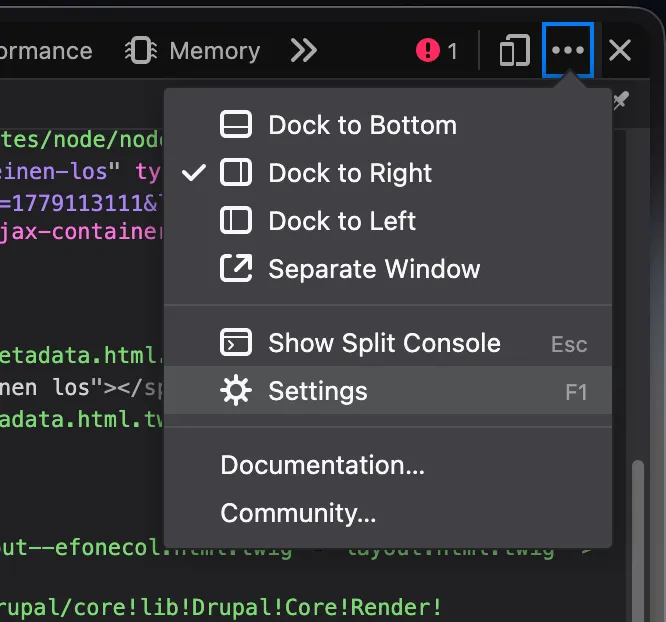
Firefox: „Einstellungen“-Menü im Entwicklerwerkzeug öffnen.

22.06.2026 | Mathias Grab

How to enable Twig debug in Drupal

You work with Twig templates and need to use the debugger.

parameters:
  twig.config:
    debug: true
    auto_reload: null
    cache: false

Issue:

You work with Twig templates and need to use the debugger.

Solution:

Code solution:
Enable Twig debug by copying the snippet provided from root/web/sites/default.services.yml into root/web/sites/development.services.yml

See also: Drupal Docs on Twig

Sitebuilding solution:
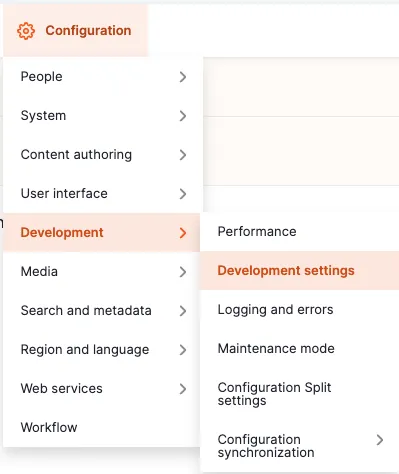
Navigate to the administrative area via the admin toolbar to Configuration -> Development -> Development settings or via the path /admin/config/development/settings
 

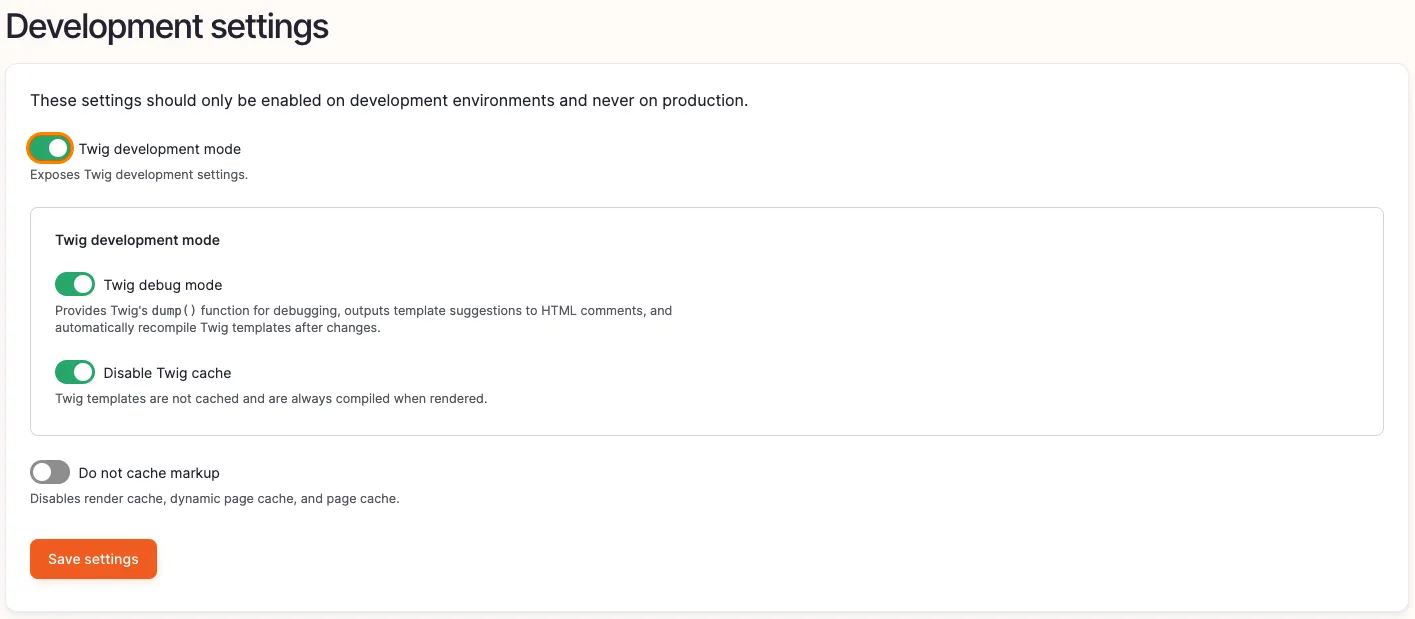
Enabling twig debug 1


Enable the checkbox Twig development mode, as well as Twig debug mode and Disable Twig cache.
 

Enabling twig debug 3

For further information regarding Drupal and Twig take a look at  https://www.drupal.org/docs/develop/theming-drupal/twig-in-drupal/debugging-twig-templates

Info

This should only be used for local development environments but disabled in production.

13.11.2025 | Nikolas Kopp

Clear APC & Opcache

You need to clear APC and Opcache, e.g. for debugging purposes.

<?php

apcu_clear_cache();
opcache_reset();

Issue:

You need to clear APC and Opcache, e.g. for debugging purposes.

Solution:

drush php:script clear_cache 

This snippet clears APCu and Opcache. Put it into the docroot. Execute from browser, not from CLI.

See the drush documentation for more info.

13.11.2025 | Nikolas Kopp

Cache Debugging for Render Elements

You need to get to know the caching settings for render elements.

  renderer.config:
    required_cache_contexts: ['languages:language_interface', 'theme', 'user.permissions']
    auto_placeholder_conditions:
      max-age: 0
      contexts: ['session', 'user']
      tags: []
    debug: true # The debug setting

Issue:

You need to get to know the caching settings for render elements.

Solution:

Drupal 9.5 introduced a debug setting for the renderer configuration to display cache information for each rendered element (see also: https://www.drupal.org/node/3162480).

13.11.2025 | Pascal Crott

Fix broken media previews

The error log is full of the warning "Warning: copy(public://media-icons/generic/generic.png)" and the media library shows no previews. This can happen when environments are set up based on a database dump and without properly transferring the files. The media icons are usually created during the…

drush php-eval "\Drupal::moduleHandler()->loadInclude('media', 'install');media_install();";

Issue:

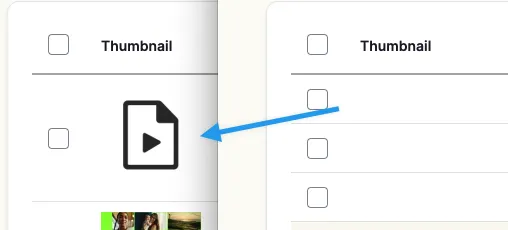
The error log is full of the warning "Warning: copy(public://media-icons/generic/generic.png)" and the media library shows no previews. This can happen when environments are set up based on a database dump and without properly transferring the files. The media icons are usually created during the installation of the media module, which will never happen in this scenario.

Devbit broken media preview icons

Solution:

Trigger the install hook of the Core Media module. It will take care of creating those files. Use the provided snippet.

See also https://www.drupal.org/project/drupal/issues/3060509