Direkt zum Inhalt

Devbits

Kleine Code-Schnipsel aus unserem Alltag mit Drupal, PHP und DevOps: Problem, Lösung, Code.

05.10.2026 | Michael Ebert

Enable the admin theme for your custom route

You are registering a new route and would like it to be displayed using the administrative theme.

my_module.edit:
  options:
    # Enable the admin theme for this route.
    _admin_route: TRUE

Issue:

You are registering a new route and would like it to be displayed using the administrative theme.

Solution:

To enable the admin theme on your custom route, you can add it as option in your routing.yml file. But keep in mind that this will only work for users that have permission to use the admin theme!

See the Drupal documentation for further information.

30.07.2026 | Lothar Ferreira Neumann

Merge multidimensional arrays in Drupal

You want to merge configurations in nested associative arrays without overwriting existing values.

use Drupal\Component\Utility\NestedArray;

// Parent array with default settings.
$parent_array = [
    'config' => [
        'theme' => 'dark',
        'layout' => [
            'width' => 800,
            'height' => 600,
        ],
    ],
];

// Child array adds more nested data but doesn't override existing values.
$child_array = [
    'config' => [
        'layout' => [
            'depth' => 300, // New nested key
        ],
        'features' => [
            'animations' => true, // New section
        ],
    ],
];

// Merge both arrays.
$merged_array = NestedArray::mergeDeep($parent_array, $child_array);
[
    'config' => [
        // Unchanged (not overridden)
        'theme' => 'dark', 
        'layout' => [
            // Keeps parent value
            'width' => 800, 
            // Keeps parent value  
            'height' => 600,
            // New nested key added
            'depth' => 300,   
        ],
        'features' => [
            // New section added
            'animations' => true, 
        ],
    ],
]

Issue:

You want to merge configurations in nested associative arrays without overwriting existing values.

Solution:

The code merges two nested arrays, preserving original values and adding new nested entries where they don't exist.

See the Drupal Nested Array documentation for more on the topic.
07.05.2026 | Peter Gerken

Run missing entity Schema updates

When you see the "Entity type needs to be updated" message on the Drupal status page, usually it's not possible to solve it without custom code.

⚠️ WARNING: Potential data loss. Use with caution.

/**
 * Run missing database schema updates.
 */
function mymodule_update_10001(&$sandbox) {
  $entity_type_manager = \Drupal::entityTypeManager();
  $entity_type_manager->clearCachedDefinitions();
  $change_summary = \Drupal::service('entity.definition_update_manager')->getChangeSummary();
  foreach ($change_summary as $entity_type_id => $change_list) {
    $entity_type = $entity_type_manager->getDefinition($entity_type_id);
    \Drupal::entityDefinitionUpdateManager()->installEntityType($entity_type);
  }
}

Issue:

When you see the "Entity type needs to be updated" message on the Drupal status page, usually it's not possible to solve it without custom code.

Solution:

Use this update hook in your custom module to force entity definition updates on next deployment.

Conclusion:

This is basically "drush entup", which was removed because it lead to data deletion in certain instances.

Beware:

Only use with caution and verify if this really yields the result you wanted - especially test for potential data loss.

Docs for the service if you want to know more can be found on drupal.org.

26.03.2026 | Dominik Wille

Quick start: module testing on drupal.org

You want to run your automated Drupal module tests on drupal.org

curl https://git.drupalcode.org/project/gitlab_templates/-/raw/main/gitlab-ci/template.gitlab-ci.yml > .gitlab-ci.yml

Issue:

You want to run your automated Drupal module tests on drupal.org

Solution:

Customize the command to fit your module and execute it.

05.03.2026 | Michael Ebert

How to output the processed value of a WYSIWYG text field

You need to output the processed value of a WYSIWYG text field to the user.

$raw_value = $entity->my_text_field->value;
echo $raw_value;  // Outputs the raw data
$processed_value = $entity->my_text_field->processed;
echo $processed_value;  // Outputs the processed and safe-to-display data

Issue:

You need to output the processed value of a WYSIWYG text field to the user.

Solution:

For text fields there is a nice property that gives you the processed value directly. Let's have a quick look at the differences:

 unprocessed (raw) outputprocessed output
Field property->value->processed
When to Use
  • when you need the original, unaltered data.
  • when you plan to apply custom processing or formatting.
  • for programmatic manipulation or calculations that require raw data.
  • When displaying the field value directly to users.
  • when you need a value that has been filtered or formatted according to site settings (e.g., text formats, HTML filtering).
  • to ensure consistency in how field data is presented across the site.

CAUTION: The field property 'processed' only exists on WYSIWYG textfields!

29.01.2026 | Marc Hitscherich

Increasing the length of a basefield with data

You cannot change the specification of an existing field if it already has content. The reason for this is that the content itself may need to be changed as well.

<?php

/**
 * Change my_basefield max_length to 255.
 */
function my_module_update_10001() {
  $entity_type_id = 'my_entity';
  $field_name = 'my_basefield';
  $field_length = 255;

  /** @var \Drupal\Core\Entity\EntityLastInstalledSchemaRepositoryInterface $schema_repository */
  $schema_repository = \Drupal::service('entity.last_installed_schema.repository');
  /** @var \Drupal\Core\Entity\EntityFieldManager $entity_field_manager */
  $entity_field_manager = \Drupal::service('entity_field.manager');
  /** @var Drupal\Core\Field\BaseFieldDefinition[] $base_field_definitions */
  $base_field_definitions = $entity_field_manager->getBaseFieldDefinitions($entity_type_id);
  $schema_repository->setLastInstalledFieldStorageDefinition($base_field_definitions[$field_name]);
  $field_storage_definitions = $schema_repository->getLastInstalledFieldStorageDefinitions($entity_type_id);

  // Update the serialized schema property.
  $rc = new \ReflectionClass($field_storage_definitions[$field_name]);
  $schema_property = $rc->getProperty('schema');
  $schema_property->setAccessible(TRUE);
  $schema = $field_storage_definitions[$field_name]->getSchema();
  $schema['columns']['value']['length'] = $field_length;
  $schema_property->setValue($field_storage_definitions[$field_name], $schema);

  // Update the field definition in the last installed schema repository.
  $schema_repository->setLastInstalledFieldStorageDefinitions($entity_type_id, $field_storage_definitions);

  // Update the storage schema.
  $key_value = \Drupal::keyValue('entity.storage_schema.sql');
  $key_name = $entity_type_id . '.field_schema_data.' . $field_name;
  $storage_schema = $key_value->get($key_name);
  // Update all tables where the field is present.
  foreach ($storage_schema as &$table_schema) {
    $table_schema['fields'][$field_name]['length'] = $field_length;
  }
  $key_value->set($key_name, $storage_schema);

  // Update the database tables where the field is part of.
  $db = Drupal::database();
  foreach ($storage_schema as $table_name => $table_schema) {
    $db->schema()->changeField($table_name, $field_name, $field_name, $table_schema['fields'][$field_name]);
  }

}

Issue:

You cannot change the specification of an existing field if it already has content. The reason for this is that the content itself may need to be changed as well.

Solution:

In case you just want to increase the size of a varchar field, here is an example of an update hook. Don't forget to also update the max_length in the baseFieldDefinitions method of your Entity class.

18.12.2025 | Dominik Wille

How to pass a context to a condition plugin instance

You want to manually create a condition instance (e.g.: "am I on an article?") but it will initially lack a runtime context which would usually be provided by the integrating UI / system, e.g. visibility settings on blocks.

use ConditionAccessResolverTrait;


$conditions = [];
foreach ($conditions as $condition_id => $condition) {
  if ($condition instanceof ContextAwarePluginInterface) {
    try {
      $contexts = $this->contextRepository->getRuntimeContexts(array_values($condition->getContextMapping()));
      $this->contextHandler->applyContextMapping($condition, $contexts);
    }
    catch (MissingValueContextException $e) {
      $missing_value = TRUE;
    }
    catch (ContextException $e) {
      $missing_context = TRUE;
    }
  }
  $conditions[$condition_id] = $condition;
}

$this->resolveConditions($conditions, 'and')

Issue:

You want to manually create a condition instance (e.g.: "am I on an article?") but it will initially lack a runtime context which would usually be provided by the integrating UI / system, e.g. visibility settings on blocks.

Solution:

Use the snippet provided to insert all available runtime contexts. This way, yours will be included.

18.12.2025 | Michael Böker

How to add a password field to an entity as the Field_UI has none to offer

You want to add a password field to an entity via the field_ui. It does not work, and – as a reminder to recurring devs – is not supposed to work. The UI is switched off in the core definition.

/**
 * Defines the 'password' entity field type.
 *
 * @FieldType(
 *   id = "password",
 *   label = @Translation("Password"),
 *   description = @Translation("An entity field containing a password value."),
 *   no_ui = TRUE,
 * )
 */

Issue:

You want to add a password field to an entity via the field_ui. It does not work, and – as a reminder to recurring devs – is not supposed to work. The UI is switched off in the core definition.

Solution:

If you need a password field, first evaluate the necessity to save a password in the database – this might create a serious security risk. 

If your project requires it anyway, you either have to create a custom widget for a textfield or use the module Password field.

12.12.2025 | Pascal Crott

Sort blocks inside layout regions by weight.

Blocks inside a layout region are not sorted by weight property per default, even though the weight is used for rendering in the rendering process. But when you work with the blocks in a template directly you can't make sure they appear in the right order.

/**
 * Implements hook_preprocess_HOOK() for layout.html.twig.
 */
function hook_preprocess_layout(&$variables) {
  $layout = $variables['layout'];
  foreach ($layout->getRegionNames() as $region_name) {
    if (array_key_exists($region_name, $variables['content'])) {
      uasort($variables['content'][$region_name], [\Drupal\Component\Utility\SortArray::class, 'sortByWeightProperty']);
    }
  }
}

Issue:

Blocks inside a layout region are not sorted by weight property per default, even though the weight is used for rendering in the rendering process. But when you work with the blocks in a template directly you can't make sure they appear in the right order.

Solution:

Preprocess the regions and use the Drupal Core sortByWeightProperty mechanism to change the order of the blocks in the array before entering the template.

13.11.2025 | Lothar Ferreira Neumann

Set the homepage for anonymous users to login page

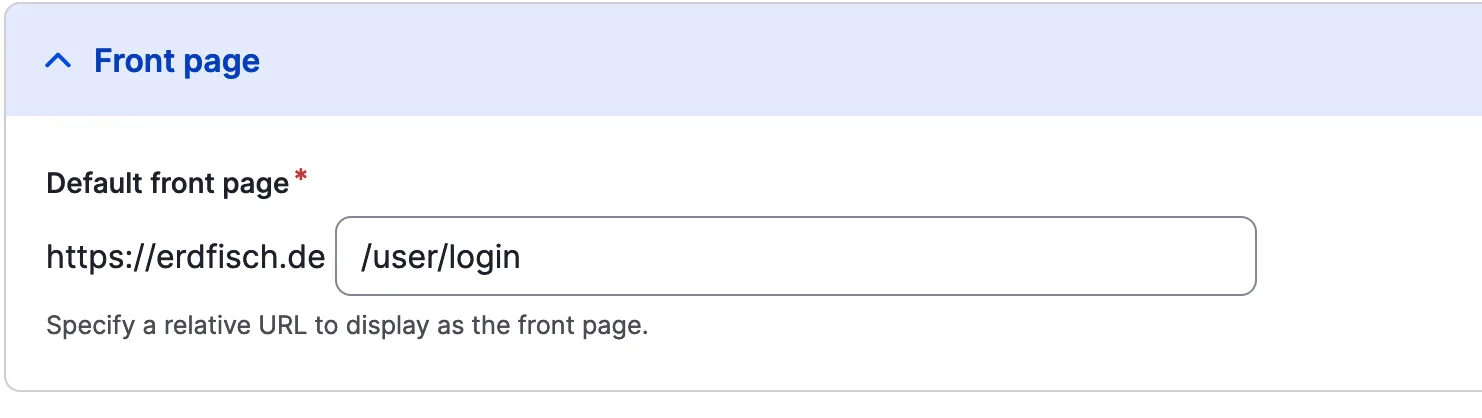
The homepage for visitors of your system should be the user login page (/user/login). This might make sense for logged-in only platforms and similar projects.

Access front page setting here: /admin/config/system/site-information

Set home page to user login
page:
  front: /user/login

Issue:

The homepage for visitors of your system should be the user login page (/user/login). This might make sense for logged-in only platforms and similar projects.

Solution:

Add /user/login in the `system.site.yml` to manipulate the front page.