Direkt zum Inhalt

Devbits

Kleine Code-Schnipsel aus unserem Alltag mit Drupal, PHP und DevOps: Problem, Lösung, Code.

08.10.2026 | Michael Ebert

Filter user entity reference field options to active users only

In a Drupal entity reference field configured to reference user accounts, the select list currently includes all users, including blocked or deactivated accounts.

Option 1 (recommended): custom entity reference selection handler. Further options down below.

<?php

namespace Drupal\my_module\Plugin\EntityReferenceSelection;

use Drupal\Core\Entity\Plugin\EntityReferenceSelection\UserSelction;
use Drupal\Core\StringTranslation\TranslatableMarkup;

#[EntityReferenceSelection(
  id: "default:active_user",
  label: new TranslatableMarkup("User selection (only active users)"),
  entity_types: ["user"],
  group: "default",
  weight: 1
)]
class ActiveUserSelection extends UserSelection {

  /**
   * {@inheritdoc}
   */
  protected function buildEntityQuery($match = NULL, $match_operator = 'CONTAINS') {
    $query = parent::buildEntityQuery($match, $match_operator);
    $query->condition('status', 1);

    return $query;
  }

}

After implementing that plugin, you need to activate it on the entity form display for the field you want it.

Issue:

In a Drupal entity reference field configured to reference user accounts, the select list currently includes all users, including blocked or deactivated accounts.

Expected behavior: only active users should be available for selection by default, or there should be a configurable option to exclude inactive accounts from the reference field results.

Solution:

See the three examples described above.

Option 1 (custom Selection handler, see above)

The best general-purpose solution. It uses the exact extension point Drupal designed for this problem, is scoped precisely to the fields where you assign it, is trivially unit/kernel-testable, and doesn't rely on fragile internals like query tags and metadata that can silently break across core updates.

Option 2: Query tag alter

Avoid this unless you have a very narrow, temporary need and full control over exactly which query is being altered. It's the least robust of the three and the easiest to get wrong (over-broad conditions affecting unrelated queries, or under-broad checks that silently stop working after a core update).

/**
 * Implements hook_entity_query_tag__TAG_alter().
 */
function my_module_entity_query_tag__entity_reference_alter(QueryInterface $query) {
  $handler = $query->getMetadata('entity_reference_selection_handler');

  if (!$handler) {
    return;
  }

  $configuration = $handler->getConfiguration();

  if (($configuration['target_type'] ?? NULL) !== 'user') {
    return;
  }

  // Filter for active users only.
  $query->condition('status', 1);
}

Option 3: entity reference view display

  1. Edit your Entity Reference field and select "Views: Filter by an entity reference view" as the reference method.
  2. Create or select a View that displays only the entities you want to show. Configure filters, sorting, and fields as needed.

The View's filters automatically control which options appear in the dropdown. No custom code required – it's all configured through the UI.

This can be chosen if (sitebuilders/editors need to have permissions to edit the view and maybe there is a config_ignore for that to prevent overrides during deployments):

  • Site builders/editors need to tweak the filtering criteria without a deployment (e.g., "also exclude role X" added later via UI), or
  • You need additional Views features (exposed filters, sorting by last login, relationships to other entities) in the same selection.
13.08.2026 | Pascal Crott

Can't save Form API autocomplete when referencing too many elements

Sometimes you can't save entity_autocomplete fields when selecting to many items. This comes from the fact that the form element is technically based on the textfield element. This results in inheriting all of the textfield specific properties and behaviors and one of them is a maxlength which…

If this does not work...

$form['nodes'] = [
    '#title' => $this->t('Select articles'),
    '#type' => 'entity_autocomplete',
    '#target_type' => 'node',
    '#tags' => TRUE,
    '#selection_handler' => 'default',
    '#selection_settings' => ['target_bundles' => ['article']],
    '#default_value' => $default_nodes,
];

...try adding an increased maxlength value:

$form['nodes'] = [
    '#title' => $this->t('Select articles'),
    '#type' => 'entity_autocomplete',
    '#target_type' => 'node',
    '#maxlength' => 1024,
    '#tags' => TRUE,
    '#selection_handler' => 'default',
    '#selection_settings' => ['target_bundles' => ['article']],
    '#default_value' => $default_nodes,
];

Issue: 

Sometimes you can't save entity_autocomplete fields when selecting to many items. This comes from the fact that the form element is technically based on the textfield element. This results in inheriting all of the textfield specific properties and behaviors and one of them is a maxlength which limits the text input to 128 characters.

Solution: 

To fix this, increase the maxlength value for your autocomplete field.

06.08.2026 | Lothar Ferreira Neumann

Change custom text field sizes in Gin Backend Theme using Asset Injector

A custom text input field might appear too large in Gin. Our example uses an ID field which will usually never be filled with more than ~7 characters.

To alter the node ID field (nid) of our content view we add this to the file:

/* Views exposed filter: appropriate field widths */
.views-exposed-form #edit-nid {
  max-width: 10ch;
}

Issue:

A custom text input field might appear too large in Gin. Our example uses an ID field which will usually never be filled with more than ~7 characters.

Prerequisites:

Our solution uses the Asset Injector module. This module can be useful for small additions to backend theming. However, there may be cleaner solutions to this, e.g. extending Gin for your project with some custom CSS, defining a custom field type, and more. 

Solution:

Adjust the width of specific Views exposed filter fields using CSS through Asset Injection. This keeps short numeric fields like Node ID compact and improves the layout of the exposed filter form. We are using the Gin backend theme in this example. You can access the asset injector for Gin here:
/admin/config/development/asset-injector/css/gin

Please note:

Don't use Asset Injector for altering a frontend theme.

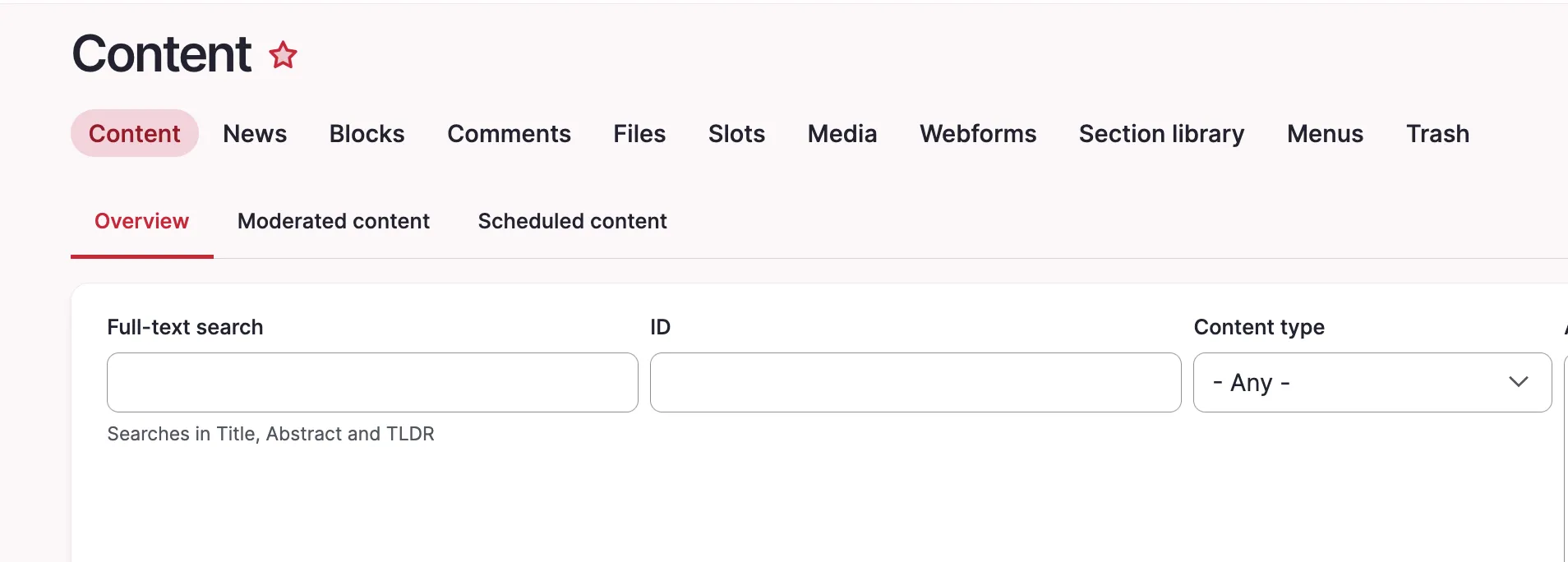
Before:

Screenshot of the content view with long nid field.

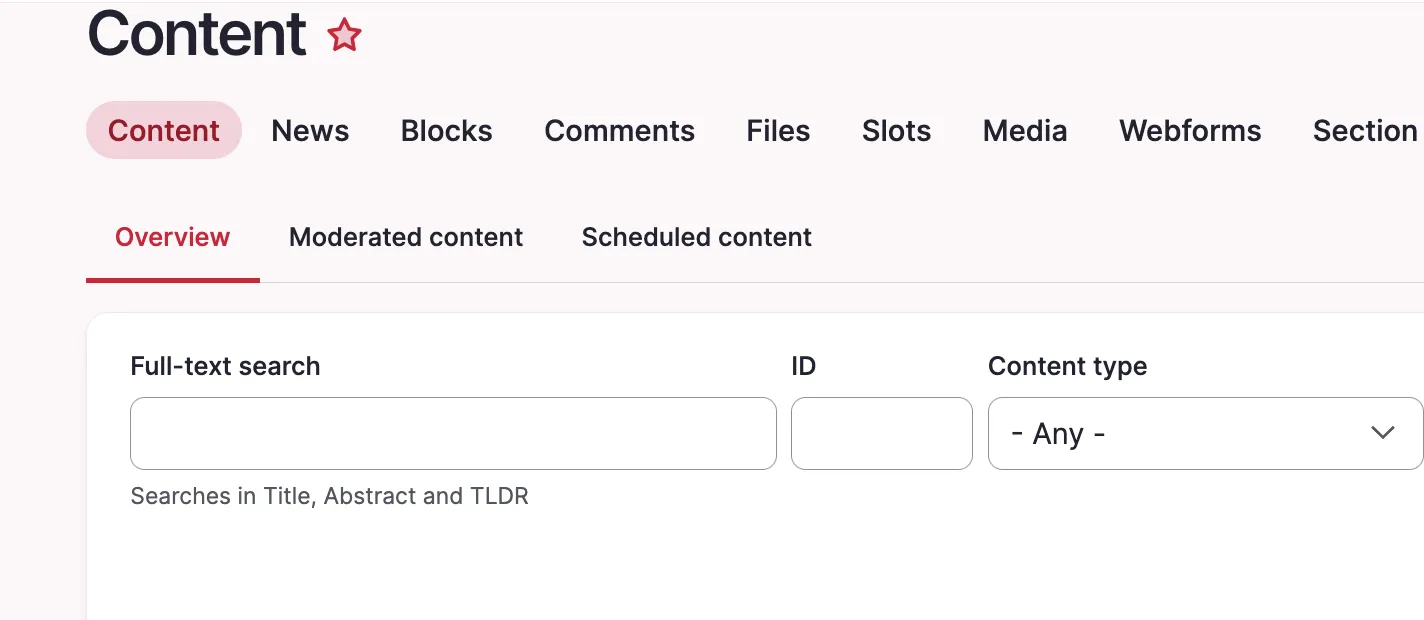
After:

Content view with short nid field

Quick note how to get the right ID for the CSS file, in our case #edit-nid:

The ID of the field is shown in the inspector

05.03.2026 | Michael Ebert

How to output the processed value of a WYSIWYG text field

You need to output the processed value of a WYSIWYG text field to the user.

$raw_value = $entity->my_text_field->value;
echo $raw_value;  // Outputs the raw data
$processed_value = $entity->my_text_field->processed;
echo $processed_value;  // Outputs the processed and safe-to-display data

Issue:

You need to output the processed value of a WYSIWYG text field to the user.

Solution:

For text fields there is a nice property that gives you the processed value directly. Let's have a quick look at the differences:

 unprocessed (raw) outputprocessed output
Field property->value->processed
When to Use
  • when you need the original, unaltered data.
  • when you plan to apply custom processing or formatting.
  • for programmatic manipulation or calculations that require raw data.
  • When displaying the field value directly to users.
  • when you need a value that has been filtered or formatted according to site settings (e.g., text formats, HTML filtering).
  • to ensure consistency in how field data is presented across the site.

CAUTION: The field property 'processed' only exists on WYSIWYG textfields!

18.12.2025 | Michael Böker

How to add a password field to an entity as the Field_UI has none to offer

You want to add a password field to an entity via the field_ui. It does not work, and – as a reminder to recurring devs – is not supposed to work. The UI is switched off in the core definition.

/**
 * Defines the 'password' entity field type.
 *
 * @FieldType(
 *   id = "password",
 *   label = @Translation("Password"),
 *   description = @Translation("An entity field containing a password value."),
 *   no_ui = TRUE,
 * )
 */

Issue:

You want to add a password field to an entity via the field_ui. It does not work, and – as a reminder to recurring devs – is not supposed to work. The UI is switched off in the core definition.

Solution:

If you need a password field, first evaluate the necessity to save a password in the database – this might create a serious security risk. 

If your project requires it anyway, you either have to create a custom widget for a textfield or use the module Password field.

12.12.2025 | Michael Ebert

Render field with given formatter type programmatically

You want to print out a field in a given formatter type.

$field_render_array = $entity->{$field_name}->view([
  'type' => 'default_formatter', // Replace with desired formatter type.
  'label' => 'hidden', // If you want to hide the label of the field (optional).
  'settings' => [
    'trim_length' => 100, // Example for textfields: Trim the text to 100 characters.
  ],
]);

Issue:

You want to print out a field in a given formatter type.

Solution:

An easy way would be to use the configuration on the view display of your entity and select the wanted field formatter there. But in some cases (e.g. you don't want to render the field on the node where it is defined) this does not work.

This snippet shows you how to do it programmatically (for example in a preprocess hook). 

As fields themselves do not have a `view()` method, we need to manipulate the render array of a field item list you get when loading an entity.

13.11.2025 | Dominik Wille

Don't list a widget for a field type.

You want to create a custom widget for a field but it should not be available to all fields of this type.

  public static function isApplicable(FieldDefinitionInterface $field_definition) {
    if (isset($field_definition->getDisplayOptions('form')['type'])) {
      return $field_definition->getDisplayOptions('form')['type'] == 'slot_content_weights';
    }

    return FALSE;
  }

Issue:

You want to create a custom widget for a field but it should not be available to all fields of this type.

Solution:

Use the `isApplicable` method to restrict it to this field only.

13.11.2025 | Michael Ebert

How to alter the langcode of a field for accessibility reasons

You want to assign a language to a certain part of your node which differs from the set content language. That could be the case if you need to make it more readable for disabled persons who use a screenreader.

function my_module_preprocess_field(&$variables): void {
  if ($variables['element']['#bundle'] == 'my_bundle') {
    if (in_array($variables['element']['#field_name'], ['my_field'])) {
      $variables['attributes']['lang'] = 'en';
    }
  }
}

Issue:

You want to assign a language to a certain part of your node which differs from the set content language. That could be the case if you need to make it more readable for disabled persons who use a screenreader.

Solution:

Use a preprocess_field hook and set the lang attribute of that field to e.g. "en" for English. We only want this to work on nodes from the "my_bundle" type.

Similar results may also be achieved using the CKEditor Text part language plugin.
