Direkt zum Inhalt

Devbits

Kleine Code-Schnipsel aus unserem Alltag mit Drupal, PHP und DevOps: Problem, Lösung, Code.

13.08.2026 | Pascal Crott

Can't save Form API autocomplete when referencing too many elements

Sometimes you can't save entity_autocomplete fields when selecting to many items. This comes from the fact that the form element is technically based on the textfield element. This results in inheriting all of the textfield specific properties and behaviors and one of them is a maxlength which…

If this does not work...

$form['nodes'] = [
    '#title' => $this->t('Select articles'),
    '#type' => 'entity_autocomplete',
    '#target_type' => 'node',
    '#tags' => TRUE,
    '#selection_handler' => 'default',
    '#selection_settings' => ['target_bundles' => ['article']],
    '#default_value' => $default_nodes,
];

...try adding an increased maxlength value:

$form['nodes'] = [
    '#title' => $this->t('Select articles'),
    '#type' => 'entity_autocomplete',
    '#target_type' => 'node',
    '#maxlength' => 1024,
    '#tags' => TRUE,
    '#selection_handler' => 'default',
    '#selection_settings' => ['target_bundles' => ['article']],
    '#default_value' => $default_nodes,
];

Issue: 

Sometimes you can't save entity_autocomplete fields when selecting to many items. This comes from the fact that the form element is technically based on the textfield element. This results in inheriting all of the textfield specific properties and behaviors and one of them is a maxlength which limits the text input to 128 characters.

Solution: 

To fix this, increase the maxlength value for your autocomplete field.
29.01.2026 | Peter Gerken

Manipulate Form Data before Submit

Using the provided solution will enable sharing of a set filter and ensures that whoever opens the link will see all teasers corresponding to the exposed filters. The map will be fully zoomed out so no teasers are 'accidentally' filtered out.

// Modifies form data on submit.
form.addEventListener("formdata", (e) => {
  const formData = e.formData;
  geoLocationFieldNames.forEach((name) => {
    formData.delete(name);
  });
});

Issue:

  • A list of teasers should be filtered by the set "area of detail" (boundaries) on an embedded map and additionaly by exposed filters
  • A filtered version of the view should be shareable by link, ensuring no items are unwantedly filtered out

Solution:

  • use "formdata event" which is supported by recent versions of all major browsers
  • form data is being manipulated on submit
  • map viewport boundaries will be injected into the get request, but not included into exposed filters

Conclusion:

Using the provided solution will enable sharing of a set filter and ensures that whoever opens the link will see all teasers corresponding to the exposed filters. The map will be fully zoomed out so no teasers are 'accidentally' filtered out.

13.11.2025 | Lothar Ferreira Neumann

How to place HTML elements into webforms via the Source tab

You want to insert headings or other text elements into a web form, e.g. to subdivide it for better readability and/or understandability.

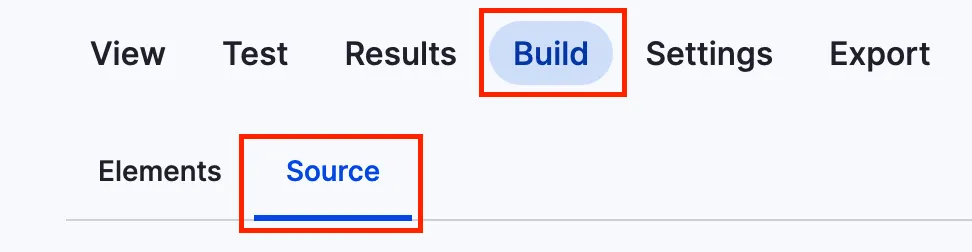
You can add headlines to a webform using the code below. To get to the source section, navigate to the form you want to alter, click on build and then on the source tab like in the screenshot.

Screenshot of the menu to add code to webform

This is just a short example on how to add a headline.

personal_data:
  '#type': html_tag
  '#tag': h3
  '#value': 'Personal data'

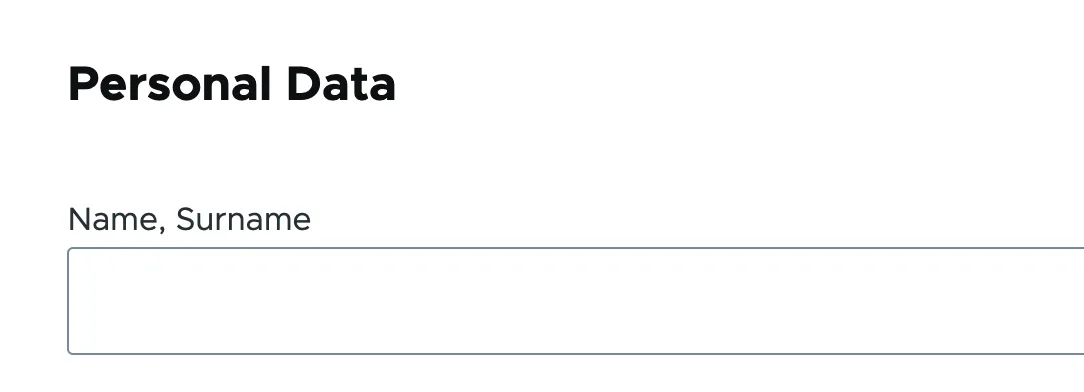
It will look something like this:

Headline within a webform

Issue:

You want to insert headings or other text elements into a web form, e.g. to subdivide it for better readability and/or understandability.

Solution:

Use a structured data format to define HTML elements that add the headline "Personal Data" to a web form.

13.11.2025 | Peter Gerken

Open all HTML details elements via browser console

You are on a page which has a large amount of HTML details elements, for instance translations, and you need to find a certain bit of information by searching the page.

let details = document.getElementsByTagName('details');
for (i = 0; i < details.length; ++i) {
  details.item(i).open = true;
}

Issue:

You are on a page which has a large amount of HTML details elements, for instance translations, and you need to find a certain bit of information by searching the page.

Solution:

The provided snippet opens all details on a page. This can be copy-and-pasted to the browser console to easily access all the fields hidden behind the nested details.