Direkt zum Inhalt

Devbits

Kleine Code-Schnipsel aus unserem Alltag mit Drupal, PHP und DevOps: Problem, Lösung, Code.

09.07.2026 | Michael Ebert

Install comment_notify module to have an easy solution to subscribe/unsubscribe to nodes like a forum topic.

You want to get informed about updates on nodes like forum topics and need an easy solution to subscribe to it.

Installation with composer:

composer require 'drupal/comment_notify'

Enable with drush:

drush pm:install comment_notify

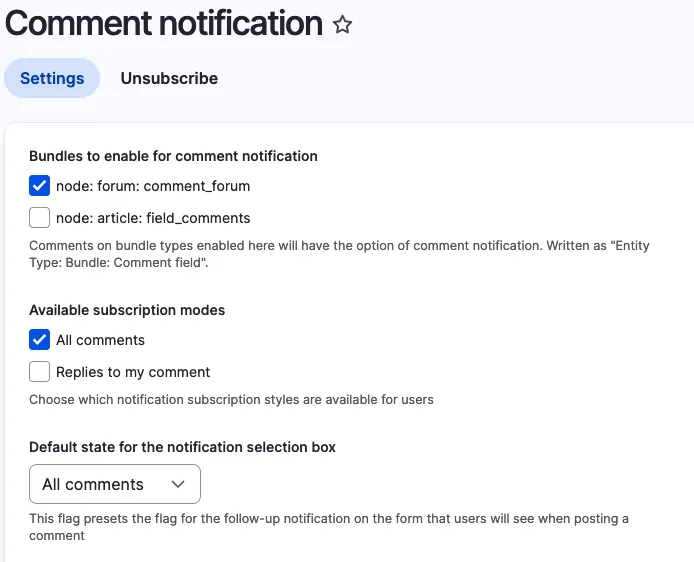
Configure it under ../admin/config/people/comment_notify.
Select the Bundle on that you want to enable it. Chose "All Comments" under availible subscription modes and set it as default state. 
 

Comment Notify Configuration

Issue:

You want to get informed about updates on nodes like forum topics and need an easy solution to subscribe to it. 

Solution:

During research we found the comment_notify module.

Conclusion:

Install the module, enable it, configure it. Thats it.
02.04.2026 | Michael Ebert

Set a custom theme to be used by Symfony Mailer

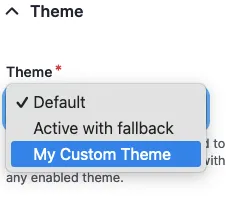
You have multiple themes enabled in your drupal page and need to select the theme that includes custom templates for send emails.

configuration:
  email_theme:
    theme: my_custom_theme

Prerequisite:

Installed and enabled the Symfony Mailer module.

Issue:

You have multiple themes enabled in your drupal page and need to select the theme that includes custom templates for send emails.

Solution:

Configure Symfony Mailer to use templates coming from your custom theme.

Go to `/admin/config/system/mailer` and edit the policy. There you can switch the theme that is used for sending your e-mails.

Symfony Mailer Policy Configuration

24.02.2026 | Michael Ebert

How to configure mailpit in local dev environment if normal sendmail will fail.

You had problems to receive mails in mailhog in a local setup with sendmail configuration.

// mailsender command for the "Symfony Mailer" module for drupal 10
$settings['mailer_sendmail_commands'] = [
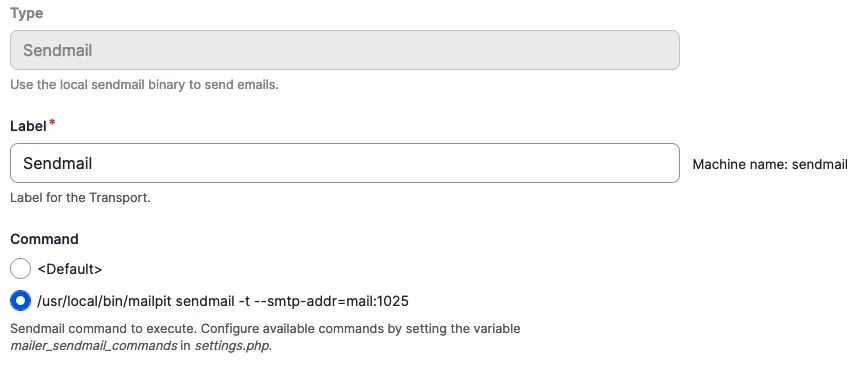
  '/usr/local/bin/mailpit sendmail -t --smtp-addr=mail:1025',
];

Prerequisite:

You have the Drupal Symfony Mailer module enabled and have a local Config Split running.

Issue:

You had problems to receive mails in mailhog in a local setup with sendmail configuration.

Solution:

Add this custom command to the sendmail configuration in your settings.local.php.

After adding go to `/admin/config/system/mailer/transport` and create a transport type 'sendmail'. Chose our newly added command and save the configuration.

Sendmail Transport Command Configuration

Add the `symfony_mailer.mailer_transport.sendmail` config to your partial split configuration for your local split and then export the configuration.