Direkt zum Inhalt

Devbits

Kleine Code-Schnipsel aus unserem Alltag mit Drupal, PHP und DevOps: Problem, Lösung, Code.

02.04.2026 | Michael Ebert

Set a custom theme to be used by Symfony Mailer

You have multiple themes enabled in your drupal page and need to select the theme that includes custom templates for send emails.

configuration:
  email_theme:
    theme: my_custom_theme

Prerequisite:

Installed and enabled the Symfony Mailer module.

Issue:

You have multiple themes enabled in your drupal page and need to select the theme that includes custom templates for send emails.

Solution:

Configure Symfony Mailer to use templates coming from your custom theme.

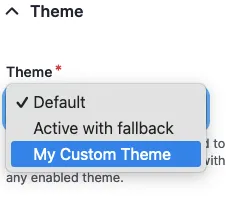
Go to `/admin/config/system/mailer` and edit the policy. There you can switch the theme that is used for sending your e-mails.

Symfony Mailer Policy Configuration

12.12.2025 | Pascal Crott

Sort blocks inside layout regions by weight.

Blocks inside a layout region are not sorted by weight property per default, even though the weight is used for rendering in the rendering process. But when you work with the blocks in a template directly you can't make sure they appear in the right order.

/**
 * Implements hook_preprocess_HOOK() for layout.html.twig.
 */
function hook_preprocess_layout(&$variables) {
  $layout = $variables['layout'];
  foreach ($layout->getRegionNames() as $region_name) {
    if (array_key_exists($region_name, $variables['content'])) {
      uasort($variables['content'][$region_name], [\Drupal\Component\Utility\SortArray::class, 'sortByWeightProperty']);
    }
  }
}

Issue:

Blocks inside a layout region are not sorted by weight property per default, even though the weight is used for rendering in the rendering process. But when you work with the blocks in a template directly you can't make sure they appear in the right order.

Solution:

Preprocess the regions and use the Drupal Core sortByWeightProperty mechanism to change the order of the blocks in the array before entering the template.
13.11.2025 | Holger Weischenberg

Consider the user's preference for dark or light system colors

The theme should take into account whether the user has selected dark or light colors in the OS settings.

/* Default theme */
:root {
  --Background-Color: #fff;
  --Text-Color: #000;
}

/* Dark theme */
@media (prefers-color-scheme: dark) {
  :root {
    --Background-Color: #000;
    --Text-Color: #fff;
  }
}

Issue:

The theme should take into account whether the user has selected dark or light colors in the OS settings.

Solution:

Use the prefers-color-scheme CSS media feature. See also: documentation at developer.mozilla.org.

13.11.2025 | Pascal Crott

Prevent the user profile from being displayed in backend theme using RouteSubscriber

Authenticated users should never see the admin/backend theme in your websystem

<?php

namespace Drupal\scp_base\Routing;

use Drupal\Core\Routing\RouteSubscriberBase;
use Symfony\Component\Routing\RouteCollection;

class RouteSubscriber extends RouteSubscriberBase {

  /**
   * {@inheritdoc}
   */
  protected function alterRoutes(RouteCollection $collection) {
    // Make sure profile pages are not admin pages, in order to load the right
    // translation.
    if ($route = $collection->get('profile.user_page.single')) {
      $route->setOption('_admin_route', FALSE);
    }
  }

}

Issue:

Authenticated users should never see the admin/backend theme in your websystem

Prerequisites:

You need to have the profile module installed in your project.

Solution:

Paste the provided code snippet into your RouteSubscriber.php file.