Direkt zum Inhalt

Devbits

Kleine Code-Schnipsel aus unserem Alltag mit Drupal, PHP und DevOps: Problem, Lösung, Code.

11.11.2026 | Pascal Crott

Provide content translation language block limited to available translations

Language blocks always show all languages but you only want to show the ones which content translations exist for.

<?php

namespace Drupal\content_translation_language_block\Plugin\Block;

use Drupal\Core\Block\Attribute\Block;
use Drupal\Core\Plugin\ContainerFactoryPluginInterface;
use Drupal\Core\Plugin\Context\ContextDefinition;
use Drupal\Core\StringTranslation\TranslatableMarkup;
use Drupal\language\Plugin\Block\LanguageBlock;
use Drupal\language\Plugin\Derivative\LanguageBlock as LanguageBlockDeriver;

/**
 * Provides a 'Content translation language switcher' block.
 */
#[Block(
  id: "content_translation_language_block",
  admin_label: new TranslatableMarkup("Language switcher"),
  category: new TranslatableMarkup("Content translation"),
  context_definitions: [
    "entity" => new ContextDefinition("entity",
      label: new TranslatableMarkup("Entity"),
      required: TRUE
    ),
  ],
  deriver: LanguageBlockDeriver::class
)]
class ContentTranslationLanguageBlock extends LanguageBlock implements ContainerFactoryPluginInterface {

  /**
   * {@inheritdoc}
   */
  public function build() {
    $build = parent::build();
    if ($entity = $this->getContextValue('entity')) {
      foreach ($build['#links'] as $langcode => $link) {
        if (!$entity->hasTranslation($langcode)) {
          unset($build['#links'][$langcode]);
        }
      }
      if (count($build['#links']) < 2) {
        unset($build['#links']);
      }
    }


    return $build;
  }

}

Issue:

Language blocks always show all languages but you only want to show the ones which content translations exist for.

Prerequisites:

  • You need to be in the context of a translatable content entity.
  • We make use of the Entity Route Context module which needs to be installed.

Solution:

Extend the Core plugin using the provided copy-and-paste snippet.

The snippet checks whether the current entity has translations. If any are found, the language options are reduced to those for which a translation exists.

23.10.2026 | Michael Ebert

Translate tab missing on custom config form

You have created a custom Drupal configuration form but no Translate tab appears when you access it.

my_module.my_form_configuration_tab:
  route_name: my_module.my_form_configuration
  title: Configuration
  base_route: my_module.my_form_configuration

Issue:

You have created a custom Drupal configuration form but no Translate tab appears when you access it.

The config_translation module automatically derives the Translate tab from the configuration mapper. However, Drupal only renders the local task (tab) navigation when there are at least two tabs on the same level. Since the Translate tab is the only local task available, Drupal does not display the tab navigation, causing the Translate tab to remain hidden.

Prerequisites:

You have the config_translations module enabled.

Solution:

Drupal Core solves the issue for settings forms by providing a default tab. We apply the same approach in our module by adding a default local task, which allows Drupal to render the tab navigation and display the Translate tab.

08.10.2026 | Pascal Crott

Get default langcode from entity

You want to find the source language of an entity programmatically (e.g. its default language).

// Assume $entity is your translatable entity object.
$default_language_entity = $entity->getUntranslated();
$default_language_code = $default_language_entity->language()->getId();

Issue:

You want to find the source language of an entity programmatically (e.g. its default language).

Solution:

Use the snippet provided. The entity will be loaded "untranslated", then its default language will be loaded.

16.07.2026 | Lothar Ferreira Neumann

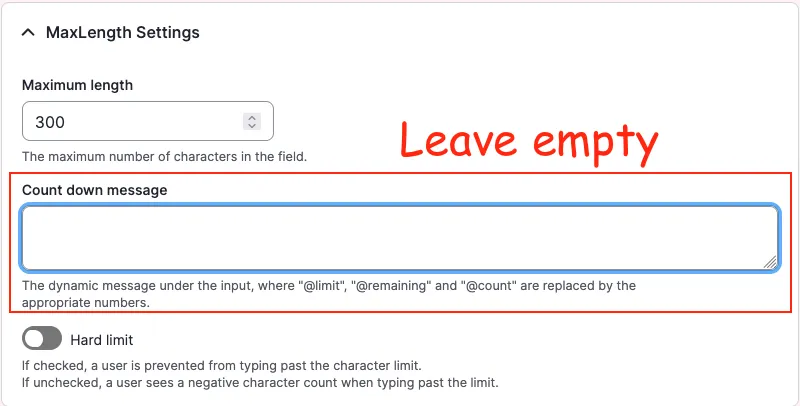
How to translate the Maxlength Countdown message label globally

When enabling the soft or hard character limit for a field using the Maxlength module, the module writes a default label into the field widget configuration. Because the label string is written directly into configuration, the fallback string logic is never used. As a result, the label cannot be…

A Drupal backend screenshot showing the "Count down message" field

Example configuration created by enabling Maxlength:

# ...
content:
  field_copyright:
    type: text_textarea
    weight: 3
    region: content
    settings:
      rows: 2
      placeholder: ''
    third_party_settings:
      allowed_formats:
        hide_help: '1'
        hide_guidelines: '1'
      maxlength:
        maxlength_js: null
        maxlength_js_label: 'Content limited to @limit characters, remaining: <strong>@remaining</strong>'
        maxlength_js_enforce: false
# ...

However, the module already contains fallback logic for this label in maxlength.module: 

$maxlength_js_label = !empty($thirdPartySettings['maxlength']['maxlength_js_label']) ? $thirdPartySettings['maxlength']['maxlength_js_label'] : t('Content limited to @limit characters, remaining: <strong>@remaining</strong>');
$maxlength_js = $thirdPartySettings['maxlength']['maxlength_js'];

Working configuration: empty the label

# ...
content:
  field_copyright:
    type: text_textarea
    weight: 3
    region: content
    settings:
      rows: 2
      placeholder: ''
    third_party_settings:
      allowed_formats:
        hide_help: '1'
        hide_guidelines: '1'
      maxlength:
        maxlength_js: null
        maxlength_js_label: ''
        maxlength_js_enforce: false
# ...

With the label empty, the module falls back to its internal t() string, which can then be translated normally via the interface translation system.

Issue:

When enabling the soft or hard character limit for a field using the Maxlength module, the module writes a default label into the field widget configuration. Because the label string is written directly into configuration, the fallback string logic is never used. As a result, the label cannot be translated through the Interface Translation system, since Drupal treats it as configuration rather than a translatable interface string.

Solution:

To allow translating the countdown string via the Drupal interface translation, the label must be removed from the configuration so the module fallback is used instead.

  • There is alrady a fix for this problem for the maxlength module on drupal.org.