composer
lenient.sh
# Get lenient.
composer require mglaman/composer-drupal-lenient
# Add the module to the allow list. Use escapes for the quote signs. \" ... \"
composer config --merge --json extra.drupal-lenient.allowed-list '[\"drupal/module_with_incompatible_core_version\"]'
# You can check if the merge worked, either just take a look
# into the composer.json or use this command.
composer config --merge --json extra.drupal-lenient.allowed-listlenient_allowed_list.json
"drupal-lenient": {
"allowed-list": [
"drupal/module_with_incompatible_core_version"
]
}
14.10.2026 | Lothar Ferreira Neumann
Require a module that is incompatible with your Drupal Core version
When working with composer you will have multiple lock files. The composer.lock in your application root directory and a installed.json file inside the vendor/composer directory.
(Internal: might be obsolete)
28.04.2026 | Michael Ebert
Difference between a composer.lock and a installed.json file
Installation with composer:
composer_require.sh
composer require 'drupal/comment_notify'Enable with drush:
drush_pm_install.sh
drush pm:install comment_notifyConfigure it under ../admin/config/people/comment_notify.
Select the Bundle on that you want to enable it. Chose "All Comments" under availible subscription modes and set it as default state.
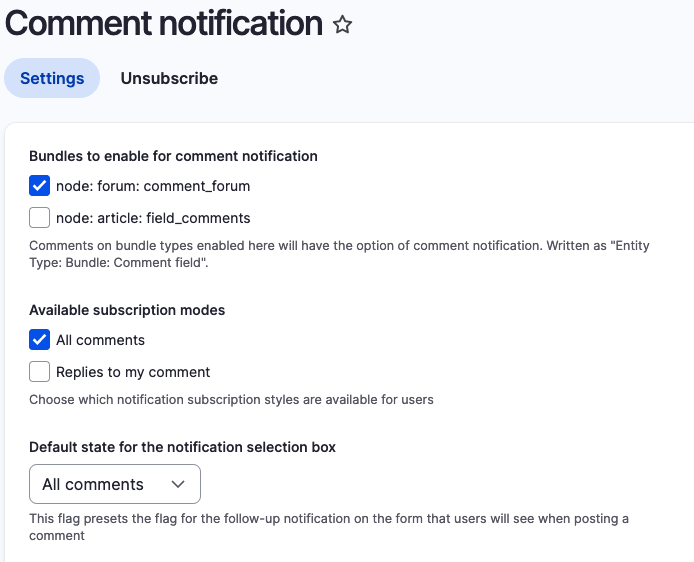
09.07.2026 | Michael Ebert
Install comment_notify module to have an easy solution to subscribe/unsubscribe to nodes like a forum topic.
Nice and important feature, so that composer fails when a patch does not apply anymore.
composer.json
"extra": {
"composer-exit-on-patch-failure": true,
10.08.2022 | Michael Böker