manipulating forms

You can add headlines to a webform using the code below. To get to the source section, navigate to the form you want to alter, click on build and then on the source tab like in the screenshot.
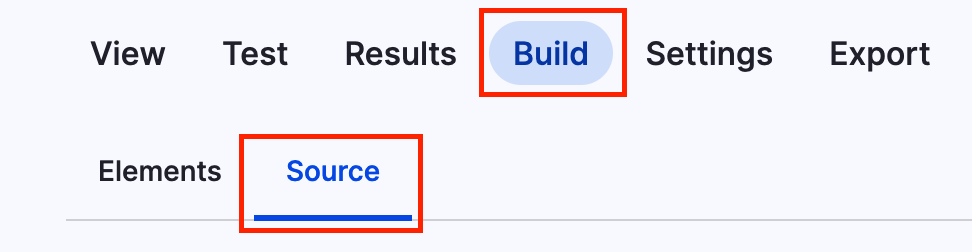
Screenshot of the menu to add code to webform

This is just a short example on how to add a headline.

webform_headline.yml
personal_data:
  '#type': html_tag
  '#tag': h3
  '#value': 'Personal data'

It will look something like this:

Headline within a webform

Enable nested arrays in $form_states with:

tree.php
$form['my_text']['#tree'] = TRUE;

Here in an example code:

alter_structure.php
$form['my_text'] = [
  '#type' => 'details',
  '#title' => t('Text'),
  '#open' => TRUE,
  // Without this line you cannot access nested arrays.
  '#tree' => TRUE,
];

$default_value = '';
$form['my_text']['text'] = [
  '#type' => 'textfield',
  '#title' => t('Text to appear as the page.'),
  '#description' => t('If textfield is left empty no text will be displayed page'),
  '#default_value' => $default_value,
];
17.07.2025 | Lothar Ferreira Neumann

How to enable nested array structure in $form_states

formDataManipulation.js
// Modifies form data on submit.
form.addEventListener("formdata", (e) => {
  const formData = e.formData;
  geoLocationFieldNames.forEach((name) => {
    formData.delete(name);
  });
});

29.01.2026 | Peter Gerken

Manipulate Form Data before Submit